What Is IBM FileNet Migration?
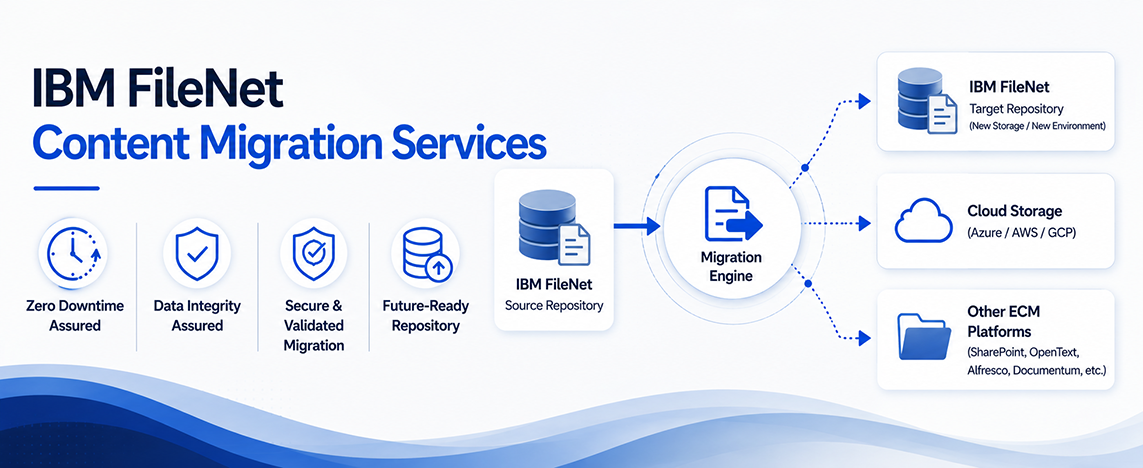
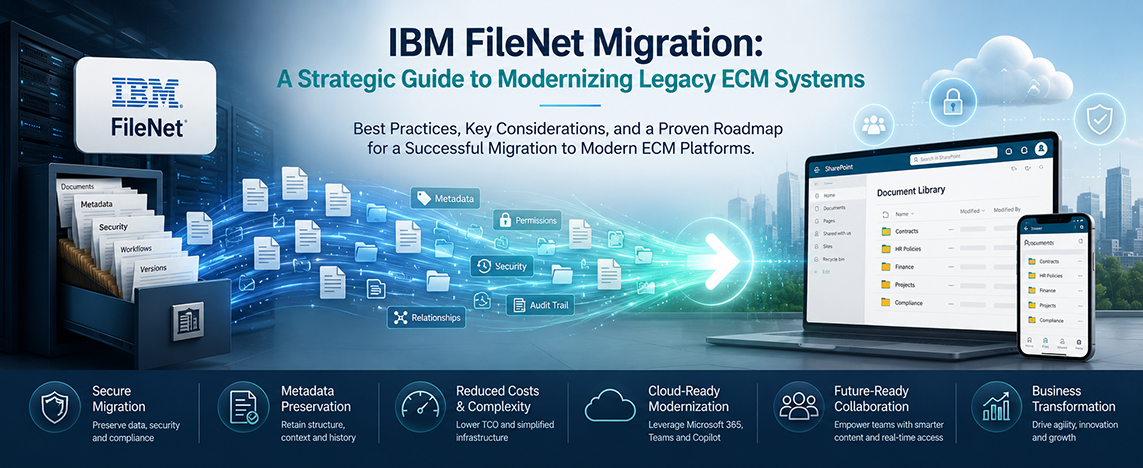
IBM FileNet migration is the process of moving documents, metadata, security permissions, and business records from an existing FileNet environment to a newer platform, cloud environment, upgraded FileNet version, or another enterprise content management (ECM) solution.
A successful migration preserves critical business information while reducing operational complexity, improving scalability, and supporting long-term modernization goals.
For many organizations, FileNet migration is no longer just an IT initiative. It has become a business priority driven by rising infrastructure costs, aging technology, cloud adoption strategies, and the growing need for agility.
Why Organizations Are Reassessing Their FileNet Environment
Many enterprises have invested heavily in IBM FileNet over the years. While the platform remains a powerful ECM solution, maintaining legacy environments often becomes increasingly expensive and resource-intensive.
Organizations commonly face challenges such as:
- Rising infrastructure and maintenance costs
- Increasing complexity of legacy integrations
- Difficulty finding experienced FileNet specialists
- Aging custom applications and workflows
- Growing compliance and security requirements
- Pressure to support cloud and digital transformation initiatives
As these challenges accumulate, organizations begin evaluating whether continuing to maintain the current environment is more costly than modernizing it.
Signs It May Be Time for a FileNet Migration
Not every organization needs an immediate migration. However, certain indicators suggest it may be time to evaluate your options.
1. Support Costs Continue to Increase
Many organizations find themselves spending significant resources simply to keep their FileNet environment operational. Licensing, infrastructure, database management, storage, backups, and specialized administration can create substantial ongoing costs.
2. Upgrades Are Becoming More Difficult
When upgrades require extensive planning, testing, and custom remediation, it may indicate that the environment has become too complex to efficiently maintain.
3. Modernization Projects Are Stalling
Legacy ECM environments can become barriers to cloud adoption, automation initiatives, and digital transformation programs.
4. User Experience Is Impacting Productivity
Employees increasingly expect intuitive, modern interfaces and seamless access to information. Older systems may struggle to meet these expectations.
Common IBM FileNet Migration Challenges
FileNet migration is far more complex than simply transferring documents from one repository to another.
Organizations must carefully preserve:
- Documents
- Metadata structures
- Security permissions
- Retention policies
- Audit histories
- Folder hierarchies
- Business rules
Without proper planning, organizations risk data loss, compliance issues, operational disruption, and project delays.
This is why successful migrations begin with a comprehensive assessment rather than immediate execution.
FileNet Upgrade vs. FileNet Migration
One of the most common questions organizations ask is:
Should We Upgrade FileNet or Migrate Away From It?
The answer depends on business objectives.
A FileNet Upgrade may be appropriate when:
- The platform continues to meet business requirements
- Existing integrations remain valuable
- The organization wants to extend its current investment
- Modernization can be achieved within the FileNet ecosystem
A FileNet Migration may be appropriate when:
- Infrastructure costs have become excessive
- Cloud adoption is a strategic priority
- Legacy customizations create operational challenges
- The organization seeks greater flexibility and scalability
The decision should be based on business outcomes rather than technology preferences alone.
Best Practices for a Successful IBM FileNet Migration
Conduct a Comprehensive Assessment
Before migrating any content, organizations should understand:
- Repository size
- Content classifications
- Metadata complexity
- Security models
- Application integrations
A detailed assessment reduces risk and improves project predictability.
Clean Up Legacy Content
Many repositories contain years of redundant, obsolete, or trivial content.
Migrating unnecessary data increases project costs and complexity. Content rationalization should be part of every migration strategy.
Prioritize Metadata Preservation
Metadata often carries more business value than the documents themselves.
Accurate metadata migration supports compliance, searchability, reporting, and business processes.
Validate Security and Compliance Requirements
Security permissions, retention schedules, and audit trails should be validated throughout the migration process.
Automate Where Possible
Automation helps reduce manual effort, minimize errors, and accelerate project timelines while preserving content integrity.
Benefits of IBM FileNet Migration
Organizations that execute migration successfully often achieve several strategic benefits.
Reduced Operational Costs
Modern environments can significantly lower infrastructure, maintenance, and administration expenses.
Improved Scalability
Organizations gain the flexibility to support future growth without being constrained by legacy architecture.
Enhanced Security
Modern platforms typically offer improved security controls, governance capabilities, and compliance features.
Better User Experience
Employees benefit from easier access to information, improved collaboration, and streamlined business processes.
Greater Cloud Readiness
Migration creates a foundation for broader modernization and digital transformation initiatives.
Frequently Asked Questions
How long does an IBM FileNet migration take?
The timeline depends on repository size, metadata complexity, custom applications, compliance requirements, and the target platform. Large enterprise migrations often require several months of planning, testing, and execution.
Can metadata be preserved during FileNet migration?
Yes. A properly planned migration should preserve metadata, document relationships, security permissions, and business rules.
What are the biggest FileNet migration challenges?
The most common challenges include repository complexity, legacy integrations, compliance requirements, and large volumes of content.
Is FileNet migration risky?
Migration projects carry risk when performed without proper assessment and planning. Organizations can significantly reduce risk through phased migration strategies, validation processes, and experienced migration expertise.
What is the difference between FileNet modernization and migration?
Modernization focuses on improving the existing environment or business processes, while migration involves moving content and functionality to a new platform or architecture.
Final Thoughts
For many organizations, the question is no longer whether modernization will happen, it is when.
As infrastructure costs rise and digital transformation initiatives accelerate, maintaining legacy ECM environments becomes increasingly difficult to justify.
A well-planned IBM FileNet migration can help organizations reduce operational costs, improve agility, strengthen compliance, and create a scalable foundation for future growth.
The most successful migrations begin with a clear understanding of the current environment, business objectives, and long-term content management strategy.
Leverage Your FileNet Investment to the Fullest
Whether you’re considering a FileNet upgrade, modernization initiative, or full migration strategy, the first step is understanding your current environment.
A comprehensive assessment can identify risks, dependencies, cost drivers, and opportunities helping your organization make informed decisions with confidence.