IBM FileNet to SharePoint Migration Free Trial – Test Before You Migrate
Test your FileNet migration with real content. Validate metadata, security, workflows, and integrations before migrating at enterprise scale.
Why Start with a FileNet to SharePoint Migration Trial?
Unlock a faster, safer migration journey—seamlessly and securely transfer your critical documents with our enterprise‑scale tool, risk‑free and without credit cards or hidden fees.
Handles large-scale migrations with ease.
Simple setup, self configurable tool
Migrate without disrupting daily operations.
Ensures data integrity & compliance
Preserve folder structures and access controls.
Optimized for high-speed, error-free migration
For easy cross-verification
Test it before committing to a full migration
What’s Included in the Free FileNet Migration Trial?
Get hands-on experience with the migration process using your own FileNet environment and representative content—before committing to a full-scale migration.
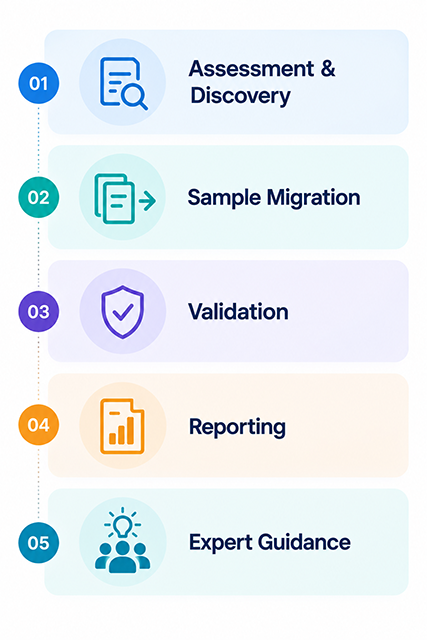
FileNet Environment Assessment
Review your FileNet environment, repositories, content structure, and migration requirements to identify potential challenges.
Sample Content Migration
Migrate a representative sample of your FileNet content to SharePoint and experience the migration process firsthand.
Metadata Mapping
Validate FileNet metadata and property mappings to ensure content is organized correctly in SharePoint.
Folder Structure Migration
Test how your existing FileNet folder hierarchy can be mapped and recreated in the SharePoint environment.
Security & Permission Validation
Validate user and group permissions to ensure migrated content maintains the appropriate access controls.
Migration Performance Testing
Evaluate migration speed, processing capacity, and performance using representative FileNet content.
Migration Reports
Review detailed migration reports covering migrated content, validation results, errors, and exceptions.
Expert Guidance
Get guidance from FileNet migration specialists on migration strategy, best practices, optimization, and next steps.
What Can You Test During the FileNet Migration Trial?
Use the trial to validate the key elements of your FileNet to SharePoint migration with representative content before moving to full-scale production.
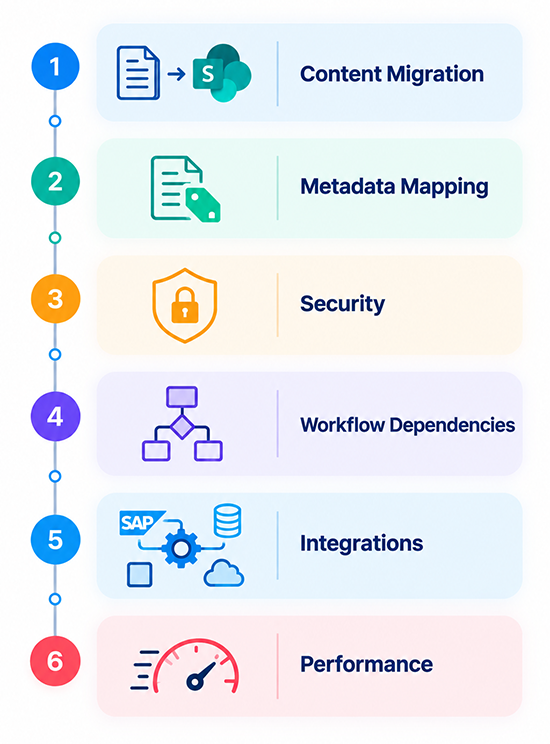
Content Migration:
Test the migration of representative FileNet documents and content to SharePoint and verify content integrity.
Metadata Mapping
Validate FileNet metadata, properties, and mappings to ensure content is correctly structured in SharePoint.
Security & Permissions
Test user access, groups, permissions, and security mappings to confirm the right users have the right access.
Workflow Dependencies
Identify and validate workflow-related dependencies, approvals, routing, and business processes affected by migration.
Integrations
Validate dependencies on SAP, ERP, and other business applications to identify integration requirements before production.
Migration Performance
Evaluate migration speed, processing capacity, and overall performance using representative FileNet content.
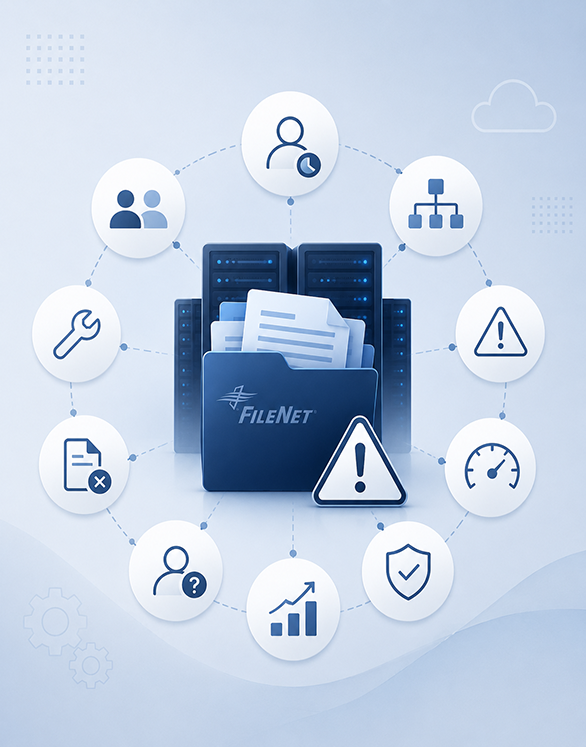
Who Benefits Most from a FileNet to SharePoint Migration Trial?
This Trial is Ideal For Organizations That
✅ Modernize your enterprise content platform
✅ Reduce FileNet operational costs
✅ Adopt Microsoft 365 and SharePoint and other modern DMS platforms
✅ Prepare enterprise content for Microsoft Copilot and AI initiatives
✅ Improve content discoverability with structured metadata
✅ Validate migration quality before production
✅ Minimize migration risks and business disruption
✅ Preserve metadata, permissions, and document versions
✅ Build stakeholder confidence with a successful proof of concept
How It Works – Simple & Secure Migration Process
Choose a specific set of documents to test the migration before a full-scale transfer.
Get the ECM Addons Migration Tool and configure it with our expert guidance.
Customize metadata mapping, folder structure, and permissions for a smooth transition.
Create a SharePoint site and document library to receive migrated content.
Ensure secure authentication and system compatibility for accurate migration.
Validate integrations with SAP, Oracle, ERP, and custom applications to ensure business continuity throughout the migration.
Run the migration and verify document class, metadata, and folder structure in SharePoint.
Download a detailed summary report to cross-check and confirm migration accuracy.
Start Your Free Migration Trial Today.
Try a risk-free FileNet to SharePoint migration and discover how effortless document migration can be. Sign up now and start your seamless migration journey!
Migration Questions Answered
Trial & Evaluation
The trial lets you migrate a representative sample of IBM FileNet content to SharePoint and validate documents, metadata, folder structures, security, and migration performance. This helps you identify potential issues and gain confidence before starting a full-scale migration.
Most FileNet to SharePoint migration trials are completed within 3–10 business days, depending on the repository size, migration scope, and environment readiness. We define the timeline during the trial assessment and pilot planning phase.
Yes, if your organization permits it. The trial can use a production or non-production FileNet environment, with a representative content set selected to minimize operational and security risks.
No. The migration tool is designed for self-service evaluation and can be used with minimal technical assistance. Our FileNet migration specialists can also help with setup, configuration, and validation when needed.
You’ll receive a migration summary report covering migration results, statistics, validation findings, and identified issues. Our experts can then help you define the scope and approach for your full production migration.
Security & Compliance
Yes. Your FileNet content is transferred using secure connections and enterprise-grade authentication, with security and access controls considered throughout the migration process.
Yes. The trial can validate the migration of document- and folder-level permissions, with FileNet security mapped to the appropriate SharePoint security model. This helps confirm access controls before production migration.
No. Your FileNet content remains within your environment throughout the migration process. ECM Addons does not retain copies of your documents or migrated content.
Yes. The migration provides detailed logs, migration reports, and validation results to support auditability, governance, and compliance requirements throughout the migration process.
Metadata & Content Migration
The migration supports documents, metadata, custom properties, folder structures, document versions, security permissions, document classes, and Object Stores. The exact migration scope can be tailored to your FileNet environment and SharePoint requirements.
Yes. FileNet metadata and custom properties can be mapped to SharePoint columns and content types, helping preserve business context, improve content organization, and maintain searchability.
Yes. Multiple FileNet document versions can be migrated to SharePoint while preserving version history, subject to the source configuration and migration requirements.
Yes. Custom FileNet properties can be mapped to SharePoint columns and content types to align with your target information architecture and preserve business context.
External System Integration
Yes. We assess and validate integrations with SAP, Oracle, Salesforce, ERP, CRM, and custom business applications to help maintain business processes and access to migrated content.
Our migration framework can address integrations with SAP, Oracle, Microsoft Dynamics 365, Salesforce, ERP, CRM, HRMS, legacy applications, REST APIs, and web services as part of the migration and integration strategy.
Yes. We identify FileNet-dependent workflows, business rules, and integrations during the migration assessment and map them to the appropriate SharePoint or Microsoft 365 solution to support business continuity.
Yes. We support REST APIs, web services, middleware, and custom integration frameworks that connect with IBM FileNet and SharePoint, helping maintain application connectivity after migration.
Performance & Scalability
Yes. ECM Addons is designed for enterprise-scale FileNet migrations involving millions of documents and multiple terabytes of content, using scalable and controlled migration processes.
Yes. Incremental or delta migration synchronizes newly added and modified content after the initial migration, helping minimize downtime and enabling a controlled final cutover.
Migration performance is optimized using parallel processing, configurable batches, intelligent retries, and validation checks. These capabilities help accelerate large-scale migrations while minimizing business disruption.
Yes. The trial allows you to evaluate migration speed, processing performance, metadata accuracy, and overall migration behavior using a representative sample of your FileNet content.
AI & Microsoft 365 Readiness
Migrating FileNet content with structured metadata, permissions, and organized content creates a stronger foundation for Microsoft 365 Copilot. This can improve content discovery, search relevance, and access to business knowledge.
Yes. Well-structured and accurate metadata improves content organization, search relevance, and AI-powered retrieval, helping users and Microsoft 365 tools find the right business content more effectively.
Yes. Migrating FileNet content to SharePoint can support AI initiatives by establishing a modern content foundation for Microsoft 365 Copilot, AI-powered search, intelligent document management, and knowledge discovery.
Yes. A well-structured migration helps organize and govern your content for future AI adoption, supporting Microsoft 365 Copilot, intelligent search, document processing, and enterprise knowledge management.
Licensing & Support
Yes. The trial is provided at no cost, allowing you to evaluate the migration tool with representative FileNet content and validate the approach before committing to a full-scale migration.
ECM Addons supports multiple IBM FileNet P8 versions, including legacy and end-of-support releases. Contact us to confirm compatibility with your specific FileNet version and environment.
Yes. ECM Addons provides end-to-end FileNet migration services covering assessment, planning, pilot migration, execution, validation, cutover, hypercare, and post-migration support.
Yes. ECM Addons supports complex FileNet environments with custom metadata, document classes, workflows, security, and integrations with SAP, Oracle, and other business applications.
Yes. We tailor the migration approach to your business and technical requirements, including metadata mapping, transformations, security, integrations, workflows, and custom migration needs.