Large-scale IBM FileNet to Microsoft SharePoint migrations can involve millions or even hundreds of millions of documents across multiple repositories, business units, applications, and geographic locations.
At that scale, successfully starting the migration is only the beginning.
The more important question is:
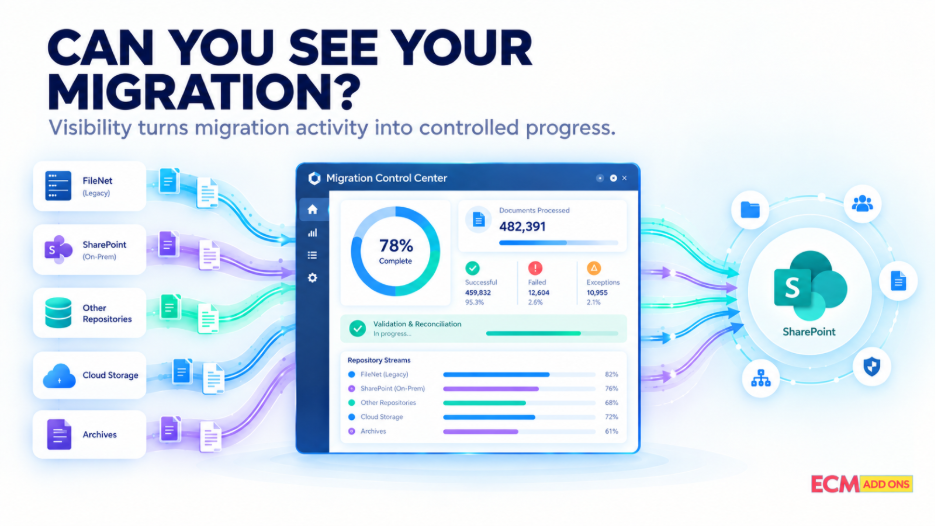
Can your migration team see what is happening while the migration is still in progress?
Project teams need to know what has been migrated, what has failed, what remains pending, which repositories are progressing, whether validation is complete, and which issues could affect the final cutover.
For enterprise migrations, visibility is therefore more than a reporting capability.
It is part of migration risk management.
Key Takeaways
- Large FileNet-to-SharePoint migrations generate significant amounts of operational data that need to be monitored.
- A centralized view can help teams track migration progress across repositories and migration waves.
- Migration monitoring should cover more than successful and failed documents.
- Exceptions should be identifiable, categorized, and actionable.
- Validation and reconciliation should be visible alongside migration activity.
- Delta migration creates an additional monitoring requirement before final cutover.
- Different stakeholders need different levels of migration information.
- Monitoring does not replace validation; both are important parts of migration control.
- A structured monitoring approach can help teams identify issues earlier rather than discovering them during final cutover.
Why Migration Visibility Matters
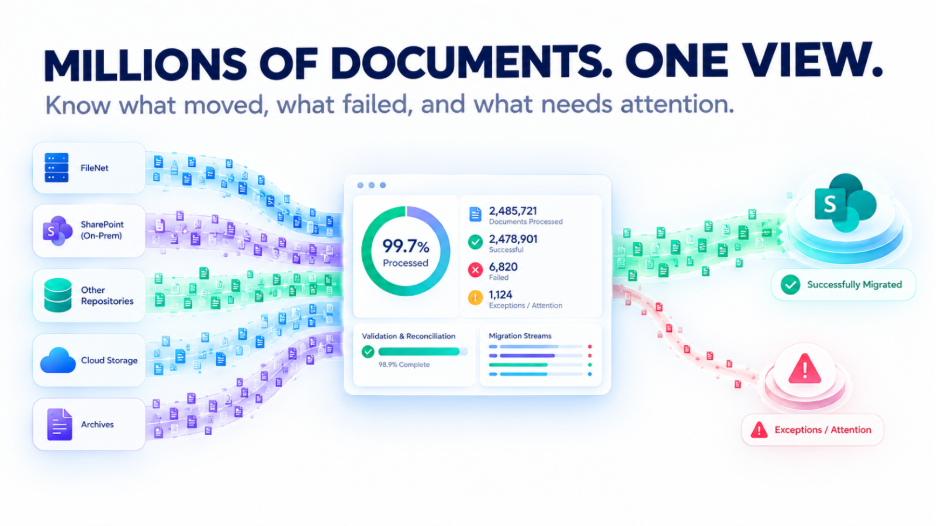
Consider an enterprise environment with millions of documents distributed across multiple FileNet Object Stores.
The migration team may need to answer questions such as:
- How much content has been processed?
- How much remains?
- How many items failed?
- Why did they fail?
- Which repositories are affected by?
- Are metadata mappings working as expected?
- Are permissions being processed correctly?
- Which migration waves are complete?
- Has validation been completed?
- What exceptions remain?
- Is the environment ready for the next migration phase?
Without centralized visibility, teams may have to combine information from migration logs, spreadsheets, databases, and separate project reports.
That makes it harder to understand the current state of migration.
A centralized monitoring approach can instead provide a common operational view of progress, exceptions, validation, and readiness.
Large-Scale Migration Creates a Visibility Challenge
As migration size increases, manual monitoring becomes increasingly difficult.
A typical enterprise migration may involve:
Multiple FileNet repositories
↓
Millions of documents
↓
Different document classes and metadata
↓
Security and permission mappings
↓
Multiple migration waves
↓
Incremental or delta synchronization
↓
Validation and reconciliation
↓
Final cutover
Every stage generates information.
The challenge is not simply collecting that information.
The challenge is turning it into a clear operational picture that project teams can act on.
For example, knowing that 80 million documents have been processed is useful.
Knowing that 80 million documents have been processed, 2,000 failed, 500 require metadata review, and one business-critical repository has not completed validation is much more useful.
Context turns migration data into actionable information.
A Migration Status Report Is Not Enough
Traditional migration reports often answer:
What happened?
Enterprise migration teams also need answers to:
What requires attention?
For example, a report might show:
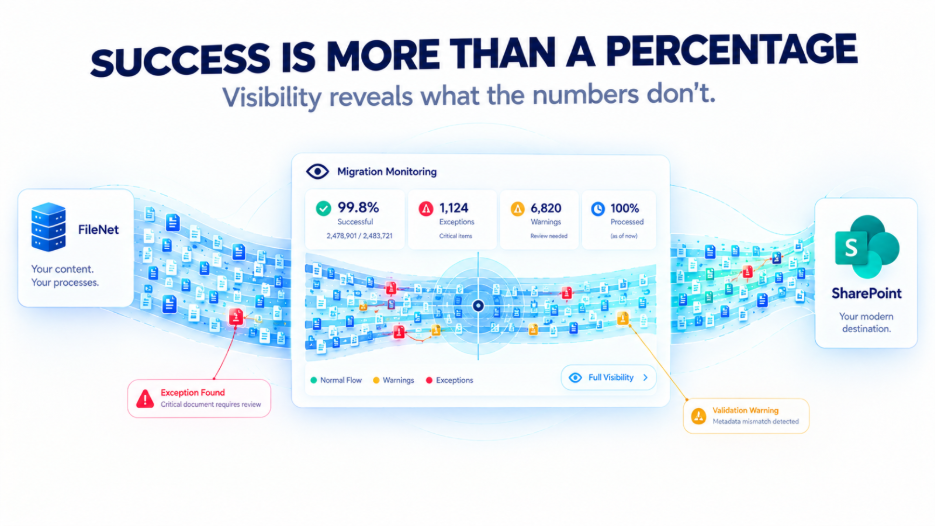
99.8% of documents migrated successfully.
That percentage may appear positive.
But suppose the remaining 0.2% represents thousands of documents from a critical business application.
The percentage alone does not provide enough context to make a cutover decision.
A useful monitoring capability should therefore allow teams to drill down from overall project status into the repositories, migration waves, content types, failures, and exceptions that make up that status.
Migration visibility needs context, not just numbers.
What Should You Be Able to See During a FileNet Migration?
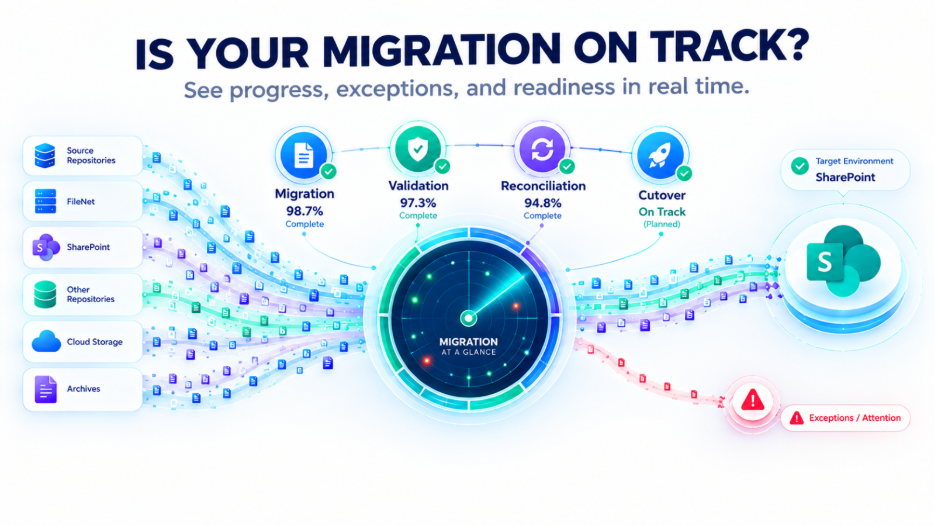
A comprehensive FileNet to SharePoint migration monitoring approach should provide visibility across multiple dimensions.
Migration Progress
Track the amount of content processed against the planned migration scope. This can help teams understand whether migration execution is progressing according to the project plan.
Success and Failure
Monitor successfully processed content as well as failed or incomplete items. Failure information should be available for further investigation rather than being hidden within technical logs.
Exceptions
Identify content or migration activities that require additional attention. Exceptions may relate to content, metadata, permissions, configuration, connectivity, or other migration conditions.
Repository-Level Progress
Enterprise environments can contain multiple repositories and Object Stores. Repository-level visibility helps teams identify which areas are progressing normally and which may be experiencing delays or higher exception rates.
Migration Wave Status
If content is migrated in phases, project teams need to know the status of individual migration waves as well as the overall program.
Validation Status
Migration completion and migration validation are different activities. Monitoring should make it possible to understand whether migrated content has passed the defined validation process.
Reconciliation
Reconciliation can help identify differences between expected source content and the migrated target environment.
Delta Migration
If incremental synchronization is being used, teams need visibility into changes identified and processed during subsequent migration cycles.
Cutover Readiness
Migration data, validation results, outstanding exceptions, and business requirements can collectively support decisions about whether a migration wave or environment is ready for cutover.
Different Stakeholders Need Different Migration Visibility
A single migration dashboard may contain information relevant to several stakeholder groups, but each group has different priorities.
CIO and IT Leadership
Leadership generally needs a high-level view of:
- Overall migration progress
- Major risks
- Critical exceptions
- Business impact
- Migration readiness
- Overall project status
They typically do not need to review individual technical errors.
Project Managers
Project managers may need:
- Migration volumes
- Repository progress
- Migration wave status
- Failed items
- Pending activities
- Validation status
- Outstanding risks
This information can support project planning and escalation.
Migration Engineers
Technical teams often need more detailed information, including:
- Processing status
- Failed content
- Error details
- Retry requirements
- Metadata issues
- Configuration issues
- Technical exceptions
Business Stakeholders
Business teams may focus on:
- Business-critical content
- Application dependencies
- Content availability
- Validation results
- Outstanding business issues
- Readiness for user transition
A centralized monitoring approach can help each stakeholder access the level of information relevant to their responsibilities.
Failed Content Should Become a Managed Exception
Migration failures can occur in complex enterprise environments.
The important question is not necessarily:
Can every document migrate without an exception?
A more practical question is:
Can the migration team identify, understand, prioritize, and resolve exceptions efficiently?
A useful migration monitoring capability should help teams determine:
- What failed?
- Where did it fail?
- Why did it fail?
- Can it be retried?
- Does it require manual intervention?
- Does it require business review?
- Is the issue isolated or recurring?
- Could it affect cutover?
This changes the role of migration failures.
Instead of becoming hidden entries in technical logs, they become managed exceptions within the migration process.
Example
Suppose a repository begins producing a higher number of metadata mapping failures.
A centralized view could highlight the change early.
The migration team can then investigate the mapping before the same issue affects additional migration waves.
That is one of the practical benefits of visibility:
Problems can be addressed while the migration is still underway.
Migration Monitoring Should Extend Beyond Content Transfer
Why Centralized Monitoring Becomes More Important at Scale
Imagine a migration involving five repositories.
Now consider fifty.
Then consider hundreds of repositories containing millions of documents.
The number of individual migration activities, exceptions, validation results, and synchronization cycles can increase substantially.
At this scale, separate logs can make it difficult to establish a single view of the project.
A centralized monitoring capability can consolidate information such as:
Overall Migration Progress
Repository Status
Migration Success / Failure
Exceptions
Validation
Reconciliation
Migration Waves
Delta Cycles
Cutover Readiness
The goal is not simply to create another dashboard.
The goal is to create a shared operational view of migration status and risk.
How Migration Transparency Helps Reduce Risk
Visibility does not eliminate migration issues.
Instead, it can help teams identify and respond to issues earlier.
For example:
Unexpected increase in failures
→ Investigate the affected repository.
Repeated metadata exceptions
→ Review the relevant mapping rules.
Unexpected permission discrepancies
→ Investigate the security mapping.
Validation discrepancies
→ Review the affected content before proceeding.
Delta synchronization issues
→ Assess whether the target environment remains aligned with the source.
Critical application dependency issue
→ Resolve the dependency before cutover.
This creates a more proactive migration model.
Instead of discovering problems during the final migration stage, teams have an opportunity to identify and manage them during execution.
Automation and Monitoring Work Together
Automation and monitoring serve different purposes.
Automation helps execute the migration.
Monitoring helps teams understand what the migration is doing.
Together, they can support a more controlled migration process:
Automated Migration
↓
Centralized Monitoring
↓
Exception Detection
↓
Validation
↓
Reconciliation
↓
Delta Synchronization
↓
Controlled Cutover
This becomes increasingly important when migration volumes are too large for manual oversight.
The migration platform handles repetitive execution activities, while monitoring provides the visibility required by project and technical teams.
Visibility Across Migration Waves
Enterprise migrations rarely need to happen as one massive operation.
Organizations may divide migration into waves based on:
Repository
Business unit
Geography
Content type
Application dependency
Business priority
Data volume
Migration readiness
For each wave, teams should be able to understand:
What was planned?
What has been processed?
What failed?
What remains?
Has validation completed?
Are there outstanding exceptions?
Is the wave ready for the next phase?
At the same time, project leadership needs to understand the overall program.
This creates two levels of visibility:
Wave-Level Visibility
Detailed information about an individual migration phase.
Program-Level Visibility
An overall view across all migration waves.
Both are important for large-scale FileNet-to-SharePoint projects.
What About Delta Migration?
Visibility becomes particularly important when a project uses delta migration or incremental synchronization.
After an initial migration, users may continue creating or modifying content in the FileNet environment.
The migration team therefore needs to understand:
- Which changes were identified?
- Which changes were processed?
- Which changes failed?
- Were all expected changes synchronized?
- Are there outstanding exceptions?
- Is another synchronization cycle required?
Without visibility into delta cycles, it becomes more difficult to determine whether the SharePoint environment is sufficiently aligned with the FileNet source before final cutover. Monitoring should therefore treat delta synchronization as an important migration stage rather than as an isolated technical operation.
How ECM Addons Approaches Migration Visibility
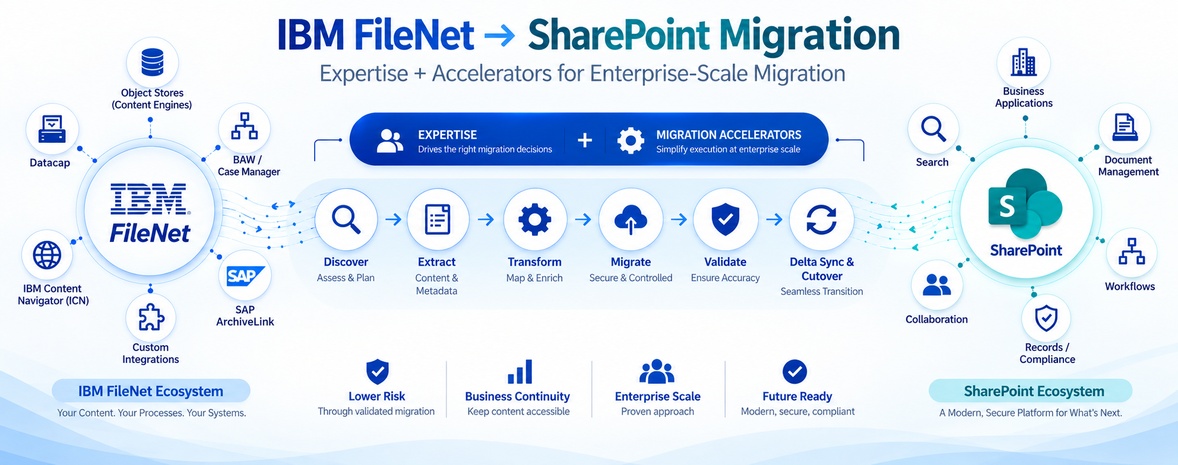
ECM Addons combines FileNet-to-SharePoint migration capabilities with migration monitoring and validation to help organizations maintain visibility throughout the migration lifecycle.
The approach focuses on areas such as:
Automated Migration Tracking
Track migration activity across large content volumes and migration stages.
Centralized Visibility
Bring relevant migration information into a consolidated view for project and technical stakeholders.
Exception Monitoring
Identify failed or problematic content that requires investigation, retry, or additional review.
Validation Tracking
Monitor validation activities after content has been migrated.
Reconciliation
Identify discrepancies between expected source content and the target environment.
Delta Monitoring
Track subsequent synchronization activity and changes between migration cycles.
Cutover Readiness
Use migration, validation, reconciliation, and exception information to support controlled transition decisions.
The objective is straightforward:
Make migration progress, exceptions, validation, and readiness visible throughout the project-not only after the migration is finished.
Questions to Ask Before Choosing a FileNet Migration Solution
Before starting a large-scale IBM FileNet to SharePoint migration, ask:
Can we see migration progress centrally?
Teams should have a clear view of overall progress without manually combining multiple sources.
Can we identify failed content quickly?
Failure identification should be part of the migration process rather than something discovered through a final report.
Can we understand why migration exceptions occurred?
Knowing that an item failed is useful. Understanding why it failed is more actionable.
Can we track repositories and migration waves?
Large projects require visibility beyond the overall percentage.
Can we monitor validation and reconciliation?
Migration completion should be separated from verification.
Can we monitor delta synchronization?
If delta migration is part of the strategy, its status should be visible.
Can different stakeholders access relevant information?
CIOs, project managers, engineers, and business teams have different information requirements.
Can we use migration data to support cutover decisions?
The migration platform should provide information that helps teams evaluate readiness against defined project criteria.
If the answers to these questions are unclear, the migration may lack the visibility needed to manage a large enterprise transition effectively.
Try Before You Commit
Planning a large FileNet-to-SharePoint migration does not have to begin with a full-scale production migration.
A controlled trial can help organizations understand the migration process, evaluate their content, and identify potential migration considerations before expanding the project.
Try the ECM Addons Free FileNet to SharePoint Migration Free Trial and evaluate the migration approach with your own requirements.
Planning an IBM FileNet to SharePoint Migration?
When millions of documents are involved, migration success is not only about moving content.
Organizations need to understand:
What has moved.
What has failed.
What remains.
What needs attention.
What has been validated.
What has been reconciled.
And whether the business is ready to move forward.
ECM Addons helps organizations approach IBM FileNet to SharePoint migration with a structured strategy covering migration automation, centralized monitoring, exception management, validation, reconciliation, delta synchronization, and controlled cutover.
Frequently Asked Questions
What should be monitored during a FileNet to SharePoint migration?
During a FileNet to SharePoint migration, teams should monitor overall migration progress, successful and failed documents, exceptions, repository-level progress, migration wave status, validation, reconciliation, delta synchronization, and cutover readiness.
Monitoring should go beyond the total number of migrated documents and provide enough context to identify where issues are occurring, what requires attention, and whether each migration stage is progressing as planned.
What should be monitored during a FileNet to SharePoint migration?
During a FileNet to SharePoint migration, teams should monitor overall migration progress, successful and failed documents, exceptions, repository-level progress, migration wave status, validation, reconciliation, delta synchronization, and cutover readiness.
Monitoring should go beyond the total number of migrated documents and provide enough context to identify where issues are occurring, what requires attention, and whether each migration stage is progressing as planned.
Why is centralized monitoring important for large FileNet migrations?
Centralized monitoring provides a single operational view of migration activity across multiple FileNet repositories, Object Stores, migration waves, exceptions, validation activities, and synchronization cycles.
For large migrations involving millions of documents, it reduces the need to combine information from separate logs, spreadsheets, databases, and reports, helping project teams identify risks and issues earlier.
How can migration teams track failed documents during a FileNet to SharePoint migration?
Migration teams can track failed documents as managed exceptions, identifying what failed, why it failed, whether it can be retried, and whether intervention is required. This helps teams resolve issues before they affect later migration stages or cutover.
Does migration monitoring include validation and reconciliation?
Yes. Migration monitoring can track validation and reconciliation alongside document transfer.
Validation verifies that migrated content meets the defined requirements, while reconciliation identifies differences between the FileNet source and SharePoint target.
How does monitoring help with delta migration?
Monitoring provides visibility into delta or incremental synchronization, allowing teams to track changes identified, processed, and failed after the initial migration. This helps verify that SharePoint remains aligned with FileNet before final cutover.
Can migration monitoring help determine cutover readiness?
Yes. Migration monitoring supports cutover readiness by bringing together migration progress, validation, reconciliation, exceptions, and delta synchronization status.
This gives project and business teams the visibility needed to evaluate whether the FileNet to SharePoint migration meets defined cutover criteria.