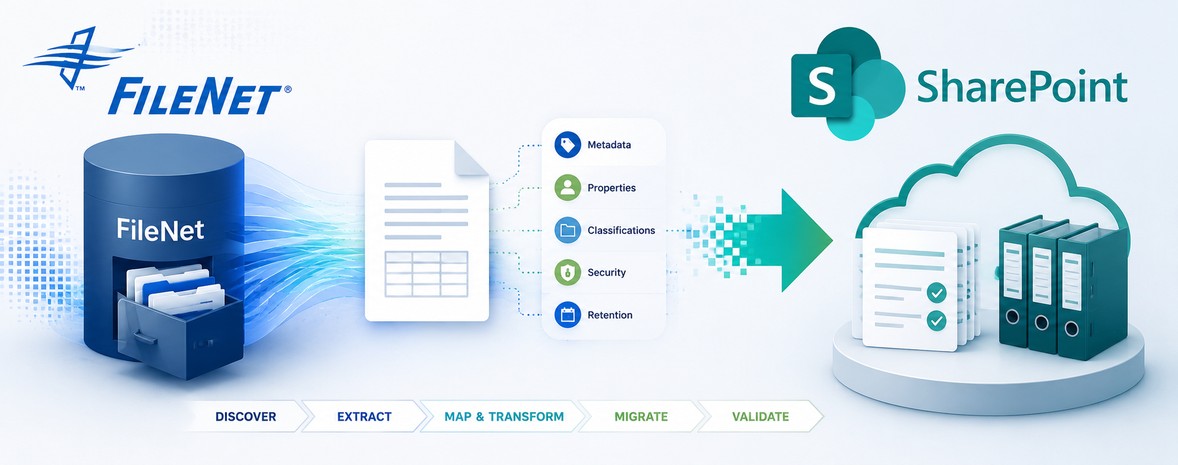
When organizations plan an IBM FileNet to Microsoft SharePoint migration, the conversation often starts with document volumes.
How many documents do we have?
How quickly can we migrate them?
But another question is just as important:
What happens to the information that tells SharePoint what those documents are, how they should be classified, who should access them, and how the business should use them?
That information is often stored in IBM FileNet metadata.
A document may successfully arrive in SharePoint, but if its metadata is missing, incorrectly mapped, poorly structured, or disconnected from its business context, the organization may struggle to:
- Find content
- Classify documents
- Apply governance
- Search effectively
- Filter and navigate content
- Apply retention requirements
- Support business processes
- Maintain document context
- Preserve application relationships
Moving the document is only part of an IBM FileNet migration. Preserving the information around the document is equally important.
For this reason, FileNet metadata migration should be treated as a dedicated migration workstream covering discovery, extraction, mapping, transformation, security, validation, and ongoing business requirements.
Why IBM FileNet Metadata Matters
Metadata provides context.
It can describe:
- What a document is
- Which business process it belongs to
- Which department owns it
- When it was created
- Which customer, contract, case, or transaction it relates to
- How it should be classified
- How it should be governed
- Which business application uses it
- Which users or groups should have access
In many IBM FileNet environments, this information has accumulated over years.
That can result in:
- Complex property structures
- Custom attributes
- Different naming conventions
- Business-specific values
- Multiple document classes
- Legacy classifications
- Application-specific metadata
- Different security models
When moving content to SharePoint, organizations therefore need to determine:
Which FileNet metadata should be preserved, transformed, consolidated, or retired?
This is why IBM FileNet metadata migration to SharePoint should begin well before the first production document is moved.
FileNet Metadata Does Not Always Map One-to-One to SharePoint
One of the biggest migration assumptions is:
FileNet Property → SharePoint Column
Sometimes that mapping may be straightforward.
In complex enterprise environments, it may not be.
Differences can exist in:
- Property structures
- Data types
- Required fields
- Naming conventions
- Allowed values
- Business classifications
- Content structures
- Taxonomy
- Choice values
- Default values
- Security requirements
For example, a FileNet property may use an internal code while the SharePoint environment requires a business-friendly value.
Therefore, FileNet to SharePoint metadata mapping should be treated as a mapping and transformation exercise rather than a simple copy operation.
The migration team should define:
Source FileNet Property → Transformation Rule → Target SharePoint Field
This creates a controlled and repeatable approach to metadata migration.
Start With IBM FileNet Discovery and Assessment
Before migration begins, organizations should understand what metadata actually exists.
This includes understanding:
Property Structures
What properties are associated with different document classes and content types?
Data Types
Are the values text, numeric, date-based, choice-based, Boolean, or another format?
Required Properties
Which metadata is mandatory for business operations, applications, search, or governance?
Business Values
Are there controlled values that need to be preserved or transformed?
Custom Properties
Which properties were created specifically for the organization’s business processes?
Usage
Which metadata is actually used for searching, reporting, classification, applications, or business processes?
Dependencies
Which applications, workflows, integrations, or business processes depend on specific metadata?
This discovery provides the foundation for defining the target SharePoint metadata structure.
Use FileNet Analyzer Before Designing the Migration
Metadata discovery should begin with an understanding of the existing IBM FileNet environment.
For complex enterprise FileNet repositories, manually reviewing Object Stores, document classes, properties, folders, dependencies, and content usage can quickly become impractical.
A structured FileNet migration assessment can help organizations understand what exists before defining the target SharePoint architecture.
A pre-migration analysis can help identify:
- FileNet Object Stores and repository structure
- Document classes and property definitions
- Metadata usage and property patterns
- Custom properties and classifications
- Content volumes and distribution
- Repository dependencies
- Application dependencies
- Workflow dependencies
- Potential migration bottlenecks
- Content requiring transformation or cleanup
This analysis helps answer a critical question:
What exactly needs to be migrated, transformed, consolidated, or retired?
FileNet Analyzer Tool
ECM Addons provides the FileNet Analyzer Tool to help organizations analyze their existing FileNet environment and understand usage, dependencies, structure, risks, and potential migration considerations.
The analysis can help establish a stronger foundation for:
Assessment → Dependency Analysis → Migration Planning → Metadata Mapping → Extraction → Migration → Validation
For organizations planning a large-scale IBM FileNet to SharePoint migration, performing this analysis before migration execution can reduce the risk of discovering structural or dependency issues after the project has already started.
Not All Legacy Metadata Should Be Migrated
An IBM FileNet environment may contain metadata that is no longer useful.
For example:
- Historical properties
- Redundant fields
- Unused attributes
- Obsolete classifications
- Values created for retired processes
- Legacy application fields
- Duplicate properties
Simply moving everything into SharePoint can reproduce unnecessary complexity.
A migration provides an opportunity to ask:
Does this metadata still serve a business purpose?
If it does, preserve or transform it appropriately.
If it does not, organizations can consider whether it should be retired.
The goal is not to recreate legacy complexity in SharePoint.
The goal is to create a metadata structure that supports the organization’s future information architecture.
FileNet Metadata Extraction Before SharePoint Migration
Once the source environment has been analyzed, the next step is to extract the content and metadata required for migration.
An IBM FileNet migration may involve more than extracting documents.
Depending on the migration scope, organizations may need to consider:
- Documents and content
- Document classes
- Metadata and properties
- Folder structures
- Object Stores
- Security and permissions
- Versions
- Renditions
- Workflows
- Entry Templates
- Application dependencies
- Integration information
The extraction process should preserve the relationship between the document and the information that gives the document business context.
Why Metadata-Aware Extraction Matters
Consider:
Document → Customer → Contract → Department → Classification → Security
If only the binary document is extracted, much of the information required to manage that document in the target environment can be lost.
A metadata-aware extraction process therefore creates a structured foundation for:
FileNet Content → Metadata → Transformation Rules → SharePoint Target
ECM Addons provides FileNet data extraction capabilities designed to extract documents and associated metadata as part of a structured migration process.
Metadata Mapping Needs Business Context
Technical mapping alone is not enough.
Consider a FileNet property such as:
Customer_Type = 01
The target SharePoint environment may require:
Customer Type = Corporate
The migration therefore needs to understand the meaning behind the source value—not just transfer the characters.
Similarly, multiple FileNet properties may potentially be consolidated into a new SharePoint structure.
For example:
Customer_Name + Customer_Number + Customer_Type
may be represented through a different target information architecture.
This is why metadata transformation should consider both:
Source structure
and
Target business requirements.
A good migration strategy defines these rules before production migration begins.
FileNet Security and Permissions Are a Separate Migration Workstream
Metadata and security are closely related, but they should not be treated as the same migration workstream.
An IBM FileNet to SharePoint migration may require analysis of security at multiple levels, including:
- Object Store security
- Folder-level permissions
- Document-level permissions
- User and group mappings
- Access Control Lists
- Permission inheritance
- Business-unit access
- Restricted content
- Sensitive information
A document can have perfectly migrated metadata and still create a serious business problem if the wrong users receive access—or legitimate users lose access.
For this reason, migration planning should evaluate:
Content + Metadata + Security + Business Context
Security validation should be performed alongside content and metadata validation before production cutover.
Component-Level IBM FileNet Migration
Not every IBM FileNet migration needs to be treated as a single repository-wide migration.
In complex environments, organizations may need to assess and migrate individual FileNet components based on business priorities, dependencies, migration readiness, or application requirements.
A component-level migration strategy may include:
- Object Store migration
- Folder migration
- Document migration
- Document class migration
- Metadata migration
- Security and permissions migration
- Teamspace migration
- Workflow migration
- Entry Template migration
- Integration and application dependency migration
This approach can be useful when different business units have different migration priorities or when specific FileNet components require additional analysis before they can be moved.
Why Component-Level Migration Matters
A large FileNet environment may contain content belonging to multiple departments, applications, business processes, and retention requirements.
Rather than treating the entire environment as one migration workload, organizations can define controlled migration scopes.
For example:
Object Store → Selected Document Classes → Metadata → Security → Applications → Pilot → Production
This can support:
- Business-unit migration
- Application-specific migration
- Object Store migration
- Phased migration
- Pilot migration
- Controlled production migration
The migration question is therefore not only:
How many documents need to be migrated?
It is also:
Which FileNet components, dependencies, metadata, security structures, and business relationships need to move together?
Metadata and Business Application Data
Metadata may not be the only information associated with migrated content.
Business applications may maintain information connected to documents stored in FileNet.
For example:
Business Application Data → Document Reference → FileNet Content
After migration, the intended relationship may need to become:
Business Application Data → Document Reference → SharePoint Content
This can require updates to:
- Business application data
- Document references
- Repository identifiers
- Application configuration
- Integration logic
- Associated business information
Therefore, organizations should assess not only FileNet metadata, but also data maintained by applications that interact with the content.
This is particularly important in enterprise FileNet environments with custom applications, workflows, APIs, SAP integrations, or other business systems.
SAP and Other FileNet Integrations
Some IBM FileNet environments are closely integrated with enterprise applications such as SAP.
For example:
SAP Business Process → ArchiveLink → FileNet Content
When content is migrated to SharePoint, the relationship may need to become:
SAP Business Process → ArchiveLink / Integration Layer → SharePoint Content
The migration team should therefore identify:
- SAP ArchiveLink dependencies
- SAP ECC integrations
- Document references
- External applications
- APIs
- Web services
- Workflow integrations
- Custom applications
- Third-party integrations
Integration assessment should be performed during the discovery and planning stages—not after the documents have already been migrated.
Metadata Can Affect SharePoint Search
One of the reasons organizations move content to SharePoint is to make enterprise information easier to access and manage.
Metadata plays an important role in that experience.
Poorly migrated metadata can affect:
- Search
- Filtering
- Classification
- Navigation
- Content discovery
- Reporting
- Views
- Business intelligence
Imagine migrating millions of documents into SharePoint and then discovering that users cannot reliably filter them by the information they previously depended on.
The migration may be technically complete.
But the user experience is not.
Metadata quality therefore has a direct impact on the value of migrated content.
Metadata Also Supports Governance and Compliance
Metadata can influence how organizations manage information.
Depending on the environment, it may support:
- Records classification
- Retention
- Information governance
- Content ownership
- Business classification
- Regulatory requirements
- Audit processes
- Compliance reporting
If metadata required for governance is not correctly migrated or transformed, the organization may create downstream governance challenges.
That is why metadata should be considered alongside:
Security + Governance + Compliance + Retention
rather than treated as a standalone technical field-mapping exercise.
Metadata Validation Should Happen Throughout Migration
Metadata should not be checked only after the entire migration is complete.
A stronger approach is progressive validation.
During Assessment
Understand the existing metadata structures.
During Mapping
Define how source properties will be represented in SharePoint.
During Transformation
Define and test business rules for values that cannot be transferred directly.
During Migration
Process and transform metadata according to the defined rules.
During Validation
Compare migrated metadata against expected results.
Before Cutover
Resolve significant exceptions and confirm that business requirements have been met.
This reduces the risk of discovering large-scale mapping problems at the end of the project.
How Do You Validate Metadata at Enterprise Scale?
Manually opening documents and checking their properties is not practical when migrating millions of documents.
Enterprise migration requires automated validation.
Validation can help identify:
- Missing metadata
- Incorrect values
- Invalid transformations
- Mapping exceptions
- Unexpected values
- Unprocessed content
- Failed migration items
- Incorrect document relationships
- Security exceptions
The objective is to create measurable evidence that migration requirements have been met.
The question should not simply be:
Did the document migrate?
It should be:
Did the document, metadata, structure, security, and business context migrate correctly?
Use Pilot Migration Before Full-Scale Execution
A pilot migration provides an opportunity to test the migration approach using representative FileNet content before moving into production.
A pilot can validate:
- FileNet metadata mappings
- SharePoint content types
- SharePoint columns
- Folder structures
- Security mappings
- Transformation rules
- Component-level migration
- Workflow dependencies
- Application dependencies
- Migration performance
- Validation and reconciliation
Pilot migration can expose mapping or dependency issues while the migration scope is still manageable.
For organizations evaluating a migration tool, a controlled trial can also provide practical evidence before committing to a full-scale migration.
Metadata Migration Should Support the Future State
A common mistake is designing SharePoint around the FileNet environment exactly as it exists today.
Migration should instead ask:
What metadata does the business need in the future environment?
This can create opportunities to:
- Simplify metadata structures
- Remove redundant properties
- Standardize classifications
- Improve search
- Support governance
- Improve content discovery
- Align content with SharePoint architecture
- Prepare information for future automation and analytics
The migration should preserve what matters while avoiding unnecessary legacy complexity.
How ECM Addons Approaches IBM FileNet Metadata Migration
ECM Addons approaches IBM FileNet to SharePoint migration as a structured, multi-stage process rather than a simple document transfer.
Our approach can include:
1. FileNet Assessment & Discovery
Analyze the existing FileNet environment, repository structure, content volumes, metadata, dependencies, and potential migration risks.
Tool: FileNet Analyzer
2. Content & Metadata Extraction
Extract documents and associated metadata while maintaining the relationship between content and its business context.
Tool: FileNet Data Downloader / Extractor
3. Metadata Mapping
Define how FileNet properties, document classes, classifications, and business values should be represented in SharePoint.
4. Metadata Transformation
Apply business rules where FileNet metadata cannot be transferred directly to the target SharePoint structure.
5. Security & Permissions Mapping
Analyze and map applicable FileNet security structures, permissions, and access requirements.
6. Component-Level Migration
Define migration scopes for Object Stores, folders, documents, metadata, Teamspaces, workflows, and other relevant FileNet components.
7. Application & Integration Assessment
Identify business application, SAP, workflow, API, and other integration dependencies that may require migration or redevelopment.
8. Automated Migration
Execute migration rules consistently across large document volumes using an automated migration process.
9. Validation & Reconciliation
Compare migration results against expected document, metadata, structural, and security outcomes.
10. Incremental Migration & Cutover
Use incremental or delta migration strategies where required to reduce business disruption and support controlled production cutover.
The objective is not simply to copy FileNet documents into SharePoint.
The objective is to preserve the content, context, security, relationships, and business value of enterprise information while creating a cleaner and more sustainable SharePoint environment.
Questions to Ask Before Migrating FileNet Metadata
Before beginning an IBM FileNet to SharePoint migration, ask:
Which metadata is actually used by the business?
Which properties are mandatory?
Which properties are obsolete or redundant?
How will FileNet properties map to SharePoint?
Which values require transformation?
Which metadata is required for search and classification?
Which metadata supports governance or retention?
Which business applications depend on metadata?
Which security structures depend on the content or metadata?
Which FileNet components need to be migrated together?
How will SAP and other integrations be handled?
How will migrated metadata be validated?
How will exceptions be identified and resolved?
If these questions are not answered, the migration strategy may be incomplete.
Try Before You Commit
Want to experience the migration process before committing to a full-scale project?
The ECM Addons FileNet to SharePoint Migration Trial allows organizations to evaluate the migration approach before proceeding with a larger migration program.
A controlled trial can help you evaluate:
- Document migration
- Metadata migration
- Mapping
- Permissions
- Migration rules
- Migration results
- Validation
Planning an IBM FileNet to SharePoint Migration?
ECM Addons helps organizations approach IBM FileNet to SharePoint migration with a structured strategy covering:
- FileNet assessment and discovery
- Content extraction
- Metadata mapping
- Metadata transformation
- Security and permissions
- Component-level migration
- Workflow and application dependencies
- SAP and other integrations
- Pilot migration
- Incremental migration
- Delta synchronization
- Validation
- Centralized monitoring
- Reconciliation
- Controlled production cutover
Whether you are migrating a specific Object Store, a business unit, selected FileNet components, or an enterprise repository containing millions of documents, the migration strategy should be designed around the content, metadata, security, dependencies, and business requirements of the target environment.
Frequently Asked Questions
What happens to FileNet metadata when migrating to SharePoint?
FileNet metadata needs to be assessed and mapped to the appropriate SharePoint structure. Depending on business requirements, some metadata may be preserved, transformed, consolidated, or retired.
Can FileNet metadata be directly copied to SharePoint?
Not always. Differences between FileNet and SharePoint property structures, data types, values, classifications, and business requirements may require metadata mapping and transformation.
Why is metadata important in a FileNet to SharePoint migration?
Metadata provides the context needed to search, classify, manage, govern, and use enterprise content effectively. Incorrect or missing metadata can reduce the value of migrated documents.
Should all FileNet metadata be migrated?
No. Organizations should determine which metadata is still required and relevant to the future SharePoint environment. Unused or obsolete metadata may not need to be reproduced.
How does metadata affect SharePoint search?
Metadata can support filtering, classification, navigation, views, and content discovery. Poor metadata migration can make it harder for users to find and organize migrated content.
Can FileNet security be migrated to SharePoint?
FileNet security and SharePoint permissions use different models and should be assessed and mapped as part of the migration strategy. Depending on the environment, Object Store, folder, document, user, group, and inheritance structures may need to be considered.
Can individual FileNet components be migrated?
Yes. A migration strategy can be designed around specific FileNet components such as Object Stores, folders, documents, metadata, Teamspaces, workflows, and other relevant components, depending on the migration scope and dependencies.
Can business application data need to be updated during migration?
Yes. If business applications maintain information or references associated with FileNet content, those records may require updates to align with the migrated SharePoint content.
What about SAP integrations?
SAP ArchiveLink, SAP ECC, document references, and other integration dependencies should be assessed during discovery and migration planning. The appropriate integration approach depends on the existing architecture and target SharePoint environment.
How is migrated metadata validated?
Automated validation and reconciliation can compare migrated metadata against defined mapping and business requirements, helping identify missing values, incorrect transformations, and exceptions.
When should metadata mapping be defined?
Metadata mapping should be addressed during the assessment and migration planning stages, before large-scale migration begins.
How can organizations assess their FileNet environment before migration?
A structured FileNet assessment can analyze repository structure, usage, dependencies, metadata, content, and migration considerations before the target migration architecture is finalized.
Final Thoughts
A document can be successfully moved from IBM FileNet to SharePoint and still lose much of its business value if the information around that document is not handled correctly.
The document is the content.
Metadata provides the context.
Security provides access control.
Business applications provide relationships and process context.
Integrations provide connections to the wider enterprise.
For that reason, metadata migration should not be treated as a minor technical step.
It should be:
Discovered → Mapped → Transformed → Migrated → Validated
while considering security, components, applications, integrations, and future business requirements.
The goal of an IBM FileNet to SharePoint migration is not simply to move documents.
It is to make the information within and around those documents remain usable, searchable, secure, governable, and valuable after the move.