Moving content from IBM FileNet to Microsoft SharePoint is a significant transformation for any enterprise.
But there is a question that is often overlooked until the end:
How do you prove that the migration was actually successful?
A migration report may say that millions of documents were processed successfully.
That does not necessarily mean the target environment contains everything it should.
Documents may have migrated while metadata was incomplete.
Content may exist while permissions are incorrect.
Document counts may match while versions or associated information do not.
A small number of exceptions may remain hidden inside a very large migration dataset.
For enterprise FileNet to SharePoint migration, moving content is only one part of success. Proving its accuracy is equally important.
Migration Success Is More Than a Document Count
A simple migration metric might be:
Source Documents → Target Documents
If the numbers match, the migration appears successful.
But enterprise content is rarely that simple.
A migrated document may depend on:
- Metadata
- Document versions
- Security permissions
- Relationships
- Business classifications
- Content attributes
- Retention requirements
- Business application dependencies
This means a migration can achieve a high transfer rate while still requiring additional validation.
The real question is not how many documents reached SharePoint.
It is:
Did the content arrive with the information and controls required for the business to use it correctly?
What Should Be Validated During a FileNet to SharePoint Migration?
Validation should be designed around the organization’s migration requirements.
Depending on the scope, this can include several layers.
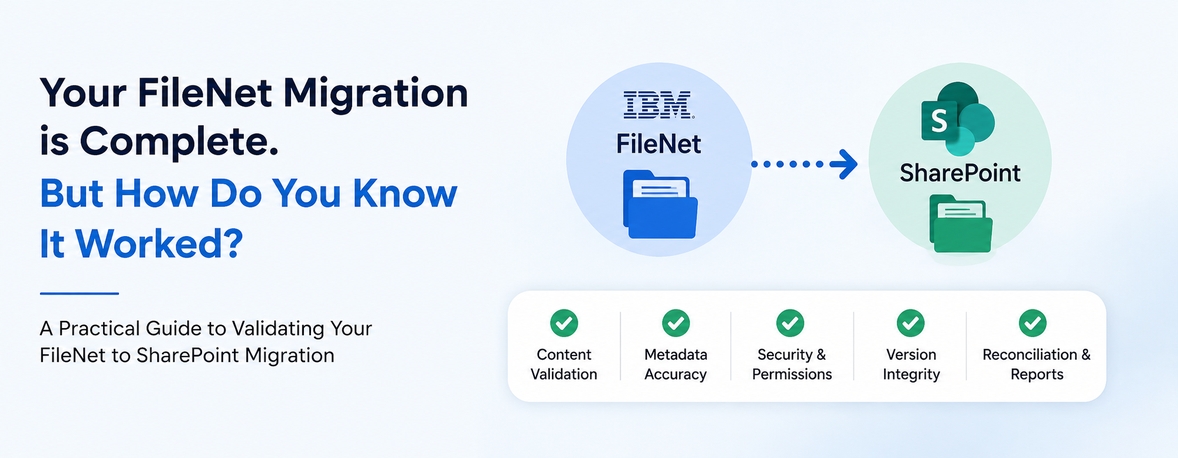
1. Content Validation
The first question is whether the expected content actually reached SharePoint.
Validation can compare:
- Source content
- Target content
- Expected document volumes
- Success scenarios
- Failed scenarios
- Pending items
- Exceptions
At large scale, automated comparison becomes essential.
2. Metadata Validation
Documents are often only as useful as the information associated with them.
Metadata can determine how content is:
- Classified
- Searched
- Filtered
- Governed
- Retained
- Managed
During FileNet to SharePoint migration, metadata mapping and transformation therefore need to be validated—not simply assumed to be correct.
A document that arrives without the expected business context may technically exist in SharePoint but still create operational problems.
3. Security Validation
Security is one of the most important areas of enterprise content migration.
FileNet environments may contain complex access models built over many years.
During migration, organizations need to understand:
- Who should access the content?
- Which permissions need to be preserved?
- How are source permissions mapped to SharePoint?
- Are restricted documents still appropriately restricted?
- Are there unexpected access changes?
A successful migration should not create a situation where content is available to users who should not have access—or inaccessible to users who legitimately need it.
Content migration and security migration need to be considered together.
4. Version and Content Integrity
Enterprise documents may have multiple versions, or other associated information.
Simply confirming that the latest document exists in SharePoint may not be enough.
Organizations may need to establish whether the migration requirements for:
- Document versions
- Content integrity
- Relevant attributes
- Associated information
have been met.
The validation strategy should therefore reflect what the business considers essential to preserve.
5. Source-to-Target Reconciliation
This is where migration validation becomes more measurable.
Reconciliation compares expected source results against actual target results.
For example:
Source
10,000 documents
↓
Migration
9,997 successfully processed
↓
Target
9,997 available
↓
Exception
3 requiring investigation
This gives the migration team something actionable.
Instead of saying:
“The migration is mostly complete.”
the team can identify exactly what remains unresolved.
At enterprise scale, that level of visibility matters.
Why Exceptions Matter
Every large migration can encounter exceptions.
The important question is not whether exceptions exist.
It is:
Can you identify, classify, investigate, and resolve them?
Examples may include:
- Content that could not be migrated
- Unsupported attributes
- Mapping issues
- Security conflicts
- Transformation errors
- Integration-related dependencies
An effective migration process should prevent exceptions from disappearing inside an overall success percentage.
A 99.9% success rate can still represent thousands of unresolved items at enterprise scale.
That is why exception management needs to be part of the migration strategy.
Validation Should Not Happen Only at the End
One of the biggest mistakes in migration projects is treating validation as a final project activity.
By that point, identifying and correcting issues can become much more difficult.
A stronger approach is to validate progressively.
During Initial Migration
Validate migrated content and identify early issues.
During Delta Migration
Validate newly created and modified content and associated data processed through delta cycles.
Before Cutover
Reconcile outstanding content and exceptions.
After Cutover
Confirm that the target environment meets the defined migration requirements.
This creates a continuous validation process rather than a single final inspection.
Centralized Monitoring Gives Stakeholders Visibility
Large FileNet to SharePoint migrations involve multiple teams.
Project managers need progress visibility.
Migration teams need operational details.
Technical teams need exception information.
Business stakeholders need confidence.
Governance teams need evidence.
A centralized monitoring capability can bring these perspectives together.
Stakeholders should be able to understand:
How much has migrated?
How much remains?
What has failed?
What requires attention?
What has been validated?
What is ready for cutover?
This is where migration monitoring becomes more than reporting.
It becomes a mechanism for migration control.
Automation Makes Validation Scalable
Imagine validating hundreds of millions of documents manually.
It isn’t practical.
Enterprise Document migration requires automation not only for content movement, but also for monitoring, validation, reconciliation, and exception handling.
Automation can help teams:
- Process large volumes consistently
- Compare source and target information
- Identify exceptions
- Track migration status
- Reduce manual reconciliation
- Produce repeatable results
- Provide greater visibility to stakeholders
The objective is not simply to migrate faster.
It is to make the migration measurable at scale.
What Should Be the Definition of "Migration Complete"?
This is an important question to establish before the project begins.
Is migration complete when:
- All documents have been transferred?
Or when:
- Content has been validated?
- Metadata requirements have been met?
- Security has been verified?
- Exceptions have been resolved or formally accepted?
- Source-to-target reconciliation is complete?
- Delta changes have been processed?
- Stakeholders have visibility into the final status?
- The business is ready to operate from SharePoint?
For an enterprise FileNet to SharePoint migration, the second definition is far more meaningful.
Migration completion should be based on defined acceptance criteria—not simply a transfer count.
Questions to Ask Before Starting a FileNet to SharePoint Migration
Before selecting a migration approach, ask:
How will we prove that all required content was migrated?
There should be a defined validation and reconciliation process.
How will we validate metadata?
Document transfer alone does not prove that the required business context was preserved.
How will security be validated?
Permissions and access requirements should be assessed and verified as part of migration.
How will exceptions be handled?
Failed or incomplete items should be identifiable, traceable, and actionable.
How will we monitor migration progress?
Stakeholders should have visibility throughout the migration lifecycle.
How will delta migration results be validated?
Changes processed after the initial migration should also be included in validation and reconciliation.
What exactly constitutes migration completion?
Define measurable acceptance criteria before migration begins.
How ECM Addons Approaches Migration Validation
For IBM FileNet to SharePoint migration, ECM Addons combines automated migration, centralized monitoring, validation, and reconciliation to provide greater visibility and control throughout the migration lifecycle.
Our approach is designed around:
Automated Migration
Reduce manual processing and support repeatable migration across large content volumes.
Centralized Monitoring
Provide stakeholders with visibility into migration progress, exceptions, and outstanding activity.
Validation
Verify migrated content and associated information against defined migration requirements.
Exception Management
Identify migration exceptions so they can be investigated, addressed, and tracked.
Source-to-Target Reconciliation
Compare migration results against expected outcomes to provide measurable evidence of migration completeness.
Controlled Cutover
Use migration and validation results to help determine readiness for the final transition to SharePoint.
The objective is not simply to report that content has been moved.
It is to provide evidence that the migration has achieved its defined objectives.
How ECM Addons Approaches Migration Validation
For IBM FileNet to SharePoint migration, ECM Addons combines automated migration, centralized monitoring, validation, and reconciliation to provide greater visibility and control throughout the migration lifecycle.
Our approach is designed around:
Automated Migration
Reduce manual processing and support repeatable migration across large content volumes.
Centralized Monitoring
Provide stakeholders with visibility into migration progress, exceptions, and outstanding activity.
Validation
Verify migrated content and associated information against defined migration requirements.
Exception Management
Identify migration exceptions so they can be investigated, addressed, and tracked.
Source-to-Target Reconciliation
Compare migration results against expected outcomes to provide measurable evidence of migration completeness.
Controlled Cutover
Use migration and validation results to help determine readiness for the final transition to SharePoint.
The objective is not simply to report that content has been moved.
It is to provide evidence that the migration has achieved its defined objectives.
Try FileNet Migration Before You Commit
Want to see how your FileNet content performs in a migration?
Start with our Free Trial FileNet to SharePoint Migration Tool and experience the migration process before moving forward with a full-scale FileNet to SharePoint migration.
Frequently Asked Questions
How do you validate an IBM FileNet to SharePoint migration?
Validation can include content comparison, metadata validation, security verification, version and integrity checks, exception analysis, and source-to-target reconciliation based on defined migration requirements.
Is matching document counts enough to validate a FileNet migration?
No. Matching document counts provide only one validation measure. Metadata, security, versions, content integrity, exceptions, and other business requirements may also need to be validated.
Why is reconciliation important in FileNet to SharePoint migration?
Reconciliation helps compare expected source results with actual target results and identify discrepancies that require investigation before migration completion.
How are migration exceptions handled
Exceptions should be identified, categorized, investigated, and tracked so that unresolved items do not become hidden inside overall migration statistics.
Should FileNet migration validation happen before cutover?
Yes. Progressive validation allows issues to be identified earlier and helps reduce the risk of discovering significant discrepancies during the final cutover.
How does centralized monitoring help during migration?
Centralized monitoring gives project, technical, business, and governance stakeholders visibility into migration progress, exceptions, validation, reconciliation, and cutover readiness.
Can migration validation be automated?
Yes. Automated validation and reconciliation can make large-scale migration verification more consistent and practical than relying entirely on manual checks.
Final Thought
A migration is not successful simply because the documents arrived.
It is successful when the organization can demonstrate that the migrated content meets its defined requirements for completeness, integrity, metadata, security, accessibility, and business use.
For large-scale IBM FileNet to SharePoint migrations, that confidence cannot come from a final spreadsheet alone.
It needs to be built into the migration process through:
Automation → Monitoring → Validation → Reconciliation → Controlled Cutover
Because when you’re moving enterprise content at scale, confidence should be measurable—not assumed.
Planning an IBM FileNet to SharePoint Migration?
How will you know your migration is truly complete?
If your organization is planning to move enterprise content from IBM FileNet to Microsoft SharePoint, validation should be part of the migration strategy from the beginning—not a final checkpoint.
ECM Addons helps organizations execute IBM FileNet to SharePoint migrations with a structured approach covering:
- Automated migration
- Delta synchronization
- Centralized monitoring
- Content and metadata validation
- Security validation
- Exception management
- Source-to-target reconciliation
- Controlled cutover
Whether you’re migrating millions or hundreds of millions of documents, the objective is the same:
Move your content accurately. Maintain control throughout the migration. And have measurable evidence that the migration is complete.
Want to understand how your current FileNet environment would approach migration?
Talk to our migration specialists