A successful IBM FileNet-to-SharePoint migration depends on more than moving documents. Discover why information architecture, security, applications, workflows, and integrations must be ready before the first production migration wave.
A FileNet environment can be assessed, the migration scope approved, dependencies identified, and the migration tooling tested. Yet the destination environment may still be unprepared to support the business workloads coming its way.
This is where an important migration risk emerges.
Moving content out of IBM FileNet is only half the transformation. The harder question is whether Microsoft SharePoint has been architected to support the information structures, access requirements, applications, workflows, integrations, and governance that surround that content.
A document may arrive in SharePoint exactly as expected, but what happens if the application that retrieves it still depends on FileNet? What if the permissions no longer reflect business requirements? What if a workflow stops functioning because its underlying repository has changed?
These are not simply migration-tool questions. They are architectural readiness questions.
For organizations planning an IBM FileNet-to-SharePoint migration, the objective should not be limited to transferring content successfully. It should be to establish a target environment that can support the business after FileNet.
FileNet Migration Does Not End When the Source Content Is Ready
FileNet environments rarely consist of documents stored independently in a repository. Over time, they become connected to business processes, applications, security structures, enterprise integrations, and information governance requirements.
The source environment may have been designed around historical applications, departmental structures, document classes, object stores, and business decisions that have evolved over the years.
When that environment is migrated, those relationships must be understood and addressed.
SharePoint is not simply a storage location waiting for FileNet content to arrive. It needs an appropriate information architecture, security model, application access strategy, integration design, search experience, lifecycle controls, and operating model.
This changes the central migration question from:
Can we migrate this FileNet content?
To a more important question:
Can the target SharePoint architecture support what this content represents and how the business uses it?
That distinction should influence migration planning from the beginning, not after the first production wave exposes a dependency that was overlooked.
Translating FileNet Into SharePoint Requires Architectural Decisions
A FileNet-to-SharePoint migration requires more than mapping source repositories and folders to destination sites and libraries. The relationships surrounding the content must also be evaluated.
Depending on the existing environment and business requirements, the target architecture may involve decisions such as:
- FileNet Object Stores: Determine how content domains should be organized across SharePoint sites, libraries, and other appropriate information structures.
- Document Classes: Evaluate how document types, content types, metadata structures, and business information requirements should be represented.
- FileNet Security: Translate existing access requirements into an appropriate SharePoint and Microsoft 365 permissions model.
- FileNet Workflows: Determine whether processes should use SharePoint capabilities, Power Automate, existing enterprise applications, custom development, or another process platform.
- FileNet-Dependent Applications: Identify whether applications need modification, an integration layer, replacement, or modernization.
- Enterprise Integrations: Establish how SAP, ERP, CRM, APIs, and other connected systems will interact with content after migration.
- Retention and Records Requirements: Design appropriate retention and governance arrangements using Microsoft Purview or an equivalent approach, as applicable.
- SAP Content Access: Assess whether a solution such as ECM Addons’ SAP Content Bridge for SharePoint is appropriate for the existing integration requirements.
- Teamspaces and Controlled Document Access: Evaluate whether capabilities provided by solutions such as Docelligent Access are appropriate for the intended user experience and access requirements.
These are potential architectural mappings, not universal one-to-one replacements. The right approach depends on the source implementation, the business process, the required capabilities, and the target environment.
Simply recreating every FileNet component in SharePoint can carry legacy complexity into the new platform. Conversely, removing existing structures without understanding their purpose can disrupt business operations.
The objective is to design the target around the future operating model rather than reproduce the source architecture by default.
Information Architecture: Should SharePoint Inherit FileNet's Structure?
One of the first decisions concerns how migrated content should be organized.
A large FileNet environment may contain years of accumulated structures shaped by historical departments, applications, object stores, document classes, and implementation choices. Those structures may have been appropriate when they were created, but they should not automatically dictate the future SharePoint design.
The target information architecture should reflect how the organization intends to manage, access, govern, and use its information going forward.
That requires evaluating where different content domains should reside, which sites and libraries are appropriate, how content types should be defined, and where security or business boundaries require separation.
It also means considering how users and applications will locate content, who owns each information domain, and how governance will operate as the environment grows.
These decisions become especially important when several FileNet repositories or business units are consolidated into a shared SharePoint environment.
A structure that works for one department may not be suitable for another. Similarly, consolidating content into fewer locations may simplify administration in some cases but create unnecessary security or governance complications in others.
The target architecture should therefore balance usability, ownership, security, governance, and future growth.
The goal is not to reproduce FileNet’s information architecture. It is to create a SharePoint architecture that supports the future use of the information.
Security Must Be Designed Around Business Access Requirements
Security is another area where a migration can appear technically successful while introducing architectural problems.
FileNet environments may contain complex, repository-specific access structures accumulated through users, groups, roles, document classes, folders, applications, and business rules.
SharePoint has its own permission model. Existing access relationships must be evaluated and translated appropriately rather than copied without analysis.
The migration team needs to establish who should access the content, what they should be able to access, and where access restrictions must apply. Depending on the business requirements, controls may need to be considered at site, library, folder, item, or other supported levels.
The team should also distinguish between permissions that exist because of current business requirements and those that remain from legacy implementation decisions.
This distinction matters in both directions.
Reproducing every historical permission relationship may create an unnecessarily complicated target environment. Simplifying permissions without understanding the underlying business rules, however, may expose restricted information to unintended users.
Security validation must therefore go beyond confirming that documents and permission entries were transferred. It should establish whether the intended users can access the appropriate content—and whether restricted content remains appropriately protected.
The target security architecture should be driven by the required business access model, with representative access scenarios tested before production migration.
What Happens to FileNet Applications and Workflows After Migration?
Moving documents does not automatically move the applications and business processes that depend on them.
A business application may create, retrieve, update, or process documents through FileNet interfaces. If the repository changes but the application continues to expect FileNet, the content may be available in SharePoint while the application can no longer interact with it as intended.
This is why content migration and application transition must be planned together.
For each significant FileNet-dependent application, the target architecture should establish whether the application will be modified to use SharePoint, connected through an integration layer, replaced, or modernized. It should also determine whether the application still needs the content and whether the associated business process will continue on its existing platform.
Workflows require the same attention.
A FileNet-based process may involve document acquisition, classification, routing, review, approval, exception handling, business rules, user assignments, notifications, audit requirements, and downstream system actions.
Migrating the documents associated with that process does not migrate these capabilities.
Depending on the process, the future design may involve SharePoint capabilities, Power Automate, existing enterprise applications, custom development, integration services, or another process platform.
The appropriate solution depends on what the business process needs to accomplish and which capabilities must be retained or redesigned.
Instead of asking only how to migrate a FileNet workflow, organizations should ask:
How should this business process operate after FileNet is no longer the system supporting it?
Application and workflow dependencies should be identified early enough to influence the target architecture and migration sequence. Otherwise, organizations risk completing a repository migration while leaving critical business applications dependent on the platform they intended to replace.
Enterprise Integrations Must Be Ready Before Migration Waves Begin
FileNet rarely operates in isolation within a large enterprise.
SAP, ERP platforms, CRM systems, custom applications, APIs, identity platforms, scanning systems, records processes, and downstream services may all interact with FileNet content.
These connections form part of the migration scope, even when the integrations themselves are not being migrated as documents.
For each dependency, the target architecture should determine whether the existing integration will be retained, reconfigured, rebuilt, replaced, or retired.
Consider an ERP application that retrieves documents through a FileNet interface. Moving those documents to SharePoint without redesigning the application’s interaction with the repository creates a dependency gap.
The organization must determine how the application will retrieve the content from the new environment—or whether the interaction should be redesigned altogether.
The same principle applies to SAP document access, custom applications, APIs, and other connected systems. The required integration approach depends on the current implementation and the capabilities expected in the target environment.
These decisions should be resolved before the affected workloads enter production migration.
Treating integrations as a later activity can result in migrated content that is technically present but not accessible through the business systems that depend on it.
This is why FileNet-to-SharePoint migration should be approached as an enterprise architecture initiative rather than a repository transfer project.
Migration Waves Should Follow Business Dependencies, Not Just Document Volume
Migration planning often considers document counts, processing capacity, and the order in which repositories can be moved. These factors matter, but they do not fully determine readiness.
Each migration wave introduces a combination of content, users, security requirements, applications, workflows, integrations, retention requirements, search needs, and operational dependencies.
A relatively small repository supporting a business-critical application may require more architectural preparation than a much larger collection of relatively independent documents.
For this reason, migration waves should be aligned with the readiness of the target environment.
Before a workload is scheduled, the team should understand its business dependencies, confirm the corresponding target architecture, validate the required security and integration arrangements, and establish that the destination can support its intended use.
The decision sequence should be:
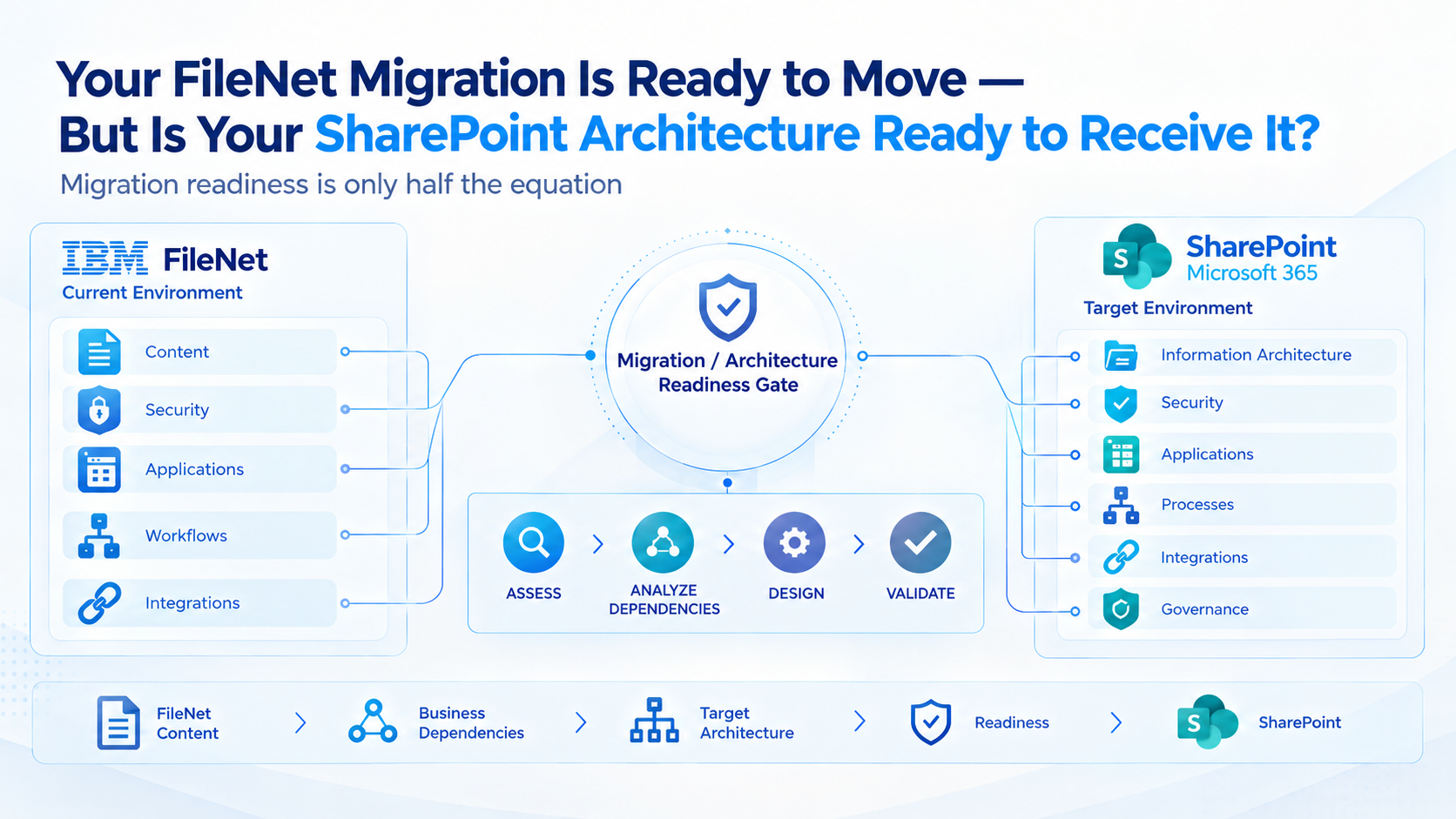
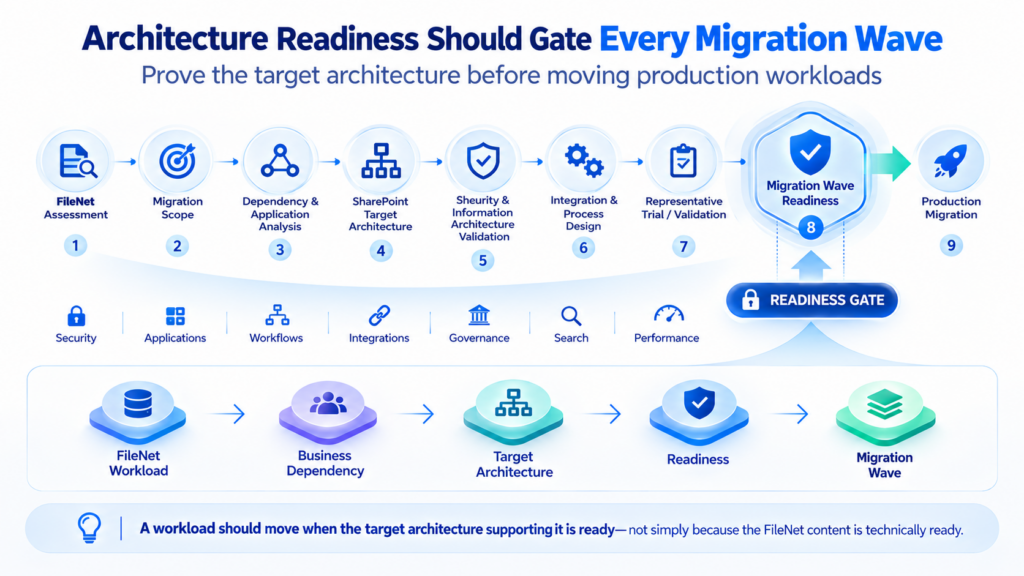
FileNet workload → Business dependencies → Target architecture → Readiness validation → Migration wave
This approach helps prevent the migration schedule from moving ahead of the architectural work required to support the business.
It also gives the organization a clearer basis for determining which workloads can move first, which need further preparation, and which require a different transition strategy.
Validate the Target Architecture Before the First Production Migration
Architecture documentation is important, but a proposed design also needs to be tested against representative workloads.
A controlled trial migration can help determine whether the migration approach and relevant parts of the target architecture behave as expected before the program scales.
The validation should go beyond checking whether documents arrive in SharePoint.
Depending on the workload, testing may need to cover content migration accuracy, file and rendition handling, security and access behavior, information architecture, search and retrieval, application connectivity, workflow behavior, integration functionality, retention requirements, exception handling, and reconciliation between the source and target.
Representative performance testing may also be appropriate for workloads with significant operational demands.
The purpose is to establish whether the proposed approach supports the business outcome—not merely whether the migration tool can transfer content.
A trial migration can reveal gaps that are difficult to identify through repository assessment alone. For example, documents may migrate correctly while application access remains unresolved, or content may arrive in the expected location while the intended access model requires further adjustment.
Identifying these issues before broad production execution gives the organization an opportunity to refine the migration approach, address architectural dependencies, and define acceptance criteria for subsequent waves.
For complex environments, readiness should be treated as a formal decision gate rather than an assumption.
A practical sequence is:
FileNet assessment → Migration scope definition → Dependency and application analysis → SharePoint target architecture → Security and information architecture validation → Integration and process design → Representative trial and validation → Migration wave readiness → Production migration
Each stage should contribute evidence that the next stage can proceed.
SharePoint Architecture Readiness Should Be a Migration Gate
A migration program should not move directly from approved scope to production execution without confirming that the target environment is ready.
Before a workload is cleared for migration, the team should be able to establish that:
- The destination information architecture has been defined for the workload.
- Security and access requirements have been translated and validated.
- FileNet-dependent applications have an agreed transition approach.
- Workflows and business processes have a defined future operating model.
- Required integrations have been assessed and addressed in the target design.
- Retention, governance, search, and operational requirements have been considered.
- A representative validation has demonstrated the relevant aspects of the migration approach.
- Exceptions, reconciliation, and acceptance criteria have been established.
The exact readiness criteria will vary by workload, but the principle remains the same: a workload should move when its target architecture is ready to support it, not simply because its source content has been prepared.
This creates a stronger connection between migration execution and the business outcomes the organization expects from modernization.
The Real Readiness Question: Can SharePoint Support the Business After FileNet?
A FileNet migration should ultimately be judged against the future operating environment.
Did the documents arrive? That is one question.
Can the business access them? Can applications use them? Can workflows continue? Can integrations operate against the new repository? Are security requirements preserved? Can the organization manage and govern the information as the environment grows?
These are the questions that determine whether the transformation has achieved its purpose.
A technically successful content transfer does not, by itself, demonstrate that the target environment is ready. The architecture must also support the applications, processes, users, controls, and integrations that make the content valuable to the business.
For enterprise organizations, this distinction is fundamental.
The objective is not simply to leave IBM FileNet. It is to establish a SharePoint environment that can support the business after the transition, without carrying forward unnecessary legacy complexity or overlooking critical dependencies.
Preparing for Your FileNet-to-SharePoint Migration?
A well-planned migration starts with understanding the existing FileNet environment and continues with validating how that environment will translate into the target architecture.
ECM Addons specializes in IBM FileNet and supports organizations evaluating and planning FileNet-to-SharePoint migrations. The preparation process can begin with an assessment of the existing environment, followed by migration planning and a representative trial to validate the proposed approach.
Start with the right understanding of your FileNet environment.
Once the migration scope and target requirements have been established, explore the FileNet-to-SharePoint Migration Trial to evaluate the proposed migration approach before broader execution.
Because migration readiness is only half the equation. The destination must be ready to receive the content-and support the business that depends on it.
Look for detailed logs, exception categorization, retry controls, progress reports, and clear visibility into pending, failed, and completed work. Also assess the support model for complex deployments, including troubleshooting responsibilities, escalation routes, and assistance during migration and cutover.
What to evaluate: Can the team identify why a document failed? Can corrected items be reprocessed and validated? Are reports available by migration wave? What support is available during pilot testing, production execution, and post-migration stabilization?
These capabilities help teams manage exceptions systematically instead of relying on manual tracking across disconnected reports.