IBM FileNet P8 environments often become deeply embedded in enterprise content operations over time. What begins as a document repository can evolve into a platform supporting business applications, workflows, records, integrations, security models, and large volumes of business-critical information.
When organizations begin planning IBM FileNet modernization, the first question is often, which platform should replace FileNet? That question is important, but it should not be the first decision.
The more important question is whether the organization fully understands what it needs to preserve, change, retire, or redesign before selecting a destination platform.
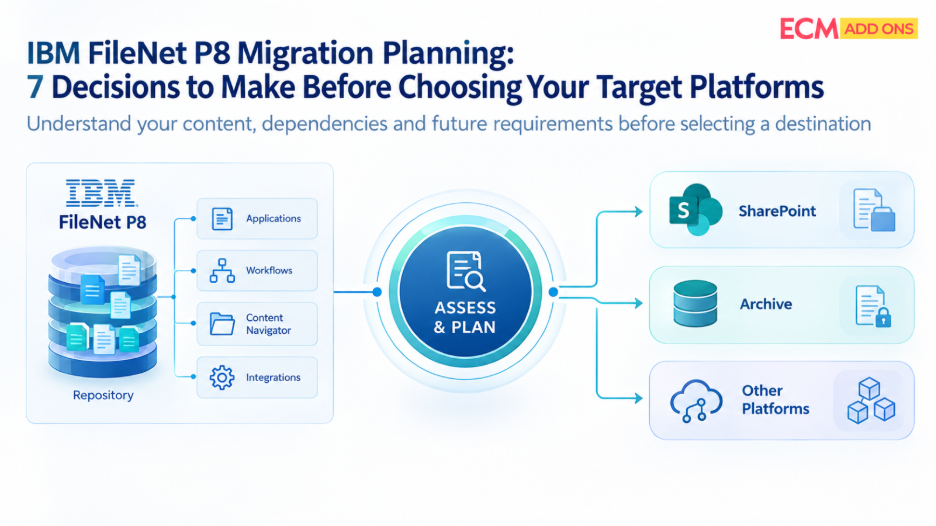
A successful IBM FileNet P8 migration planning process therefore starts with business and technical decisions rather than a product comparison. Microsoft SharePoint online may be the right destination for some workloads, while other content may require a different platform, an archive, or a redesigned application architecture.
For CIOs, ECM architects, IT directors, and migration managers, these seven decisions can establish a more reliable foundation for an IBM FileNet migration strategy.
1. What Does Your FileNet Environment Actually Contain?
Before choosing a target platform, establish what exists inside the current FileNet environment and how that content is being used.
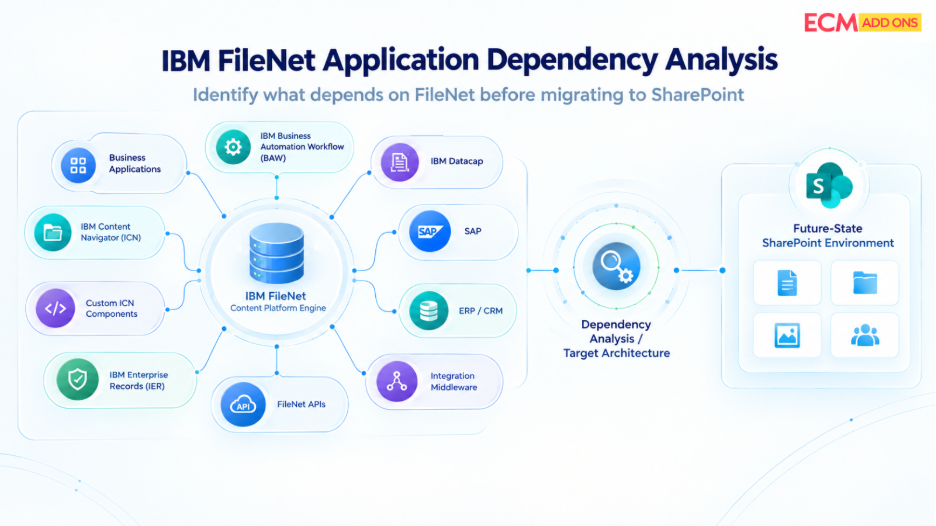
An enterprise FileNet environment may include multiple object stores, document classes, business application structures, folders, versions, renditions, security configurations, retention rules, workflows, and custom components. It may also support applications through IBM Content Navigator, APIs, Business Automation Workflow, Datacap, or integrations with SAP, ERP, CRM, and other enterprise systems.
Document volume alone does not provide enough information for migration planning. Two repositories containing the same number of documents can have very different migration complexity depending on file sizes, metadata, versions, permissions, business dependencies, and application integrations.
A FileNet Migration Assessment should therefore establish a detailed baseline of the current environment.
The assessment should answer questions such as:
- Which object stores and document classes are actively used?
- How much content exists, and how is it distributed?
- Which documents are business-critical?
- Which applications create, retrieve, modify, or route FileNet content?
- Which workflows depend on the repository?
- Which integrations require continued access to the content?
- Which security and retention requirements apply?
- Which content is active, inactive, redundant, or subject to retention?
This discovery creates the evidence required for the decisions that follow. Without it, target-platform selection is based on assumptions rather than the actual enterprise environment.
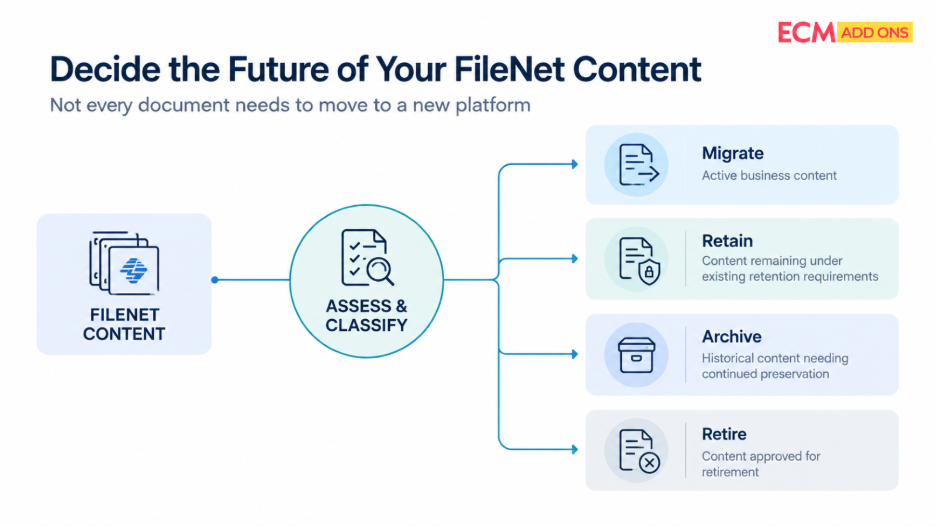
2. Which Content Should Be Migrated, Retained, Archived, or Retired?
Not every document in FileNet necessarily needs to move to a new platform.
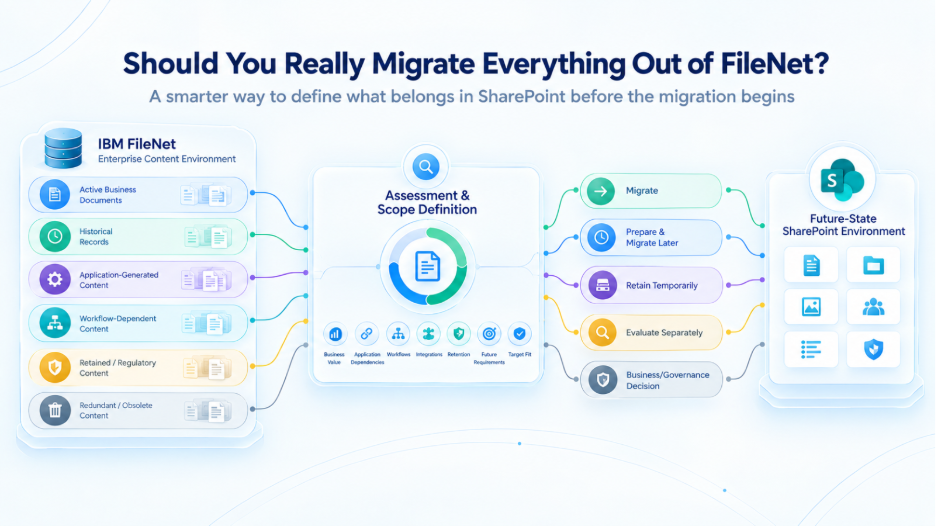
A large repository may contain active business content alongside historical records, obsolete documents, duplicates, content subject to regulatory retention, and information that is rarely accessed. Moving everything without classification can increase migration cost, extend timelines, and introduce unnecessary complexity into the target environment.
Migration planning should therefore establish a disposition strategy before finalizing the target architecture.
Content can broadly fall into several categories: information that must remain actively accessible, information that should be migrated for ongoing business use, records that should remain under retention but do not require active collaboration, and content that can be retired according to approved governance policies.
This decision should involve business owners, records-management teams, compliance stakeholders, and IT rather than being treated as a purely technical exercise.
The objective is not simply to reduce the document count. It is to ensure that every content category has an appropriate destination based on business value, access requirements, governance, and lifecycle.
This decision can significantly influence the economics of Enterprise FileNet Migration. A smaller, better-defined migration scope may require a different target architecture and substantially different migration effort than a strategy based on moving the entire repository
3. Which FileNet Capabilities Must the New Platform Replace?
FileNet P8 provides more than document storage. Over time, organizations may have built business processes and applications around its capabilities.
Before selecting a destination, determine which FileNet functions are actually being used and which of those functions need to continue.
For example, an organization may depend on document versioning, metadata-driven processing, workflows, security controls, records management, custom APIs, Content Navigator interfaces, or application-specific repository interactions.
The target environment should therefore be evaluated against actual business requirements rather than against a generic feature checklist.
For each important FileNet capability, the migration team should determine whether it will be:
Replaced directly: The target platform provides an appropriate equivalent.
Redesigned: The business requirement remains, but the implementation will change.
Rebuilt through integration: The capability will be delivered through another application or service.
Retired: The functionality is no longer required.
This distinction is particularly important when evaluating SharePoint or other modern content platforms. A successful IBM FileNet Modernization program is not necessarily a one-to-one technical recreation of the existing environment.
Modernization should provide an opportunity to simplify unnecessary complexity while preserving the business capabilities that still matter.
4. Should the Enterprise Standardize on One Target Platform or Use Multiple Platforms?
Choosing a single destination for every FileNet workload can appear attractive because it simplifies the migration narrative. However, enterprise content rarely has identical requirements across every business function.
Some content may be well suited to SharePoint because users require collaboration, Microsoft 365 integration, enterprise search, and modern document management. Other content may have specialized regulatory, archival, transactional, or application requirements that call for a different solution.
This creates an important architectural decision: Should FileNet content be consolidated onto one platform, or should workloads be distributed across multiple target environments?
A multi-platform strategy does not necessarily mean creating another fragmented environment. The architecture should establish clear ownership, integration patterns, governance, security standards, and lifecycle rules across the selected platforms.
Conversely, choosing multiple platforms without a clear rationale can simply recreate the complexity that modernization was intended to remove.
The decision should therefore be driven by workload characteristics rather than platform preference.
For CIOs and enterprise architects, the target-state architecture should answer not only where documents will reside, but also how users, applications, security, governance, search, and integrations will operate across the future content landscape.
5. How Will FileNet Data and Business Context Map to the Target?
Moving a document from one repository to another is technically straightforward compared with preserving the information surrounding that document.
FileNet content can include metadata, versions, security information, relationships, folders, lifecycle information, and application references. These elements may not have direct equivalents in the target platform.
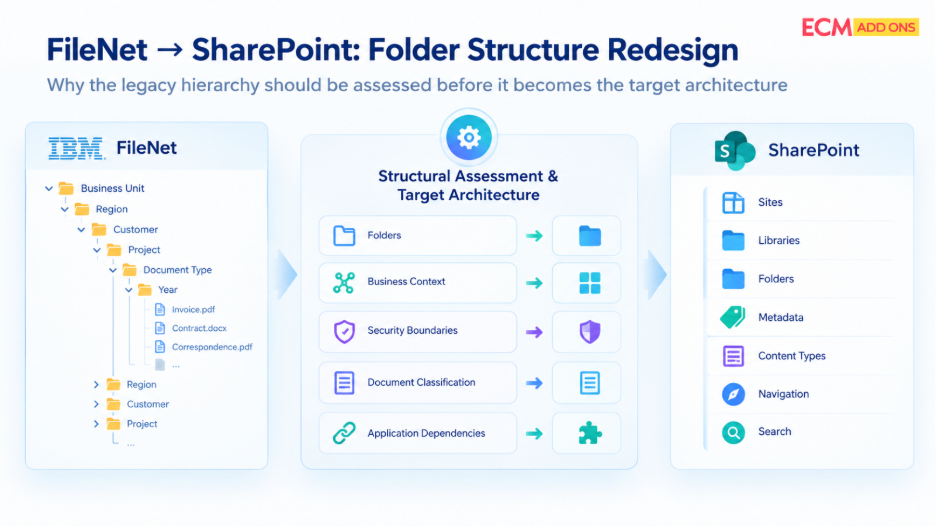
The migration strategy must therefore define how source structures will map to the target architecture.
This includes determining how document classes map to content types or other target structures, how properties are transformed, how permissions are represented, and how application references are updated. Where a direct mapping is not possible, the organization needs an approved transformation or alternative design.
This is also where legacy structures should be challenged.
A FileNet taxonomy created years ago may reflect historical organizational structures or application requirements that no longer exist. Replicating it exactly in the target environment could transfer unnecessary complexity into a modern platform.
The mapping exercise should therefore distinguish between information that must be preserved and structures that can be redesigned.
For large environments, automated analysis and mapping can make this process more consistent and provide a clearer view of exceptions requiring architectural or business decisions.
6. What Will Happen to Applications and Integrations That Depend on FileNet?
One of the most frequently underestimated aspects of an IBM FileNet migration strategy is application dependency.
Business applications may retrieve documents from FileNet without users interacting directly with the repository. A document might be generated in SAP, accessed through an ERP process, retrieved by a customer-facing application, or used by a workflow without the business user realizing that FileNet sits behind the process.
If the content moves but the application dependency remains unchanged, the migration is incomplete.
An application-dependency assessment should identify:
- Applications accessing FileNet content
- APIs and integration services
- Workflow dependencies
- Custom applications
- Scheduled jobs and background processes
- Authentication and authorization dependencies
- Repository-specific URLs or identifiers
Each dependency should receive a target-state decision.
Some applications may be redirected to the new repository. Others may require API changes, integration redesign, or application modernization. In certain cases, the application itself may need to be replaced or retired.
This analysis should happen before migration waves are finalized because application dependencies can determine the sequence in which content can safely move.
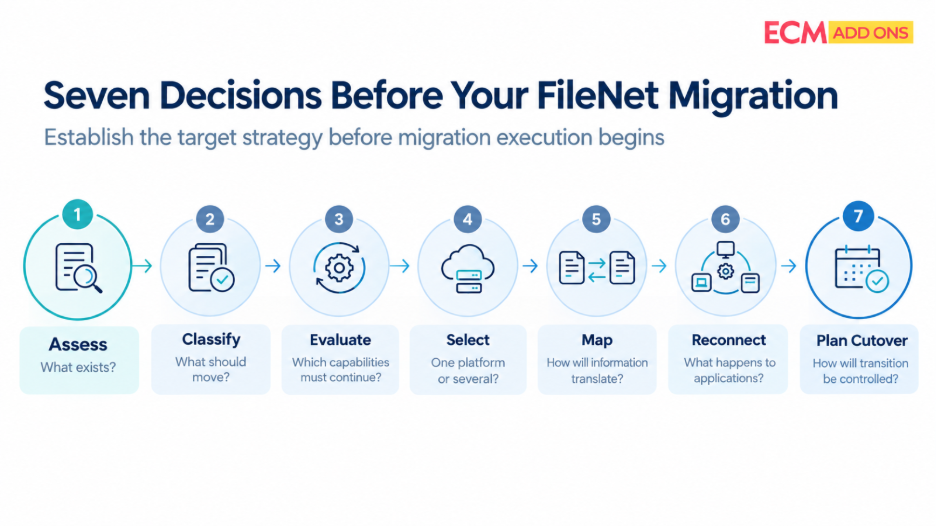
7. What Does a Controlled Migration and Cutover Actually Require?
Once the target architecture and migration scope are established, the final decision is how the transition will be executed without creating unacceptable business risk.
A large FileNet P8 migration should rarely be treated as a single transfer followed by an immediate shutdown of the source environment.
A phased approach allows the organization to validate the migration process against representative workloads before expanding to more complex content.
Migration waves can be organized around business functions, applications, content complexity, or dependencies. Each wave should have defined entry criteria, validation requirements, exception handling, and business ownership.
For environments where content continues to change during migration, the strategy should also account for incremental or delta synchronization. Documents created or modified after the initial transfer need to be identified and processed before the relevant business function is cut over.
Cutover readiness should be based on evidence rather than document-transfer completion.
Before transitioning a workload, the organization should confirm that migrated content has been reconciled, security has been validated, dependent applications have been tested, outstanding exceptions are understood, and business owners have approved the transition.
The FileNet environment should remain available for workloads that have not yet transitioned. Retirement should follow successful validation and dependency closure rather than simply reaching a migration milestone.
What Should CIOs Measure During FileNet Migration Planning?
Migration programs involving large enterprise repositories require measurable governance. Document count alone does not provide sufficient visibility into readiness or risk.
KPI | What It Shows | Executive Value |
Content inventory accuracy | Confidence in the identified FileNet scope | Establishes a reliable migration baseline |
Migration scope | Content approved for migration, retention, archive, or retirement | Shows whether the program is moving the right information |
Migration throughput | Documents and data volume processed over time | Supports realistic schedule forecasting |
Validation pass rate | Content successfully meeting migration criteria | Indicates migration quality |
Exception backlog | Unresolved technical and business exceptions | Highlights outstanding migration risk |
Application readiness | Critical integrations tested and approved | Shows whether business processes can operate on the target |
Security validation | Access and permission testing results | Reduces risk of inappropriate content access |
Delta backlog | Changes remaining between source and target | Indicates readiness for cutover |
Cutover readiness | Completion of technical and business acceptance criteria | Supports go/no-go decisions |
These KPIs should be established during the planning phase rather than introduced after migration execution begins. They give migration managers and executive stakeholders a common framework for evaluating progress and deciding whether a workload is ready to transition.
Why a FileNet Migration Assessment Should Come Before Choosing a Target Platform
The most important decision in IBM FileNet P8 Migration Planning is not immediately choosing SharePoint, another ECM platform, or an archival solution.
It is establishing what the organization actually needs from its future content environment.
A robust FileNet Migration Assessment identifies the content, applications, dependencies, governance requirements, and business capabilities that exist today. From there, the organization can determine what should be migrated, redesigned, archived, or retired and which target platform is appropriate for each workload.
This approach changes migration from a repository replacement project into a structured modernization program.
For organizations evaluating FileNet P8 Migration Services, the right partner should be able to go beyond document transfer and address discovery, dependency analysis, target-state architecture, migration planning, automation, validation, synchronization, and controlled cutover.
Before cutover, confirm that the agreed content scope has been migrated, outstanding changes have been synchronized, validation results meet acceptance criteria, and critical integrations have passed testing.
The cutover plan must define how updates are handled during the transition. Depending on the architecture, this may involve a controlled change freeze, temporary write restrictions, final delta synchronization, or another mechanism that prevents conflicting changes between platforms.
The team should then switch approved user and application access paths, verify critical business transactions, and monitor the environment for issues.
Recovery procedures should be agreed upon in advance. They must define the conditions that trigger a rollback, which system remains authoritative, and how changes made after cutover will be reconciled if the previous operating model needs to be restored.
A phased cutover limits the scope of each transition and helps isolate problems before additional business functions move to SharePoint.
Planning Your FileNet P8 Migration?
ECM Addons works with enterprise FileNet environments to assess migration complexity, identify dependencies, and develop structured approaches for modernizing and migrating business-critical content.
If your organization is considering IBM FileNet modernization or evaluating SharePoint as a target platform, start with an assessment of your existing environment before committing to a migration architecture.
Explore ECM Addons’ FileNet migration capabilities to understand how a structured assessment and migration approach can support your modernization program.