A FileNet-to-SharePoint migration can become unnecessarily complex when the starting assumption is that everything in FileNet needs to move. In a large enterprise environment, that assumption deserves to be challenged.
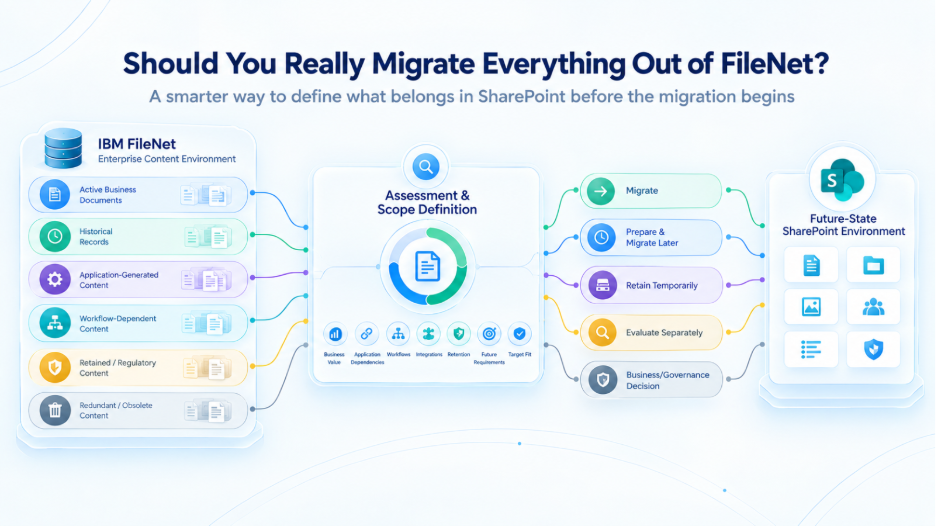
FileNet repositories often contain a mixture of active business content, historical records, application-generated documents, workflow-related content, regulated information, duplicate or obsolete material, and documents that are no longer connected to an active business process. Some content may also be closely tied to applications or integrations that need to be redesigned before it can move.
Before deciding how to migrate, organizations therefore need to answer a more fundamental question: What content, capabilities, and business dependencies actually belong in the future-state SharePoint environment?
That distinction is important. A FileNet repository tells you what exists. It does not automatically tell you what should move.
Your FileNet Repository Is Not Your Migration Scope
A typical FileNet inventory can provide useful information such as document volumes, Object Stores, document classes, content types, repository sizes, creation and modification dates, users, and access structures. This establishes an important baseline for understanding the environment.
However, enterprise migration planning requires a deeper level of analysis. Organizations need to understand why the content exists, who uses it, which business processes depend on it, which applications create or consume it, whether it still has business value, whether retention or regulatory requirements apply, and how the content will be used after it reaches SharePoint.
Without this analysis, document volume can easily become a substitute for migration strategy.
The real objective is to understand the business role of the content, not simply its size or age.
Which FileNet Content Actually Belongs in SharePoint?
Age and last-accessed date can be useful analytical dimensions, but they should not be used as the sole basis for migration decisions.
A document that has not been accessed recently may still be important because it is subject to retention requirements, serves as historical evidence, supports an ongoing customer or legal relationship, is required for audit or regulatory purposes, is referenced by an application, or remains part of an important business record.
The opposite can also be true. Recently created content may not belong in the future-state environment if the application or business process associated with it is being retired or redesigned.
The better question is:
What role does this content play today, and what role should it play after migration?
This changes migration scope from a simple age or volume exercise into a business-led assessment.
Different Types of FileNet Content Require Different Decisions
A large FileNet environment rarely represents one uniform category of information. Different content types can have very different business and technical requirements.
Active operational content is actively used by business teams or applications and generally requires careful planning because users, workflows, applications, and integrations may depend on continued access.
Historical content may no longer support daily operations but can still need to remain accessible because of business, legal, regulatory, or operational requirements.
Application-dependent content requires analysis of the application alongside the documents. Moving the content without understanding how the application accesses it can create problems after migration.
Workflow-dependent content participates in review, approval, case management, processing, or other business processes. The future-state workflow needs to be understood before the associated content is assigned to a migration wave.
Retained or regulated content must be handled according to applicable retention, compliance, legal, and governance requirements rather than migration convenience.
Redundant or obsolete content may no longer support an active business requirement, but its disposition should still be determined through appropriate business and governance decisions rather than simply assuming that old content can be discarded.
The key is that these categories do not necessarily require the same migration treatment.
What Happens to FileNet Content Used by Business Applications?
This is one of the most important considerations in enterprise migration planning.
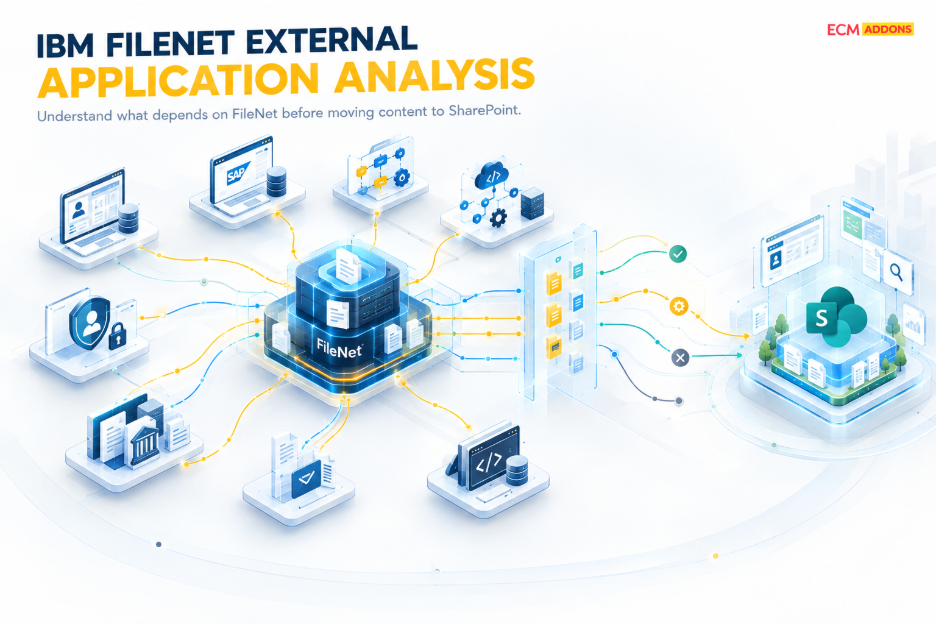
A FileNet repository may contain documents that are actively used by a business application. Those documents may be technically transferable, but the migration team still needs to understand how the application currently accesses the content and whether that application will continue to exist in the future state.
Questions should include:
- How does the application currently access the FileNet content?
- Will the application continue to exist after migration?
- Will it need to access SharePoint?
- Are application changes required?
- Are APIs or integrations involved?
- Does the related business process need to change?
If an application dependency is overlooked, the content can be successfully migrated while the business process remains dependent on the old FileNet environment.
For this reason, migration scope should be considered at the level of:
Content + Application + Business Process + Integration
rather than content alone.
How Should FileNet Workflows Be Handled?
Documents often form part of an active business workflow rather than simply sitting in a repository.
A process may involve document creation, review, approval, processing, and retention. If that process currently relies on FileNet capabilities, moving the underlying documents does not automatically move the business process.
Before assigning workflow-dependent content to a migration wave, organizations need to determine whether the workflow should be:
- Recreated in the target environment
- Redesigned around a different business process
- Replaced with another capability
- Integrated with SharePoint or another target component
- Addressed through a different future-state architecture
The workflow decision and the content migration decision therefore need to be connected.
What If a FileNet Capability Has No Direct SharePoint Equivalent?
Enterprise FileNet environments may contain customized components, workflows, integrations, and application dependencies that do not map directly to SharePoint.
In these situations, the goal should not be to reproduce every historical implementation detail.
Instead, the organization should first identify what business capability the existing component provides and then determine how that capability should be delivered in the future-state architecture.
Depending on the requirement, the answer could involve a direct target capability, redesign, reimplementation, a replacement integration, another architectural component, or a decision that the capability is no longer required.
This distinction is particularly important for organizations with highly customized FileNet environments. The objective of modernization should be to preserve the business capabilities that are still required—not necessarily every technical implementation detail accumulated over the years.
How Should FileNet-to-SharePoint Migration Scope Be Defined?
A consistent assessment framework can help organizations make migration decisions across different content categories.
Assessment Dimension | Question to Answer |
Business value | Is the content still required by the business? |
Usage | Who uses it and how frequently? |
Business process | Which process depends on it? |
Application dependency | Which applications create or consume it? |
Integration dependency | Which systems exchange information with it? |
Retention | Does it have defined retention or governance requirements? |
Future requirement | Will the business still need it after migration? |
Target fit | Does SharePoint provide an appropriate future-state location or capability? |
Complexity | What additional changes are required to migrate it? |
Disposition | Should it migrate, remain temporarily, be handled through another approach, or receive a separate business decision? |
This framework does not automatically determine whether content should migrate. Instead, it provides a consistent basis for making those decisions and documenting why each major category has been assigned a particular treatment.
How Should Migration Content Be Grouped Into Waves?
Once content, applications, workflows, and dependencies have been assessed, those findings should influence the migration sequence.
Some content may be relatively independent and suitable for an early migration wave. Other workloads may depend on applications or workflows that require redesign before migration. Business-critical content may require additional validation and a more controlled transition.
Migration sequencing can therefore consider factors such as:
- Business criticality
- Dependency complexity
- Application readiness
- Target architecture readiness
- Integration readiness
- Business owner readiness
- Validation requirements
This creates a migration plan based on the characteristics and readiness of each workload rather than simply the size of the repository.
What Happens to Content That Is Not Ready for Migration?
Not every migration decision needs to be reduced to “migrate now” or “do nothing.”
Different categories of FileNet content may require different treatment depending on their business and technical circumstances.
Migrate: Content with a clear future-state requirement and an established target approach.
Prepare and migrate later: Content that requires application, workflow, integration, or business preparation before it can move.
Retain temporarily: Content that needs continued source access while its future-state treatment is being implemented or validated.
Evaluate separately: Content with unusual dependencies, governance requirements, or architectural considerations.
Business or governance decision: Content whose future treatment depends on legal, regulatory, retention, or business disposition decisions.
The important principle is that every significant category should have an identified treatment and an accountable owner.
Some content may be relatively independent and suitable for an early migration wave. Other workloads may depend on applications or workflows that require redesign before migration. Business-critical content may require additional validation and a more controlled transition.
Migration sequencing can therefore consider factors such as:
- Business criticality
- Dependency complexity
- Application readiness
- Target architecture readiness
- Integration readiness
- Business owner readiness
- Validation requirements
This creates a migration plan based on the characteristics and readiness of each workload rather than simply the size of the repository.
How Do You Avoid Recreating FileNet Complexity in SharePoint?
A migration can technically succeed while failing to improve the future-state environment.
If an organization transfers every historical structure, unnecessary content category, and obsolete dependency into SharePoint, it may simply reproduce the complexity that modernization was intended to address.
SharePoint should therefore be designed around the future-state business and information architecture, rather than treated as a replacement storage location for FileNet.
That requires decisions around information architecture, access and security, business processes, workflows, applications, integrations, governance, retention, user access, and future operating requirements.
The migration then becomes an opportunity to establish a more intentional content environment instead of simply creating a new location for the old one.
What Should Move From FileNet to SharePoint?
Before approving a migration scope, organizations should be able to answer several fundamental questions:
- What content has a defined business requirement in the future state?
- What applications and business processes depend on it?
- What workflows and integrations must continue?
- Which FileNet capabilities need to be mapped, redesigned, or replaced?
- What content has retention or governance requirements?
- What should move in the first migration wave?
- What requires additional preparation?
- What requires a separate business or architectural decision?
Most importantly, for every major category of content, the organization should be able to explain why it belongs in the future-state environment.
If that answer is unclear, the migration scope may not be mature enough to proceed.
FileNet-to-SharePoint Migration Starts With Scope, Not the Migration Tool
Migration technology can automate and streamline content movement, but it cannot determine what the business should retain, which applications need the content, which workflows must change, or what the future-state architecture should look like.
Those decisions come from assessment and planning.
A structured migration approach can therefore follow this sequence:
Assess the environment → Understand dependencies → Define business requirements → Rationalize migration scope → Identify capability gaps → Design the target architecture → Plan migration waves → Execute and validate
This helps ensure that SharePoint receives the content the organization actually intends to use in its future-state environment—not simply everything that happened to exist in FileNet.
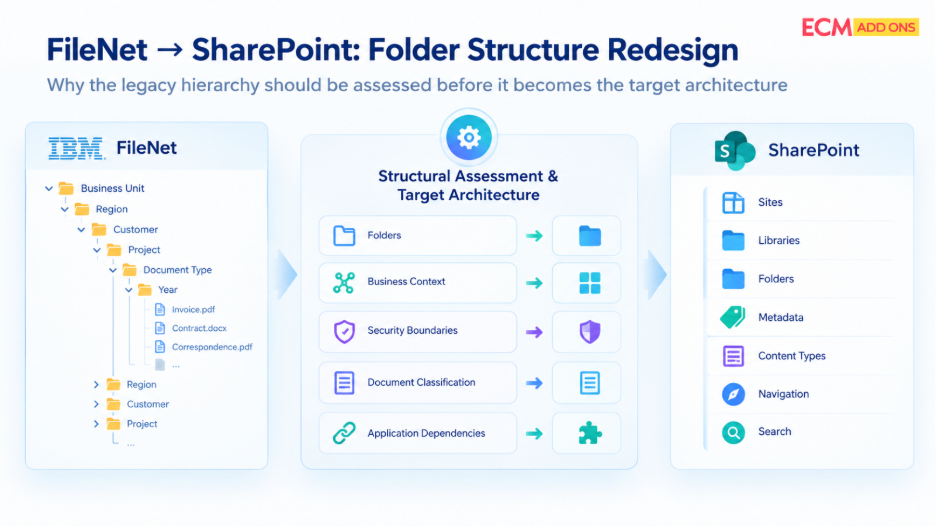
This is particularly important when the existing FileNet hierarchy follows an old organizational chart.
Organizations change. Departments merge. Business units are renamed. New regions are created. Applications are replaced. Responsibilities move between teams.
If the SharePoint structure is built entirely around the historical FileNet hierarchy, the target environment can become difficult to maintain as soon as the business changes again.
Instead, the redesign should identify the business concepts that are expected to remain meaningful over time.
For some organizations, those concepts may be business functions. For others, they may be projects, products, customers, regulatory domains, or operational processes.
Microsoft’s SharePoint guidance similarly recommends organizing information around what users need to accomplish rather than simply reproducing the organizational chart.
For a FileNet migration, that means the legacy hierarchy should be treated as source evidence, not automatically as the target blueprint.
Before Moving FileNet to SharePoint, Define What Belongs in the Future State
The most important FileNet migration decision may not be how quickly content can be moved.
It may be deciding what deserves to move in the first place.
A well-defined migration scope gives the organization a clearer understanding of what is moving, why it is moving, what depends on it, what needs to change around it, and how those requirements will be supported after migration.
That is where FileNet migration planning moves beyond repository transfer and becomes a future-state business and architecture decision.
Planning a FileNet-to-SharePoint Migration?
Before defining migration waves, it helps to understand the content, dependencies, and scope of the existing FileNet environment.
Explore the Free FileNet Analyzer Tool to assess your FileNet environment and establish a clearer starting point for migration planning.
Once the scope and migration approach are defined, a representative trial migration can help validate how selected content and structures behave in the target environment before broader execution.