When an organization moves from IBM FileNet to Microsoft SharePoint, the folder hierarchy is often one of the easiest parts of the legacy environment to see-and one of the easiest parts to migrate incorrectly.
A FileNet repository may contain years of accumulated folder structures built around departments, customers, projects, document categories, regions, applications, or business processes. Some of those structures may still be essential. Others may simply reflect how the organization worked when the repository was first implemented.
This makes the FileNet to SharePoint folder structure more than a migration mapping exercise. It is a target-architecture decision.
The goal is not to make every FileNet folder appear somewhere in SharePoint. The goal is to determine which elements of the existing hierarchy still provide business value and design a target structure that makes content easier to find, manage, secure, govern, and use after migration.
Microsoft’s current SharePoint guidance treats information architecture as a combination of site structure, navigation, metadata, search, taxonomy, and security rather than simply a folder hierarchy. It also recommends a flatter modern architecture and cautions against deeply nested folder structures because they can make content harder to discover.
Why FileNet Folder Structure Becomes a Migration Decision
A legacy FileNet hierarchy often tells a story about the organization, but it does not necessarily represent the organization’s future information architecture.
For example, a repository may have been structured around an organizational model in which documents were stored under:
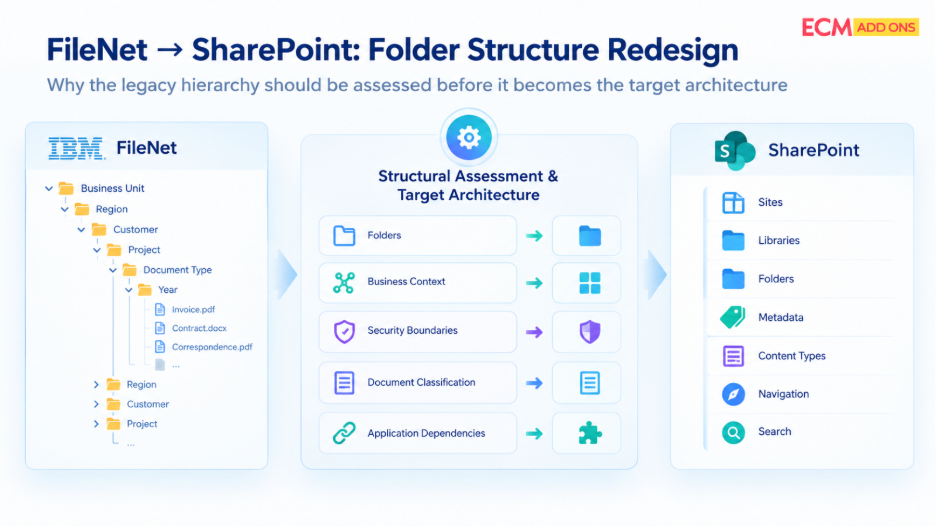
Business Unit → Region → Customer → Project → Document Type → Year
That arrangement may have worked when users primarily navigated through folders to find documents. After moving to SharePoint, however, users may need to find the same content through a combination of sites, libraries, metadata, views, navigation, and search.
The migration therefore creates a decision point.
Should the hierarchy be retained?
Should some levels be removed?
Should certain folder levels become metadata?
Should content be separated into different SharePoint libraries or sites?
Should some legacy structures be consolidated?
These questions should be answered before migration execution begins.
A direct folder copy may preserve the appearance of the old environment while transferring its complexity into the new one. A thoughtful FileNet folder structure redesign, on the other hand, uses the migration as an opportunity to decide what the target environment actually needs.
Start With a Structural Assessment of FileNet
Folder redesign should begin with the source environment, not with a blank SharePoint site.
The first objective is to understand what exists in FileNet and how the hierarchy is being used. That means looking beyond folder names and examining the relationships between folders, documents, document classes, metadata, security, applications, workflows, and business processes.
A folder containing thousands of documents may look important simply because of its volume. Another folder containing fewer documents may be more important because it supports a critical business process or application.
The assessment should therefore establish the role of each significant structural level.
For example, a folder may represent:
- a genuine business boundary;
- a security boundary;
- a project or case;
- a document classification;
- a temporary working arrangement;
- an application-driven structure; or
- a historical convention that is no longer relevant.
These distinctions determine what should happen to that structure in SharePoint.
Microsoft similarly recommends understanding both users and existing content before designing SharePoint information architecture, including how content is distributed across current folders and which information people actually use.
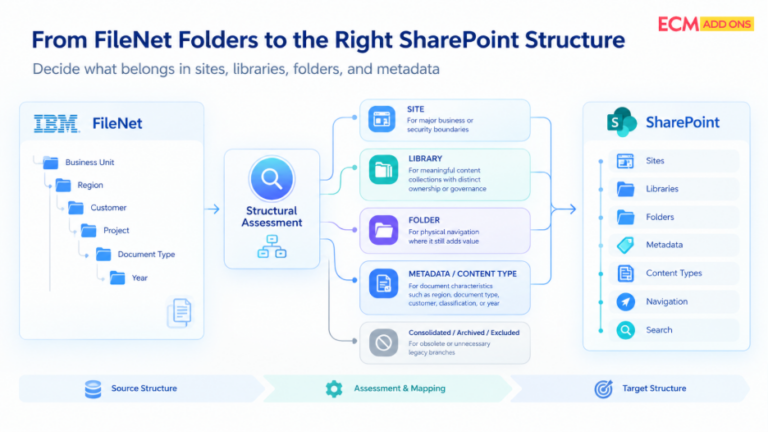
Then Ask: What Is the Business Actually Trying to Achieve?
The central decision in FileNet to SharePoint migration folder structure is whether each existing folder represents something that users genuinely need in the target environment.
A folder is often useful when its location provides meaningful context. A project folder, for example, may represent a natural working boundary for a collection of related documents.
The situation is different when multiple folder levels exist only to represent attributes of the document.
Consider a FileNet hierarchy such as:
Policies → Human Resources → India → Employee Policies → 2026
If the important characteristics of the documents are actually department, region, document type, and effective year, reproducing all four levels as folders may not be the best target design.
SharePoint can represent these characteristics through metadata and content types, allowing users to filter, sort, search, and organize content without depending entirely on physical folder location. Microsoft identifies columns and content types as key metadata mechanisms for organizing and finding content.
The decision is therefore not “folders versus no folders.”
It is:
Which information belongs in the physical structure, and which information should travel with the document as classification?
That is the more useful question for migration planning.
Beyond FileNet: Defining the Future Content Ecosystem
A good target structure should make sense from the perspective of the people who will use it after migration.
This is particularly important when the existing FileNet hierarchy follows an old organizational chart.
Organizations change. Departments merge. Business units are renamed. New regions are created. Applications are replaced. Responsibilities move between teams.
If the SharePoint structure is built entirely around the historical FileNet hierarchy, the target environment can become difficult to maintain as soon as the business changes again.
Instead, the redesign should identify the business concepts that are expected to remain meaningful over time.
For some organizations, those concepts may be business functions. For others, they may be projects, products, customers, regulatory domains, or operational processes.
Microsoft’s SharePoint guidance similarly recommends organizing information around what users need to accomplish rather than simply reproducing the organizational chart.
For a FileNet migration, that means the legacy hierarchy should be treated as source evidence, not automatically as the target blueprint.
Separate Navigation From Classification
One of the most useful distinctions in a FileNet to SharePoint folder structure redesign is the difference between navigation and classification.
Folders primarily provide a physical location and a way to navigate.
Metadata provides information about what a document is.
Those two mechanisms can work together.
Imagine a contract currently stored under:
Customers → North America → ABC → Legal → Contracts
The business may actually need to know:
Customer: ABC
Region: North America
Business Area: Legal
Document Type: Contract
If those attributes are available as metadata, users do not necessarily need to navigate through five folder levels to reach the document.
The target SharePoint design might therefore retain a meaningful library or folder boundary while using metadata for the characteristics that users need to filter and search.
This approach also gives the target architecture more flexibility as content grows.
Microsoft notes that folders remain useful in SharePoint but describes them as a physical construct with limited flexibility, recommending that deeply nested folder structures be avoided where possible.
Determine Which FileNet Structures Should Become Sites, Libraries, Folders, or Metadata
A FileNet to SharePoint migration folder structure should not be designed in isolation from the rest of the SharePoint architecture.
Some FileNet structures may be better represented at the site level.
Others may belong in separate document libraries.
Some may remain as folders.
Others may become metadata.
This is where the redesign moves from folder cleanup into actual target architecture.
For example, if two FileNet areas have completely different users, ownership, governance requirements, and security boundaries, placing everything into one SharePoint library with a large folder tree may not be appropriate.
Conversely, if several FileNet branches differ only because of document attributes, creating separate SharePoint sites or libraries for each branch could create unnecessary administration.
The target should therefore be designed using the appropriate SharePoint building blocks rather than forcing every source structure into the same type of destination.
Microsoft’s modern SharePoint architecture supports separate sites for discrete topics, tasks, or units of work and uses hubs and navigation to connect related sites rather than relying on deeply nested site structures.
Security Can Change the Target Structure
Folder redesign cannot be performed independently of access requirements.
A FileNet folder may have a security relationship that users depend on, or the location of content may correspond to a particular access boundary.
If that folder is consolidated into another location during migration, the access model must be reconsidered.
For example, two FileNet folders may look structurally similar but have completely different audiences. Simply merging them because their document types are the same could create an inappropriate SharePoint permission model.
The migration assessment should therefore determine whether a structural boundary is also a security boundary.
If it is, the target architecture may require separate SharePoint sites, libraries, groups, or other access controls rather than simply another metadata column.
Microsoft’s SharePoint information architecture guidance includes security alongside site structure, taxonomy, and navigation as part of the architecture that needs to be planned.
Application Dependencies Can Make a Folder More Important Than It Looks
A folder should not be redesigned based only on what users see.
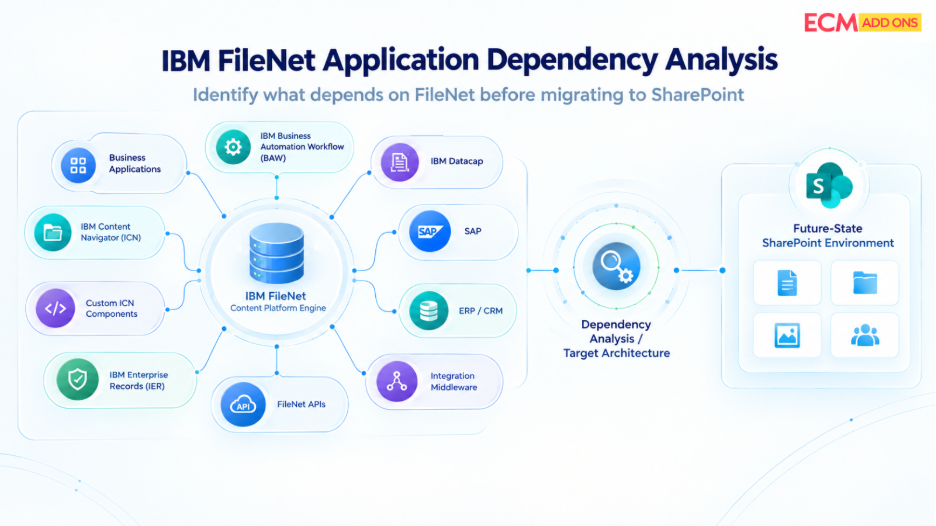
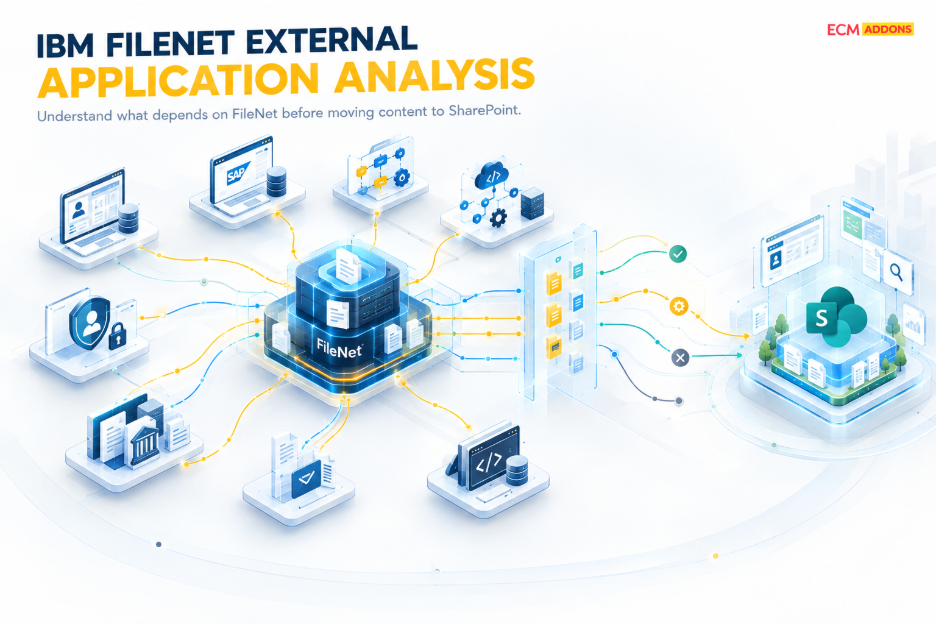
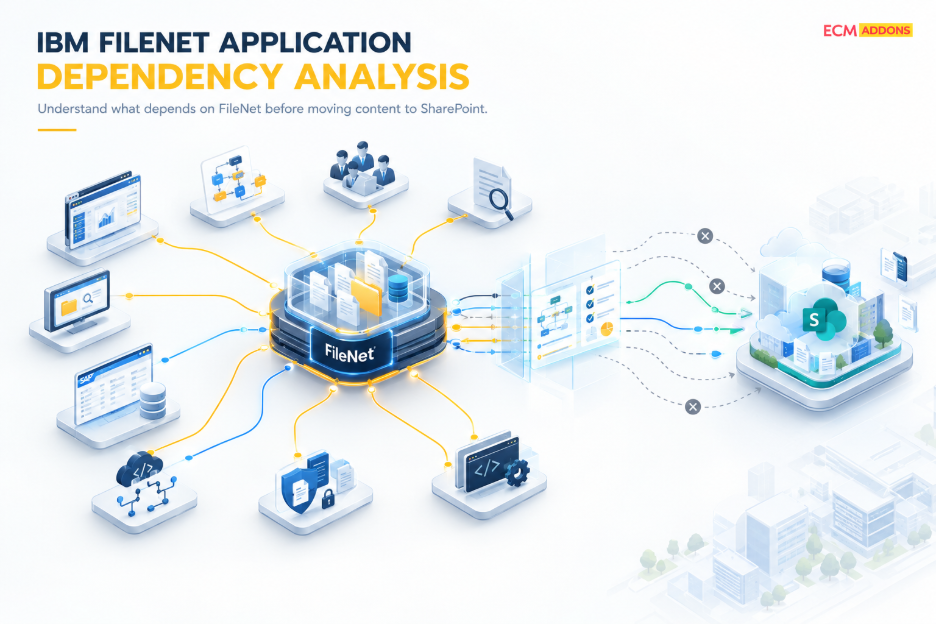
Enterprise FileNet environments may have applications, workflows, integrations, or custom components that interact with content based on its location, metadata, class, or other repository characteristics.
This is particularly relevant when the FileNet environment supports business applications rather than functioning only as a document repository.
A folder that appears obsolete from a user perspective may still be referenced by an application or business process.
That is why FileNet to SharePoint migration planning should connect folder analysis with application and dependency assessment.
Before consolidating or eliminating a structure, the migration team should establish whether any business application, workflow, integration, or downstream process relies on it.
This prevents a visually cleaner SharePoint design from introducing an operational dependency problem.
Build a Source-to-Target Mapping Model
Once the source structure has been assessed, the migration needs a clear mapping model.
This is where the FileNet to SharePoint migration folder structure becomes something that can actually be implemented.
A mapping should explain how the important elements of the FileNet hierarchy will appear in the target environment.
For example:
FileNet source concept | SharePoint target decision |
Business unit | Site, hub, library, or metadata depending on business scope |
Project | Site, library, folder, or metadata depending on lifecycle and ownership |
Document category | Metadata or content type |
Region | Metadata or navigation structure |
Customer | Metadata, folder, library, or site depending on business context |
Security boundary | SharePoint site, library, or appropriate permission model |
Legacy/obsolete branch | Consolidate, archive, or exclude according to migration scope |
The purpose of this model is not to create a universal mapping template. Different FileNet environments require different target designs.
The purpose is to make every major transformation explainable.
If content moves from one FileNet location to a different SharePoint location, the migration team should be able to explain why.
That traceability becomes especially valuable during testing, reconciliation, user acceptance, and post-migration support.
Design the Structure for Migration Waves, Not Just the Final State
Large FileNet environments are rarely migrated as one enormous operation.
Content may be divided by business unit, repository, application, region, document category, or business priority.
That makes the folder redesign relevant to migration-wave planning.
The target structure needs to be sufficiently defined before a wave begins so that source content can be mapped consistently.
At the same time, the architecture should not be so tightly tied to one migration wave that later waves require a completely different design.
A reusable target model can allow multiple FileNet structures to converge into a consistent SharePoint architecture.
For example, several legacy FileNet branches may use different folder names for the same business concept. The target design can standardize that concept rather than preserving every historical naming variation.
This is one of the practical benefits of treating FileNet to SharePoint migration planning as an architecture exercise rather than a file-transfer exercise.
Validate the Mapping Before Production Migration
Folder redesign should be validated before large-scale migration begins.
A pilot or controlled migration can be used to verify whether the proposed mapping works with real source content.
Validation should look beyond document counts.
The team should confirm that content reaches the intended SharePoint location, metadata is populated correctly, permissions remain appropriate, and the resulting structure is usable.
The source-to-target relationship should also remain traceable so that exceptions can be investigated.
This is particularly important when a single FileNet folder is intentionally transformed into a combination of SharePoint libraries, metadata, or sites.
The migration may be technically successful even though the target structure is not what the business expected. Structural validation helps identify that problem before the migration becomes difficult to reverse.
Microsoft’s migration planning guidance also emphasizes reviewing the content being migrated and planning the migration according to the organization’s specific environment and requirements.
A Better Way to Approach FileNet to SharePoint Folder Structure Redesign
The strongest approach is not to begin with a question such as, “How many FileNet folders can we eliminate?”
It begins with the source environment.
First, understand how the FileNet hierarchy is constructed and what business purpose each major level serves. Then identify the structures that carry business, security, application, or operational meaning. From there, determine which concepts belong in SharePoint sites, libraries, folders, metadata, content types, navigation, or search.
The resulting target model should then be tested with representative content and user scenarios before being applied at scale.
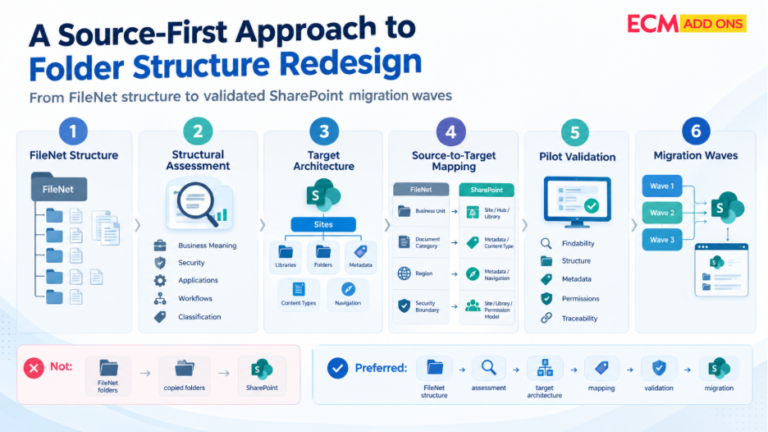
This creates a controlled path from:
FileNet structure → structural assessment → target architecture → source-to-target mapping → pilot validation → migration waves
rather than:
FileNet folders → copied folders → SharePoint
That distinction is at the heart of effective folder redesign.
How ECM Addons Supports FileNet to SharePoint Folder Redesign
ECM Addons approaches FileNet to SharePoint folder structure as part of the wider migration assessment rather than treating it as an isolated folder-copy exercise.
The FileNet environment can be assessed in the context of its content structure, metadata, security, applications, workflows, integrations, and business dependencies. Based on that assessment, source structures can be mapped to an appropriate SharePoint target rather than automatically reproduced.
The migration design can define which folder levels remain, which classifications should become metadata, how content maps to SharePoint libraries or sites, and how the resulting structure should be validated.
This source-first approach helps organizations use the migration to improve their information architecture instead of simply transferring legacy structure into a new platform.
Frequently Asked Questions
What is FileNet to SharePoint folder structure redesign?
It is the process of evaluating an existing IBM FileNet hierarchy and determining how its business structure should be represented in SharePoint.
The result may retain some folders, transform others into metadata, consolidate legacy structures, or move different content groups into separate SharePoint sites or libraries.
What should be considered when redesigning a FileNet folder structure?
The assessment should consider how users find content, why the current hierarchy exists, document classification, security boundaries, applications and workflows, integrations, governance requirements, migration scope, and future growth.
How does security affect FileNet to SharePoint folder structure?
If a FileNet folder represents an access boundary, removing or consolidating it may affect how users should be granted access. Security therefore needs to be assessed alongside the folder redesign rather than after it.
How does folder redesign affect FileNet to SharePoint migration planning?
The target structure influences source-to-target mapping, migration rules, metadata, permissions, validation, migration waves, and user acceptance. Defining it early reduces the risk of discovering structural problems after content has already been migrated.
Should FileNet folder paths be preserved after migration?
Not necessarily. Some paths may remain useful for traceability or user familiarity, while others may be transformed. The important requirement is to maintain a clear relationship between the source location and its target representation.
How deep should a SharePoint folder hierarchy be?
There is no single structure that works for every organization. However, Microsoft advises avoiding folder structures with more than one or two levels of nesting where possible because deeper nesting can create a discoverability burden.