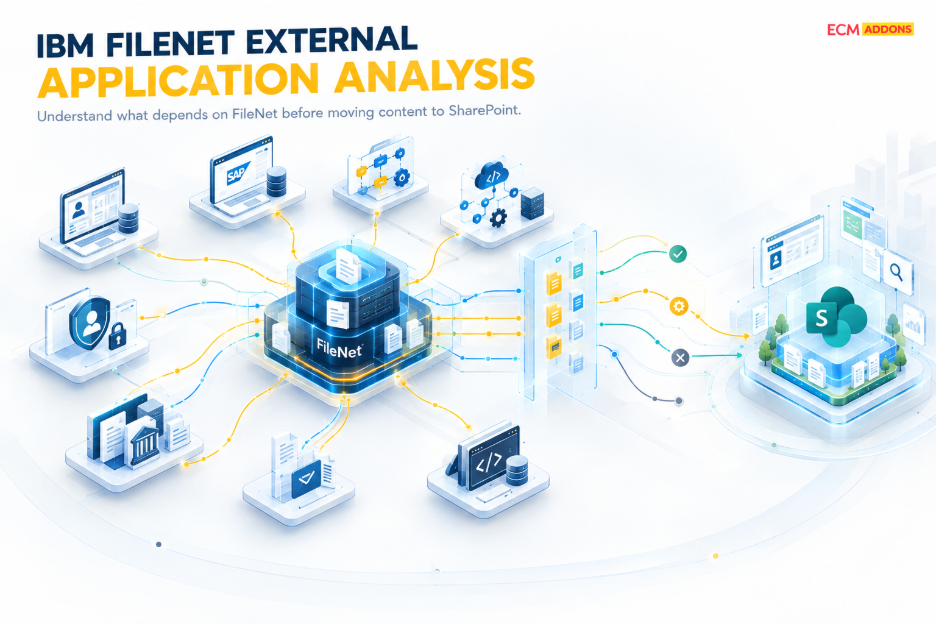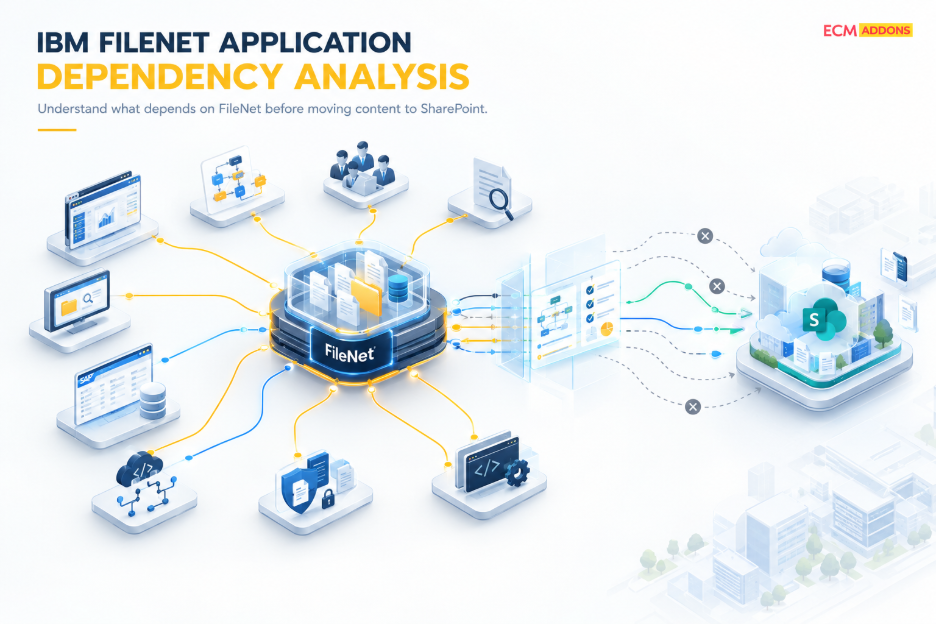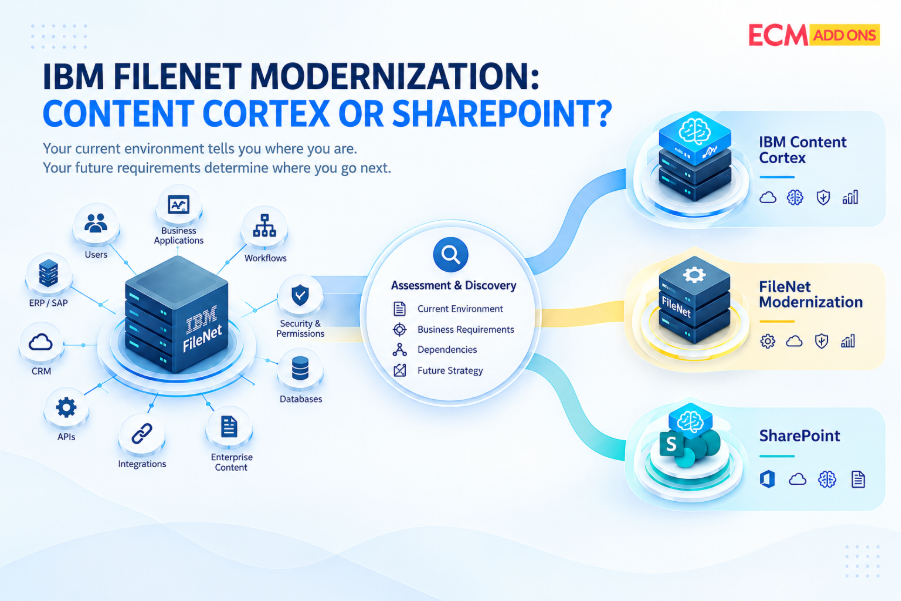
Before migrating IBM FileNet content to SharePoint, organizations need to understand what depends on FileNet-not just what is stored in it.
An IBM FileNet environment is rarely just a repository containing documents.
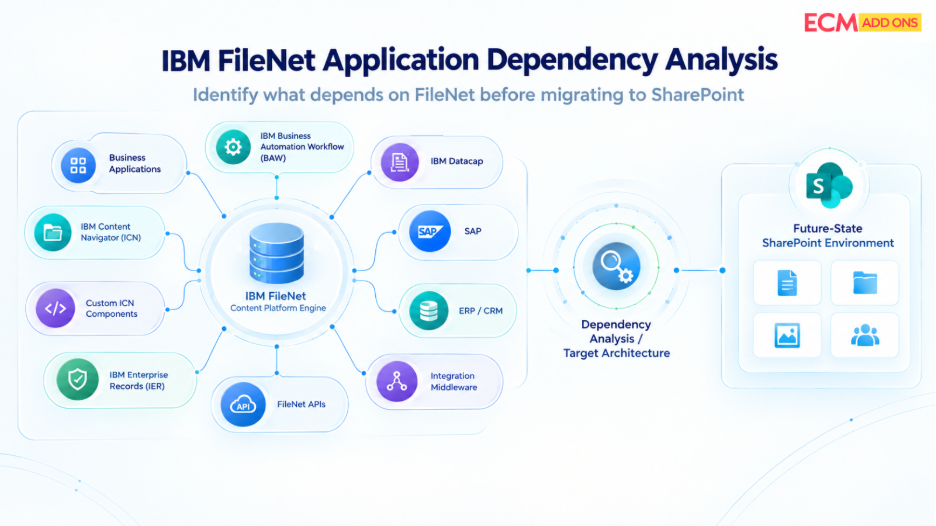
Over the years, organizations often build an ecosystem around FileNet that includes Content Platform Engine (CPE), object stores, IBM Content Navigator (ICN), custom ICN components, IBM Business Automation Workflow (BAW), IBM Enterprise Records (IER), IBM Datacap, custom applications, APIs, SAP integrations, ERP systems, CRM platforms, and other enterprise applications.
These components can support different stages of a business process.
A document may be captured through Datacap, stored in a FileNet object store, processed through a workflow, accessed through IBM Content Navigator, governed through Enterprise Records, and retrieved or updated by an external business application through FileNet APIs.
When FileNet becomes the source platform for a SharePoint migration, each of those relationships matters.
The question is therefore not simply:
“How do we migrate the documents from FileNet to SharePoint?”
A more important question comes first:
What business applications, FileNet components, workflows, APIs, and integrations depend on those documents today-and what happens to those dependencies when SharePoint becomes the target?
That is the purpose of IBM FileNet application dependency analysis.
What Is IBM FileNet Application Dependency Analysis?
IBM FileNet application dependency analysis is the process of identifying and understanding the applications, FileNet components, interfaces, workflows, repositories, and external systems that depend on an IBM FileNet environment.
The objective is not simply to create an application inventory.
It is to understand the relationships between the applications and the FileNet environment.
For example, an organization may discover that:
- A custom business application retrieves documents directly from a FileNet object store.
- An application uses FileNet APIs to create or update documents.
- IBM Business Automation Workflow uses an external FileNet Content Manager environment for content.
- Datacap captures documents and exports them into FileNet.
- IBM Content Navigator provides access to FileNet repositories through standard and custom functionality.
- A custom ICN plug-in provides business-specific actions or integrations.
- IBM Enterprise Records applies records management controls to FileNet content.
- SAP or another enterprise application retrieves documents associated with business transactions.
- A downstream application expects specific document classes, properties, folders, or object identifiers.
Each relationship can represent a dependency that needs to be addressed during migration.
IBM’s documentation describes Content Platform Engine as a platform that provides APIs for applications to access and manipulate objects stored in FileNet. IBM also documents Java and web-service access mechanisms for applications interacting with Content Platform Engine.
This is why application analysis needs to be part of the migration assessment rather than an activity performed after migration planning is already complete.
Why Application Dependency Analysis Matters Before FileNet to SharePoint Migration
A document can be successfully migrated to SharePoint and still leave the business process broken.
Consider a simple example.
A business application currently retrieves an invoice from FileNet using a FileNet API. The document is migrated to SharePoint, but the application continues looking for the document in the original FileNet repository.
From a content perspective, the migration may appear successful.
From a business-process perspective, it is not.
The same issue can occur when a workflow expects a FileNet object, when Datacap continues exporting newly captured documents to FileNet, when an ICN custom plug-in provides functionality that users still depend on, or when a records-management process relies on FileNet object stores and classifications.
IBM documentation also highlights that FileNet application assets can include documents, folders, workflow definitions, custom objects, class definitions, custom properties, choice lists, event actions, subscriptions, and associated scripts.
This demonstrates why the source environment needs to be understood as an application ecosystem, not simply as a collection of files.
What Applications Depend on IBM FileNet?
There is no universal application inventory for a FileNet environment.
The actual dependency landscape is specific to how each organization implemented FileNet.
However, a FileNet application assessment should generally investigate several categories.
Business Applications
Custom and packaged business applications may interact with FileNet to retrieve, create, update, search, or manage documents.
These applications may use:
- FileNet APIs
- Web services
- REST-based interfaces
- Java APIs
- .NET applications
- Integration platforms
- Archive platforms and external storages
- Custom middleware
- Database or metadata references
- Repository-specific configuration
IBM’s Content Engine APIs expose operations that applications can use to work with FileNet objects and object stores. IBM documentation describes runtime applications as one of the application types built using these APIs.
During migration assessment, the important question is therefore not simply whether an application connects to FileNet.
The important question is:
What does the application actually do with FileNet?
Does it retrieve documents?
Does it create content?
Does it search using specific properties?
Does it depend on document classes?
Does it expect particular folder structures?
Does it reference object IDs?
Does it initiate workflows?
Does it use custom FileNet services?
These details determine the migration impact.
FileNet CPE and Object Store Dependencies
Content Platform Engine sits at the center of many FileNet environments.
It provides the content services, object model, APIs, security model, metadata structures, events, and repository services that applications interact with. FileNet object stores can contain documents and other application assets, including folders, class definitions, custom properties, workflow definitions, event actions, and subscriptions.
That makes object-store analysis particularly important.
A migration assessment should identify:
- Which object stores are actively used
- Which applications use each object store
- Which document classes are business-critical
- Which properties are consumed by applications
- Which folders are application-dependent
- Which workflows reference the object store
- Which integrations read or write to it
- Which security structures are relevant
- Which events, subscriptions, or actions are configured
- Which custom objects are part of business applications
The goal is to establish a relationship between the FileNet repository structure and the applications that rely on it.
Without that relationship, migration mapping can become a content-only exercise.
FileNet APIs and Application Dependencies: What to Assess Before Migration
FileNet APIs are one of the most important areas to investigate during application dependency analysis.
An application that communicates with FileNet through an API does not necessarily care that a document physically resides in an object store. It may rely on the FileNet API to search for a document, retrieve properties, download content, create a document, update metadata, or perform other repository operations.
IBM documents the Content Engine Java API as providing access to the capabilities of Content Engine, while web services provide another mechanism for applications to access content and process capabilities.
This creates a key migration question:
What happens to the application when the FileNet API endpoint is no longer the system through which the content is accessed?
The answer may involve:
- Replacing the integration
- Reconfiguring the application
- Introducing an integration layer
- Connecting the application to SharePoint APIs
- Retaining FileNet for a defined period
- Rebuilding selected application functionality
- Changing the business process itself
Not every FileNet API dependency needs to be reproduced exactly in SharePoint.
The objective should be to determine what business capability the dependency provides and then identify the appropriate target architecture.
How Does IBM Business Automation Workflow Depend on FileNet?
IBM Business Automation Workflow can be configured to work with an external Content Platform Engine, including an external FileNet Content Manager environment.
IBM documentation specifically describes scenarios where organizations use an existing external Content Platform Engine with Business Automation Workflow, including environments where FileNet Content Manager is used for documents, cases, or long-lived content.
This means BAW needs to be explicitly included in a FileNet application assessment.
The migration team should determine:
Which BAW applications use FileNet content?
Which object stores are involved?
Which workflows create or retrieve documents?
Which business processes depend on those documents?
Are documents part of cases or process activities?
Are users accessing FileNet content through BAW interfaces?
Does the process require content to remain in FileNet during the migration period?
The answers influence whether a workflow can move directly to a SharePoint-based architecture, whether integration changes are required, or whether FileNet needs to remain operational during a transition period.
A FileNet migration should therefore avoid treating BAW as an unrelated platform simply because the workflow application and repository may be administered separately.
How Does Datacap Depend on FileNet?
Datacap introduces another important dependency pattern.
Datacap can capture documents, extract information, process batches, perform validation, and export documents and extracted data to FileNet Content Manager and other repositories or business applications.
IBM documentation specifically describes FileNet P8 connector actions that allow Datacap applications to connect to a FileNet repository, set document attributes and folders, and upload documents for storage.
That means the migration team should not only ask:
Which documents are currently in FileNet?
It should also ask:
Which documents are still being produced by Datacap and sent into FileNet?
This distinction is critical.
If Datacap continues operating after the migration begins and continues sending newly captured documents to FileNet, the target architecture needs to account for that flow.
The assessment should therefore identify:
- Datacap applications
- Capture workflows
- Export rulesets
- FileNet connectors
- Target object stores
- Document classes
- Index fields
- Folder mappings
- Security behavior
- Business applications receiving extracted data
- Whether Datacap needs to be redirected toward the new repository
A migration that moves historical content while leaving an active capture-to-FileNet dependency untouched can create a continuously changing source environment.
How Do ICN Custom Components Affect FileNet Migration?
IBM Content Navigator is often the user-facing layer through which employees access FileNet content.
But the standard ICN interface may not represent the full functionality of an organization’s environment.
Organizations can create custom IBM Content Navigator plug-ins to add features, services, viewers, layouts, actions, filters, and other functionality. IBM documents these plug-in extension points and the deployment of plug-in JAR files into the Content Navigator environment.
This creates an important migration assessment question:
What business functionality exists inside custom ICN components?
A custom plug-in may provide a relatively simple interface feature.
Or it may be the front end for a larger business process involving:
- FileNet APIs
- External applications
- Workflow services
- Custom viewers
- Security checks
- Metadata retrieval
- Document actions
- External web services
- External Data Services (EDS)
- Business-specific processing
Therefore, simply identifying that “ICN is used” is not enough.
The assessment should create an inventory of:
Standard ICN functionality
Custom ICN plug-ins
Custom menus and actions
Custom viewers
Custom services
External endpoints called by plug-ins
Authentication and authorization dependencies
Business functions performed through those components
This helps determine whether the functionality needs to be recreated in SharePoint, replaced with Microsoft capabilities, integrated through another application, or retired because the underlying business requirement has changed.
IBM Enterprise Records: Understanding Records Management Dependencies
IBM Enterprise Records adds another layer of dependency because content may be subject to records-management policies, classifications, retention rules, file plans, and disposition processes.
IBM documentation describes Enterprise Records as working with FileNet object stores and using file plans and records-enabled object stores to manage records.
A migration assessment should therefore determine whether FileNet content is:
- Declared as a record
- Associated with a file plan
- Subject to retention rules
- Controlled by disposition schedules
- Associated with records classifications
- Stored in records-enabled object stores
- Subject to records-management workflows
This is not simply a question of moving the underlying document.
The migration architecture needs to determine how the business and compliance requirements represented by the existing records-management implementation will be handled in the target environment.
The correct target approach will depend on the organization’s records-management requirements and the capabilities of the selected SharePoint/Microsoft 365 architecture.
SAP, ERP, CRM and Other Enterprise Integrations
FileNet is frequently integrated with systems outside the ECM platform.
SAP is one example, but the same principle applies to ERP, CRM, claims, case-management, finance, HR, manufacturing, and other enterprise applications.
An application may associate a FileNet document with a business transaction without users ever opening FileNet directly.
For example, an SAP user might access an invoice attachment from an SAP business transaction while the underlying document is stored in FileNet.
From the user’s perspective, the document appears to be part of the SAP process.
From the architecture perspective, there is a dependency chain:
Business transaction → SAP → integration → FileNet → object store → document
If FileNet is replaced by SharePoint, that chain needs to be reassessed.
The question is not simply where the document should live.
The question is:
How should the business application continue to find, retrieve, create, or relate to that document after migration?
This is why enterprise integration analysis should be performed alongside content analysis.
Internal vs. External FileNet Application Dependencies
A useful FileNet application assessment distinguishes between internal dependencies and external dependencies.
Internal FileNet dependencies
These exist within the FileNet ecosystem itself.
Examples include:
- CPE
- Object stores
- Document classes
- Properties
- Folders
- Workflows
- Events
- Subscriptions
- Custom objects
- Team Spaces
- Datacap
- ICC For Files
- ICC for SAP
- ICC for Emails
- IER
- ICN
- ICN plug-ins
- FileNet APIs
IBM’s documentation also describes dependencies between FileNet objects, where one object can reference another object, class definition, property definition, event action, or other required component.
External dependencies
These connect FileNet to systems outside the ECM platform.
Examples include:
- SAP
- ERP applications
- CRM platforms
- Custom business applications
- Integration middleware
- External APIs
- Reporting systems
- Authentication services
The distinction matters because the migration treatment can be different.
An internal FileNet component may need to be mapped to a SharePoint or Microsoft 365 capability.
An external integration may instead require an API, connector, middleware change, or application redesign.
How Do You Assess FileNet Applications Before SharePoint Migration?
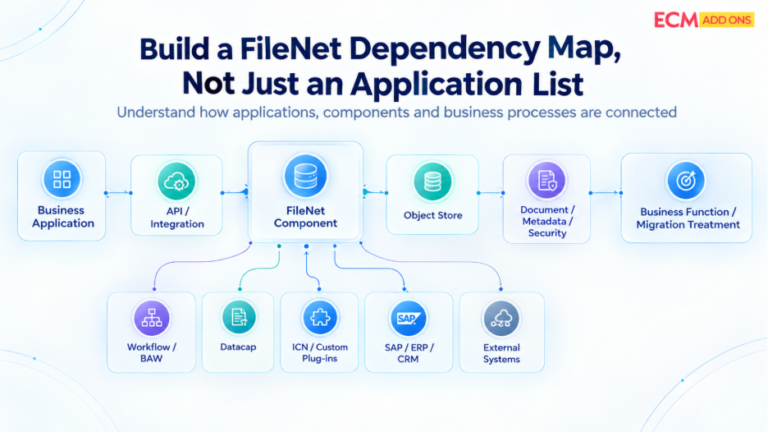
A practical assessment should move beyond a static application inventory.
The goal should be to build a dependency map showing how business applications interact with FileNet.
A typical assessment can follow these stages.
- Build the FileNet Application Inventory
Start by identifying all known applications that interact with FileNet.
Include:
- Custom applications
- Packaged applications
- BAW applications
- Datacap applications
- ICN configurations
- Custom ICN plug-ins
- SAP integrations
- ERP and CRM integrations
- APIs
- Middleware
- Reporting applications
- Administrative and operational tools
At this stage, the objective is coverage rather than detailed redesign.
- Map Each Application to Its FileNet Dependencies
For each application, identify what it actually uses.
For example:
Application → Object Store → Document Class → Properties → API → Workflow → External System
This creates a much more useful view than simply recording the application’s name.
The assessment should capture:
- Object stores used
- Document classes accessed
- Properties queried
- Folder structures referenced
- APIs used
- Workflows invoked
- Documents created
- Documents retrieved
- Security dependencies
- Events and subscriptions
- External integrations
- Business processes supported
- Identify the Business Function Behind Each Dependency
Technical dependency alone does not tell you how important something is.
A migration team should connect every significant dependency to a business function.
For example:
Technical dependency | Business function |
FileNet object store | Stores customer documents |
FileNet API | Retrieves documents from a claims application |
BAW workflow | Processes approval cases |
Datacap | Captures incoming invoices |
ICN plug-in | Provides a business-specific document action |
IER | Applies records-management controls |
SAP integration | Associates documents with SAP transactions |
This creates the bridge between technical analysis and migration planning.
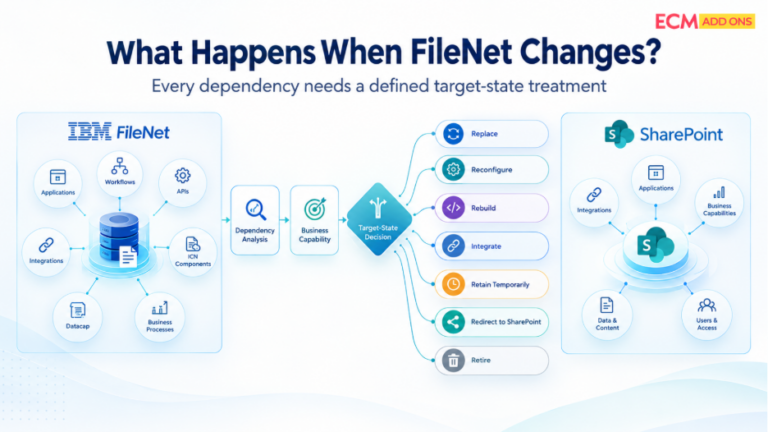
- Determine What Happens When FileNet Changes
For every dependency, ask:
Does this dependency continue after migration?
If yes, determine how.
Possible outcomes include:
- Replace
- Reconfigure
- Rebuild
- Integrate
- Retain temporarily
- Retire
- Redirect to SharePoint
- Maintain during a transition period
This is where application dependency analysis begins influencing the target architecture.
Build a FileNet Dependency Map, Not Just an Application List
An application of inventory tells you what exists.
A dependency map tells you how everything is connected.
For example:
Datacap
↓
Capture and indexing
↓
FileNet Object Store
↓
Document Class + Properties
↓
BAW Workflow
↓
Business Approval
↓
ICN / Custom Plug-in
↓
User Access
↓
SAP / Business Application
↓
Document Retrieval
The actual environment may be considerably more complex.
One object store can serve multiple applications.
One application can use multiple object stores.
A custom ICN plug-in can call an external service.
A BAW process can depend on FileNet content.
Datacap can continue creating new content while historical documents are being migrated.
That is why dependency mapping should be treated as an architectural activity.
What Should Be Captured in a FileNet Application Dependency Inventory?
A useful application inventory should capture more than application names and owners.
At minimum, consider documenting:
Assessment area | Questions to answer |
Application | What business application uses FileNet? |
Business owner | Which team owns the process? |
Business function | What process depends on FileNet? |
Object store | Which repositories are accessed? |
Content | What documents are created, retrieved, or updated? |
Metadata | Which properties and classes are used? |
API | How does the application communicate with FileNet? |
Workflow | Does the application depend on BAW or FileNet workflows? |
ICN | Does the application use standard or custom ICN functionality? |
Datacap | Does capture or indexing send content into FileNet? |
IER | Are records-management controls involved? |
Integration | Does SAP, ERP, CRM, or another system participate? |
Security | Which users, groups, or permissions matter? |
Frequency | How often does the application interact with FileNet? |
Migration impact | What changes when SharePoint becomes the target? |
Target approach | Replace, reconfigure, rebuild, integrate, retain, or retire? |
The exact fields will vary by environment, but the principle remains the same:
Every significant dependency should have an owner, a business purpose, a technical relationship, and a migration treatment.
Make Application Dependencies Visible Before You Migrate
A successful FileNet to SharePoint migration is not only about moving content from one repository to another.
It is about understanding the business ecosystem around that content.
Before designing migration waves or finalizing the SharePoint target architecture, identify the applications, workflows, APIs, integrations, ICN customizations, Datacap processes, BAW dependencies, and records-management requirements connected to your FileNet environment.
ECM Addons helps organizations assess FileNet environments from the source architecture outward—so application dependencies can be understood before migration decisions are finalized.
If you are planning an IBM FileNet to SharePoint migration, start with a FileNet migration assessment that looks beyond document volume and examines the applications and dependencies that make your FileNet environment part of the business process.