Understanding the FileNet ecosystem. Automating the migration. Controlling risk from discovery to production.
An IBM FileNet to SharePoint migration is easy to describe.
Discover. Extract. Transform. Migrate. Validate. Cut over.
But that description hides the real complexity.
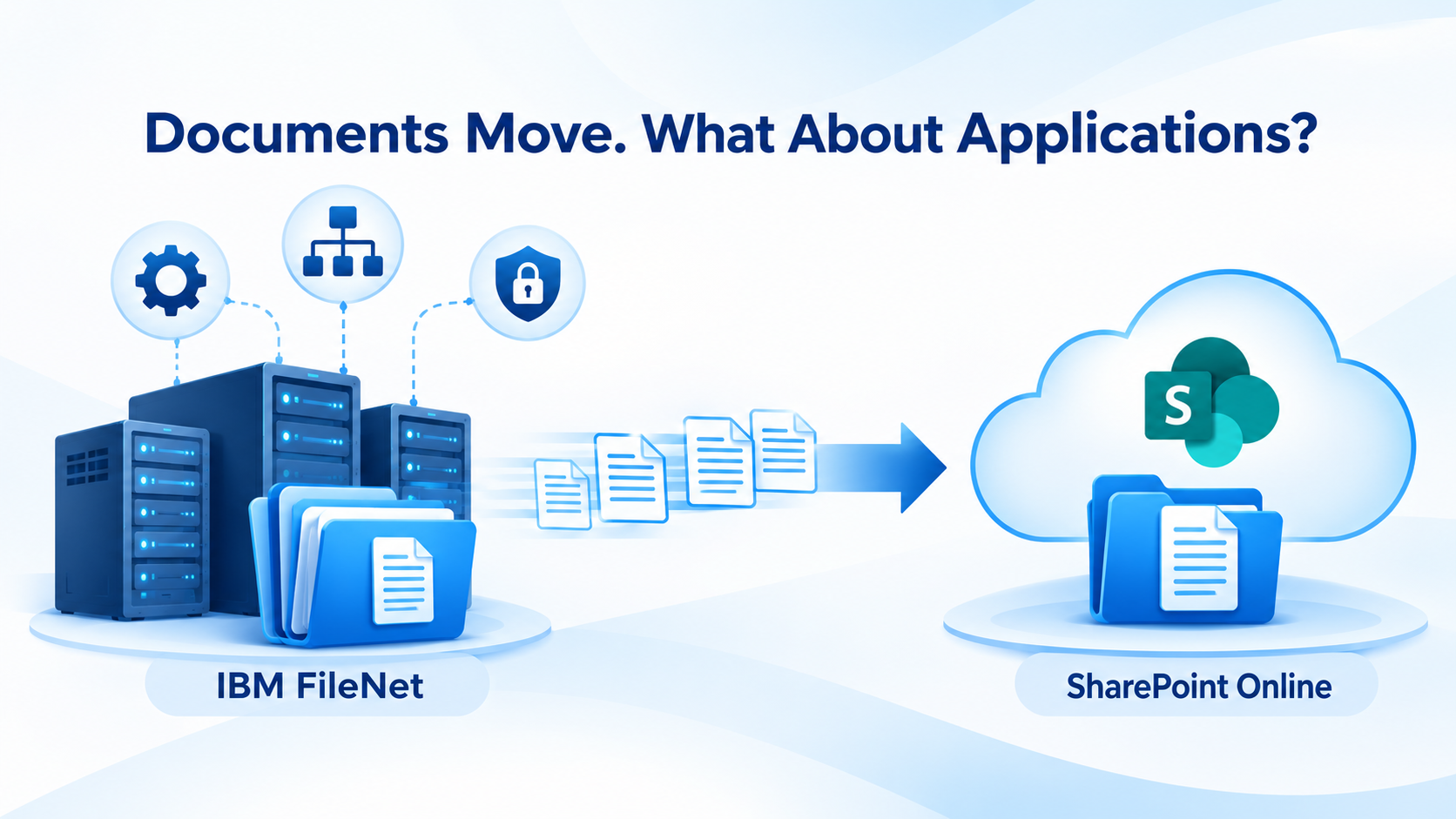
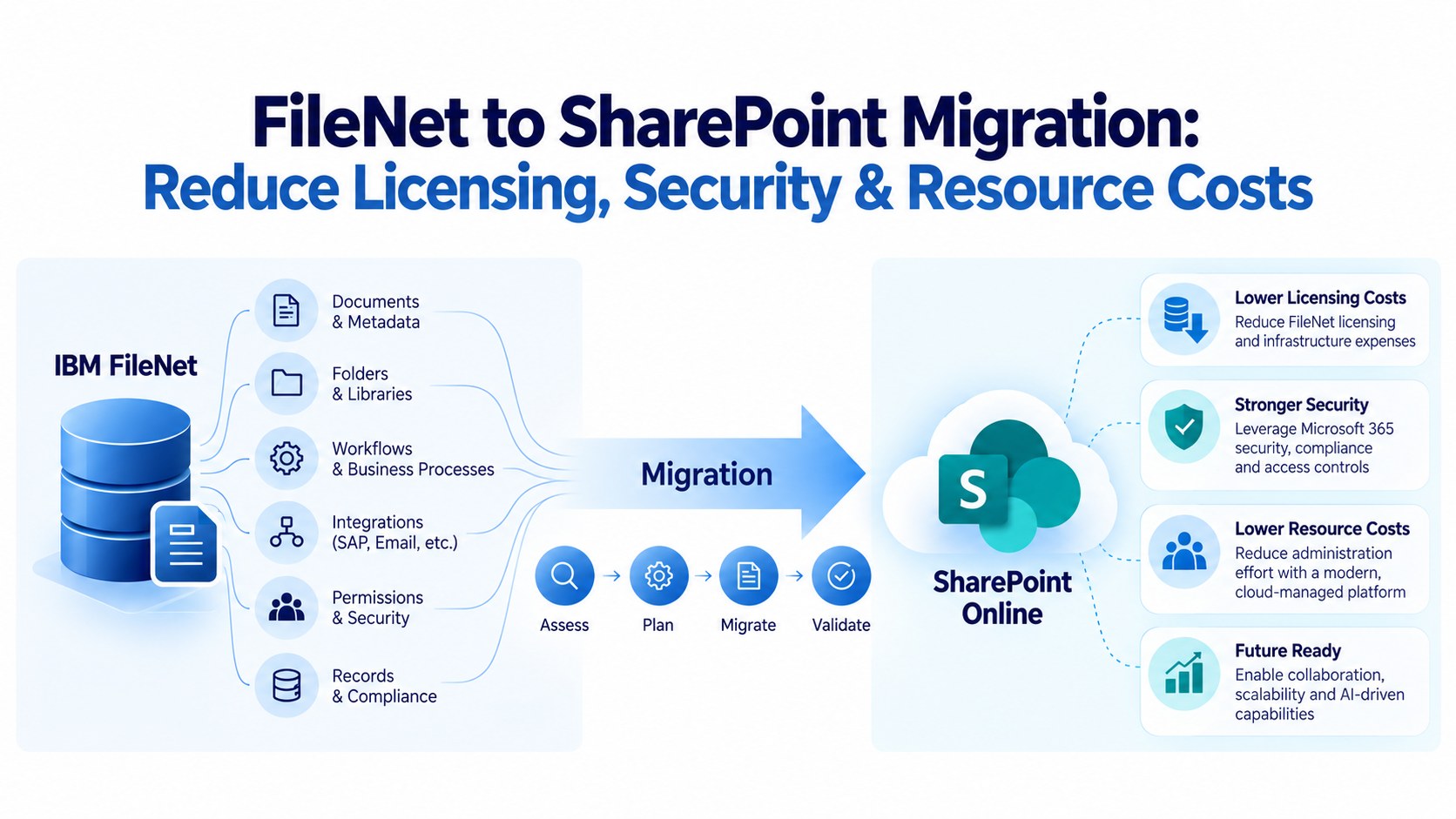
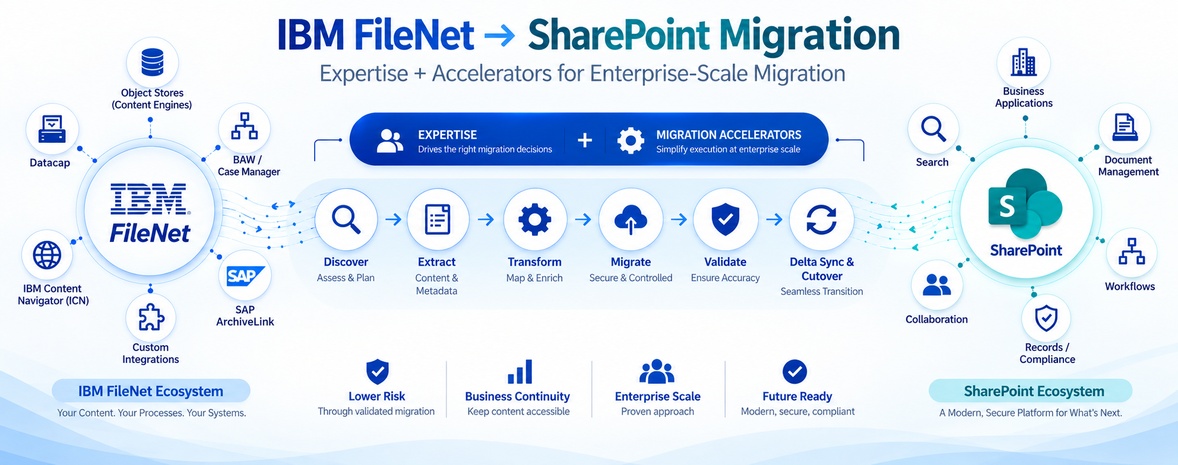
In an enterprise FileNet environment, millions of documents rarely exist in isolation. They may be connected to business applications, BAW processes, Datacap capture processes, IBM Content Navigator, Case Manager, Teamspaces, SAP ArchiveLink, custom integrations, security models and other enterprise systems.
So the real migration question is not:
How do we move documents from FileNet to SharePoint?
It is:
How do we move the FileNet ecosystem to a SharePoint-based architecture while preserving business continuity and transforming the parts that should not simply be recreated?
That requires two things working together:
Deep FileNet and SharePoint expertise + Purpose-built migration accelerators
This combination is what makes an end-to-end migration practical at enterprise scale.
Why FileNet-to-SharePoint Migration Requires Specialized Expertise
There is a significant difference between a company that supports migrations across many ECM platforms and a team that understands FileNet deeply enough to analyze what exists inside the source environment before deciding how it should be migrated.
A generic migration approach may begin with:
Extract → Transform → Load
But FileNet environments require much more investigation before extraction begins.
A migration team needs to understand:
- What Object Stores exist?
- Which document classes are actively used?
- Which structures are business-critical?
- Which applications create or consume FileNet content?
- Which BAW processes depend on FileNet?
- What document acquisition and capture processes are supported by IBM Datacap?
- Where is Datacap used to acquire, classify, extract, validate, and deliver document content or captured data to downstream systems?
- What does IBM Content Navigator provide to users?
- Are there ICN custom components?
- Is Case Manager being used?
- Are Teamspaces part of the current environment?
- Is IBM Enterprise Records (IER) being used for records management, retention, classification, holds, or disposition?
- What role does the Records Manager play in maintaining file plans, retention/disposition schedules, records holds, and disposition decisions?
- Which applications use FileNet APIs?
- Which content is connected to SAP through ArchiveLink?
- Which security structures need to be transformed?
- Which legacy components should be retained, redesigned, replaced or retired?
These are not generic ECM questions.
They are FileNet migration questions.
And the answers directly influence the migration architecture.
Expertise First. Automation Second.
A migration accelerator is valuable only when it is driven by the right migration decisions. For example, automation can move a large volume of documents efficiently. But automation alone cannot determine whether a particular FileNet structure should:
Move as-is
Be transformed
Be consolidated
Be redesigned
Be replaced
or
Be retired
That decision requires knowledge of the FileNet environment and the business process surrounding it.
This is why the strongest migration model combines:
Expertise
Understanding the source and target environments.
Methodology
Knowing what needs to happen and in what sequence.
Accelerators
Automating repetitive, high-volume and complex migration activities.
Validation
Proving that the expected result was achieved.
The technology accelerates execution.
The expertise determines what should actually be executed.
Step 1: Discover What Is Actually Inside FileNet
The first challenge is visibility.
Large FileNet environments often evolve over many years. Components are added, applications are integrated, customizations are introduced and business requirements change.
As a result, documentation may not always represent the environment accurately.
That is why discovery should be supported by analysis of the actual FileNet environment.
The objective is to build a detailed picture of:
Content
→ Object Stores, classes and structures
Applications
→ Business applications consuming or creating content
Processes
→ BAW and related business processes
Capture
→ Datacap dependencies and capture processes
User experience
→ IBM Content Navigator and custom components
Enterprise integrations
→ SAP, ERP, CRM and other applications
Security
→ Users, groups, permissions and access structures
Dependencies
→ APIs, integrations and application relationships
This creates the foundation for every migration decision that follows.
ECM Addons’ migration tooling includes pre-migration analysis and assessment capabilities to help identify FileNet content, structures, dependencies and migration considerations before large-scale execution.
Step 2: Determine What Should Actually Be Migrated
Once the environment is understood, the next question is not simply:
“How much content is there?”
It is:
“What should the future environment contain?”
Enterprise FileNet repositories can contain years of accumulated content.
Some may be actively used.
Some may be retained for compliance.
Some may be obsolete.
Some may be duplicated.
Some may belong to applications that are themselves being retired.
Therefore, migration planning should classify and prioritize content before large-scale movement begins.
The goal is not to move everything simply because it exists.
The goal is to move what the business needs, in the structure the future environment requires.
Step 3: Design the FileNet-to-SharePoint Mapping
This is where FileNet expertise and SharePoint expertise need to work together.
A FileNet environment should not simply be reproduced inside SharePoint.
The migration team needs to determine how the source environment should translate into the target architecture.
For example:
FileNet Object Store
↓
Target SharePoint site / architecture
FileNet document classes
↓
SharePoint content structures
FileNet properties
↓
SharePoint information architecture
FileNet security
↓
SharePoint permissions and groups
FileNet folder structures
↓
Enhanced SharePoint Folder Structure
The mapping needs to account for business requirements rather than simply matching source fields one-to-one.
The target architecture should answer:
- Where should content reside?
- How should users find it?
- How should access be controlled?
- Which structures should be simplified?
- Which information needs to be preserved?
- Which legacy structures should not be recreated?
This is where SharePoint expertise becomes as important as FileNet expertise.
Step 4: Extract at Enterprise Scale
Once the migration rules are defined, extraction can begin.
This is where migration accelerators become important.
When an organization has millions or hundreds of millions of documents, manually managing extraction and transfer activities becomes impractical.
An enterprise migration platform needs to support controlled processing of large content volumes while maintaining visibility into what has been processed.
The migration process should be able to track:
→ What was selected
→ What was extracted
→ What was transformed
→ What was migrated
→ What failed
→ What needs to be retired
→ What was successfully validated
This turns migration from a collection of scripts and manual activities into a controlled migration pipeline.
Step 5: Transform Rather Than Simply Copy
This is one of the most important distinctions in a FileNet-to-SharePoint migration.
The target environment may require transformation.
For example, the migration may need to transform:
- FileNet structures
- Document classifications
- Properties
- Folder organization
- Security
- Naming conventions
- Content relationships
- Application references
The objective is not:
FileNet → identical copy in SharePoint
It is:
FileNet → understand → transform → appropriate SharePoint architecture
That distinction prevents organizations from carrying unnecessary legacy complexity into their new platform.
Step 6: Address the FileNet Ecosystem — Not Just the Repository
This is where a FileNet-specialized migration approach becomes particularly important.
IBM Content Navigator
If users currently interact with FileNet through ICN, the migration needs to consider what happens to that user experience and any custom ICN components.
BAW / Case Manager
Business processes and case-based applications may depend on FileNet content and services. These dependencies need to be assessed before deciding whether they should be redesigned, replaced or integrated with the target environment.
IBM Datacap
Datacap may sit upstream of FileNet and support document capture, classification, extraction and validation.
Moving FileNet content without addressing the Datacap dependency can leave the organization with a business process that still relies on the legacy environment.
Therefore, Datacap should be assessed as part of the overall migration architecture.
Teamspaces
Teamspaces and related collaboration structures need to be assessed to determine how their business purpose should be represented in the target SharePoint environment.
IBM Enterprise Records
Enterprise records introduce another critical consideration in a FileNet migration.
FileNet may not only contain active business documents. It can also serve as the system of record for documents that must be retained for specific periods, protected from unauthorized alteration, audited, or managed according to regulatory and corporate retention policies.
Before migrating this content, organizations need to understand:
- Which FileNet content is classified as a record
- What retention policies and schedules apply
- Whether records are subject to legal holds or disposition requirements
- What metadata, classifications and audit history must be preserved
- How record declarations and retention controls should be represented in the target environment
- Whether historical records need to remain accessible after FileNet is decommissioned
This becomes particularly important in regulated industries such as banking, insurance, healthcare, government and manufacturing, where the document itself is only one part of the compliance requirement.
Simply moving the files to SharePoint does not necessarily mean the organization has migrated the record.
The migration strategy therefore needs to distinguish between:
Active Content → Collaboration Content → Enterprise Records
Each category may require a different migration, governance and validation approach.
The objective should be to ensure that records remain accessible, governed, traceable and compliant after the transition — rather than treating them as another batch of documents to be copied from FileNet to SharePoint.
SAP ArchiveLink
SAP-connected content requires another level of consideration.
The question is not simply:
“Where will the document be stored?”
It is:
“How will SAP continue to find and access that document after FileNet is no longer the repository?”
ECM Addons specifically provides SAP Content Bridge for SharePoint to address SAP ArchiveLink scenarios as part of the FileNet-to-SharePoint transformation. Its migration tooling also identifies SAP ArchiveLink and external application integration as areas that need to be considered in a comprehensive FileNet migration.
This is an important distinction between moving content and moving the business process around that content.
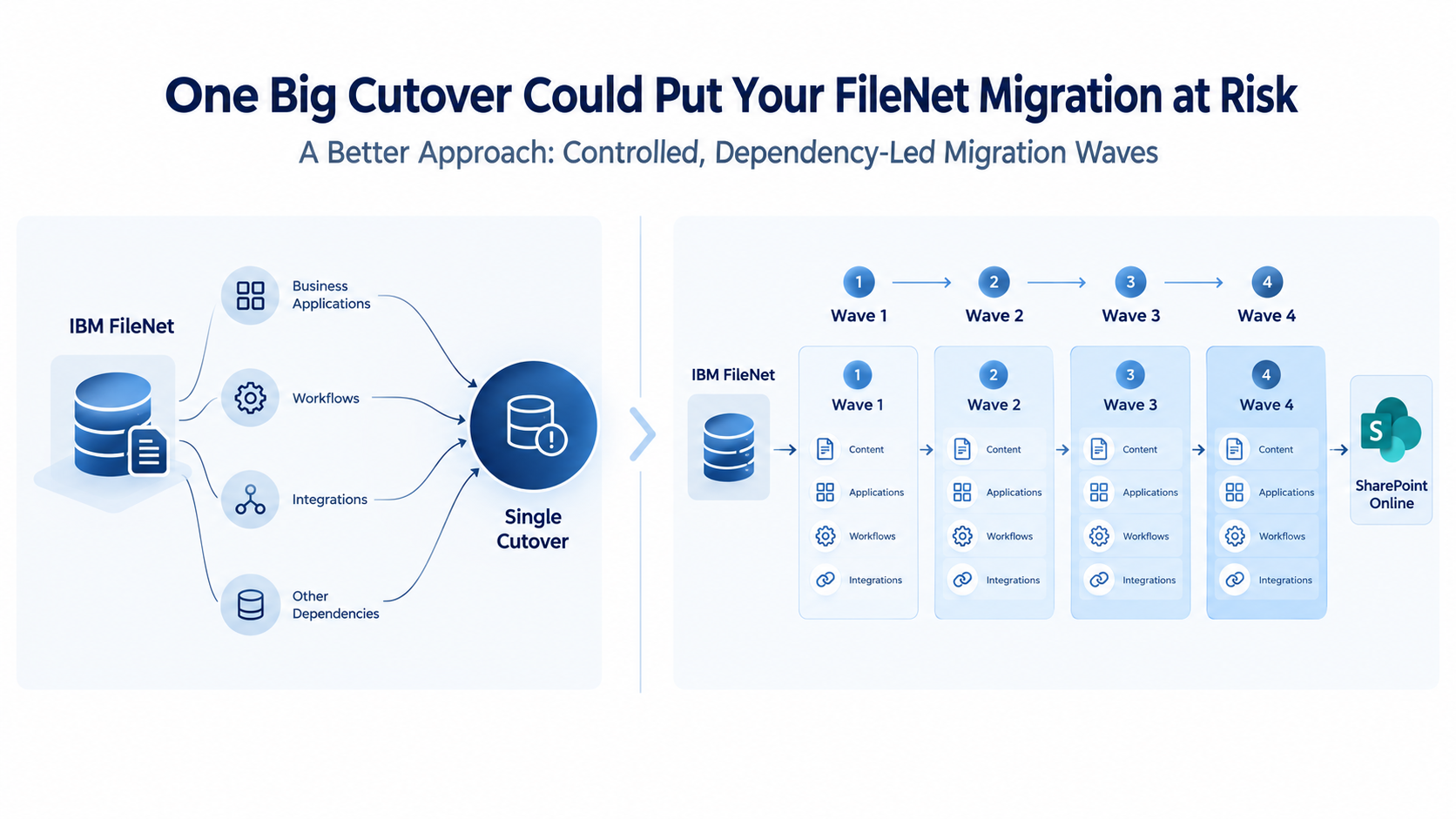
Step 7: Migrate in Controlled Waves
Large enterprise migrations should not necessarily be treated as one massive migration event.
A controlled migration can divide the environment into logical waves based on factors such as:
- Business unit
- Object Store
- Content type
- Application dependency
- Business criticality
- Volume
- Complexity
- Risk
A typical wave can follow:
Discover
↓
Prepare
↓
Migrate
↓
Validate
↓
Approve
↓
Proceed to next wave
This creates measurable checkpoints throughout the program.
Instead of asking:
“Can we migrate 100 million documents?”
the team can ask:
“Can we successfully migrate, validate and approve this specific workload before moving to the next one?”
Step 8: Keep FileNet and SharePoint Aligned Through Delta Migration
This is where many migration strategies become difficult.
The business does not necessarily stop changing content just because migration has started.
Users continue creating documents.
Existing documents continue to change.
Applications continue updating content.
New business transactions continue arriving.
If the initial migration takes months, the source environment will continue changing during that period.
That is why a large migration can use delta synchronization.
The basic approach is:
Initial Migration
Move the existing content.
↓
Business Continues
Users and applications continue working in FileNet.
↓
Delta Capture
Identify new or changed content.
↓
Delta Migration
Transfer those changes to SharePoint.
↓
Final Delta
Capture the remaining changes before cutover.
↓
Cutover
Move users and applications to SharePoint.
ECM Addons’ migration tooling supports incremental/delta migration as part of a migration approach involving initial migration, synchronization, validation and controlled final cutover. The objective is to reduce the amount of work required during the final cutover window and minimize business disruption.
Step 9: Validate More Than Document Counts
A migration report saying:
“10,000,000 documents migrated successfully”
does not by itself prove that the migration was successful.
Validation needs to examine whether the migrated environment is actually usable.
That can include:
Content validation
Was the expected content transferred?
Structure validation
Is the content where it is supposed to be?
Information validation
Are the required business properties and classifications correct?
Security validation
Do users have the correct access?
Application validation
Can connected applications still perform their required functions?
Business validation
Can users complete the business processes they depend on?
This is where validation and reconciliation accelerators become valuable. The migration needs evidence, not assumptions.
Step 10: Reconcile Exceptions
Enterprise migration rarely means every item succeeds on the first attempt.
There can be:
- Unsupported content
- Permission exceptions
- Transformation failures
- Connectivity issues
- Application dependencies
- Invalid configurations
- Unexpected source conditions
A mature migration process therefore needs an exception-management cycle:
Identify
↓
Classify
↓
Investigate
↓
Remediate
↓
Retry
↓
Validate
This is much more manageable when the migration platform provides reporting and traceability rather than requiring teams to manually search through scripts and logs.
Step 11: Execute a Controlled Cutover
Cutover is where months of planning become a production transition.
The objective should not simply be:
“Stop FileNet and start SharePoint.”
A controlled cutover needs to establish that:
- Final changes have been synchronized
- Critical applications are ready
- Business users are ready
- Security has been validated
- Integrations have been tested
- Exceptions have been addressed
- Final reconciliation has been completed
- Business owners have approved the transition
Only then should the production switch occur.
The migration should be designed around the business’s operating requirements.
The business should not have to adapt its operations around an uncontrolled migration event.
Step 12: Stabilize After Go-Live
Go-live is not the end.
It is the point at which the new environment becomes the production environment.
The initial stabilization period should focus on:
- User issues
- Access problems
- Application issues
- Search behavior
- Content exceptions
- Integration issues
- Performance
- Business-process validation
This is also where knowledge transfer becomes important.
The organization’s team should receive the documentation and operational knowledge required to manage the new environment.
Step 13: Optimize the SharePoint Environment
Once the environment is stable, the organization can move beyond migration.
This is where the migration becomes a modernization initiative.
The organization can evaluate:
Information architecture
Is the content organized appropriately?
Search
Can users find what they need efficiently?
Governance
Are the right controls in place?
Security
Are permissions aligned with business requirements?
Integration
Are business applications using the new environment effectively?
Automation
Can manual processes be improved?
AI readiness
Can the new content environment support future intelligence and automation initiatives?
The objective is not simply to leave FileNet behind.
It is to create a better content environment than the one that existed before migration.
Why FileNet Migration Requires FileNet-Specific Expertise
This is where ECM Addons’ specialization becomes important.
A generic migration provider may understand migration methodology.
A SharePoint specialist may understand SharePoint.
But an enterprise FileNet-to-SharePoint migration requires someone who understands both sides deeply enough to connect them.
The migration team needs to understand why a FileNet object exists, how an application uses it, what a BAW process depends on, how Datacap feeds content into the environment, how ICN exposes functionality, how SAP ArchiveLink connects business transactions to documents, and how those requirements should be represented in SharePoint.
That is not simply:
Source → Target
It is:
FileNet ecosystem → Business requirements → Migration architecture → SharePoint ecosystem
And that is a very different problem.
Expertise + Accelerators
This is ultimately where the ECM Addons model comes together.
Expertise
Deep understanding of IBM FileNet and SharePoint.
Discovery
Visibility into the actual FileNet environment.
Methodology
A structured approach to assessment, planning, migration, validation and cutover.
Accelerators
Tool-driven capabilities for discovery, extraction, transformation, migration, validation and synchronization.
FileNet Ecosystem Knowledge
FileNet, ICN, BAW, Datacap, Case Manager, Teamspaces, Enterprise Records and related components.
SAP ArchiveLink
A dedicated consideration for SAP-connected content and business processes.
Enterprise Scale
Automation designed to make large and complex migration programs manageable.
Business Continuity
Incremental migration and delta synchronization designed to reduce disruption.
Together, these capabilities create something more valuable than a migration tool alone.
They create a migration capability. Maintain end-to-end operational continuity with ECM Addons, offering seamless alternatives for legacy FileNet architecture
The Real Meaning of End-to-End FileNet to Share Point Migration
End-to-end migration is not:
Extract → Transform → Load
It is:
Discover
Understand what actually exists.
↓
Assess
Identify complexity, dependencies and risk.
↓
Design
Define how FileNet should translate into SharePoint.
↓
Prepare
Make source and target environments ready.
↓
Extract
Automate large-scale content retrieval.
↓
Transform
Apply the required migration rules.
↓
Migrate
Move content in controlled waves.
↓
Validate
Verify the migration result.
↓
Reconcile
Identify and resolve exceptions.
↓
Synchronize
Keep FileNet and SharePoint aligned during the transition.
↓
Cut Over
Move production operations in a controlled manner.
↓
Stabilize
Support the business after go-live.
↓
Optimize
Improve the SharePoint environment for long-term value.
That is end-to-end FileNet-to-SharePoint migration.
SharePoint Collaboration & Modern Workspace
SharePoint Collaboration & Modern Workspace
SharePoint can extend document collaboration beyond internal teams without relying on disconnected file-sharing tools. Organizations can securely share selected documents, folders, or sites with customers, partners, vendors, and other external stakeholders while maintaining control over permissions and sharing policies.
This can be particularly valuable for organizations moving away from legacy content repositories where external collaboration may have required separate systems or manual processes. SharePoint brings content access and collaboration into the Microsoft 365 ecosystem, with administrative controls that allow organizations to define where and how external sharing is permitted.
Migration benefit: The move to SharePoint can turn external collaboration into part of the target content architecture rather than treating it as a separate capability outside the repository.
Modern Team Collaboration
SharePoint provides a collaboration model that is closely connected to Microsoft 365 and Microsoft Teams. Teams can use SharePoint sites for file storage, allowing users to access, share, and collaborate on documents within the tools they already use for day-to-day work.
For organizations coming from FileNet, this creates an opportunity to move beyond repository-centric content management toward a more connected working environment. Documents can become part of team sites, business workspaces, and collaboration processes rather than remaining isolated within a traditional ECM repository.
Migration benefit: The objective is not simply to move FileNet documents into SharePoint, but to place those documents within a collaboration environment that supports how teams work today.
Real-Time Document Editing and Co-Authoring
One of the practical advantages of moving content into the Microsoft 365 ecosystem is the ability to work directly with documents rather than simply retrieve and download them.
With SharePoint and Microsoft 365, users can open supported Office documents in the browser or desktop applications and collaborate on the same document. Multiple users can work on a document while changes are saved and tracked through SharePoint’s version history.
This changes the user experience significantly. Instead of downloading a document, editing a local copy, sending it back, and managing multiple versions, teams can work from a shared source while maintaining document history and visibility into changes.
Migration benefit: The value of migration is not only where documents are stored. It is also how people interact with, edit, review, and collaborate on those documents after they arrive in SharePoint.
Why This Matters at Enterprise Scale
When an organization has millions or hundreds of millions of documents, even a small percentage of errors can represent thousands of exceptions.
When those documents support business applications, BAW processes, SAP transactions and compliance requirements, the consequences become much larger than a failed document transfer.
This is why enterprise migration needs:
Automation for scale.
Expertise for decisions.
Validation for confidence.
Delta synchronization for continuity.
Specialized FileNet knowledge for source complexity.
SharePoint expertise for the destination.
And most importantly:
A methodology that connects all of them.
The Difference Is Not Just the Tool
A migration tool can help move content.
But the difficult questions come before and after the movement:
What should move?
How should it change?
What depends on it?
What happens to IBM Enterprise Records and records-management requirements?
What happens to SAP ArchiveLink?
What happens to Datacap?
What happens to BAW?
What happens to ICN customizations?
How will applications access the content?
How do we synchronize changes?
How do we prove that everything worked?
How do we cut over without disrupting the business?
Those questions require experience.
When IBM FileNet is the source environment, deep FileNet-specific expertise is critical not just to move content, but to understand the platform, its ecosystem, dependencies, and the implications of transitioning them to SharePoint.
Expertise That Understands the Complexity. Accelerators That Simplify the Execution.
This is the combination ECM Addons brings to FileNet-to-SharePoint migration.
Not a generic migration approach applied across unrelated ECM platforms.
A focused approach built around:
IBM FileNet → Microsoft SharePoint
with the expertise to understand the source, the knowledge to design the destination, and the accelerators to execute the migration at enterprise scale.
The objective is not simply to move documents.
Move the content. Preserve the business. Reduce the risk. Transform the ECM environment.
Thinking About Moving from FileNet to SharePoint?
Don’t begin by asking:
“How many documents can we migrate?”
Begin by asking:
What does our FileNet environment actually depend on, and how should those dependencies work in SharePoint?
ECM Addons can help assess the FileNet environment, identify migration complexity, evaluate dependencies, test migration scenarios and build a structured path toward SharePoint.
Start with a FileNet assessment or validate your approach with a migration trial before committing to a full-scale migration.
Ready to understand what your FileNet environment requires for a successful transition?
Explore how ECM Addons approaches FileNet to SharePoint migration across discovery, assessment, transformation, migration, validation, delta synchronization, and controlled cutover.
Explore ECM Addons FileNet to SharePoint Migration
Not ready to commit to a full-scale migration? Validate the approach first.
Run a representative FileNet to SharePoint migration trial to evaluate content migration, metadata mapping, security, integrations, performance, and migration results before moving forward.
Start a Free FileNet to SharePoint Migration Trial
Is SAP ArchiveLink part of your FileNet environment? Plan the SAP transition alongside the migration.
Explore how SAP-connected content and ArchiveLink requirements can be addressed as part of a SharePoint-based target architecture rather than treated as a separate migration dependency.