Key Takeaways
- An IBM FileNet health check evaluates more than whether the platform is operational. It examines the infrastructure, repository architecture, applications, integrations, security, and support readiness surrounding it.
- Infrastructure sizing, document growth, system performance, and recurring support issues help reveal operational weaknesses that may not be immediately visible.
- Security assessment should consider FileNet versions, operating-system patch currency, access rights, and integration-related exposure.
- Backup availability does not automatically establish recovery readiness. Restore procedures, supporting dependencies, and available recovery evidence also need review.
- Assessment scores help organize findings, while a detailed report translates them into risks, priorities, and recommended next steps.
What Is an IBM FileNet Health Check?
An IBM FileNet health check is a technical assessment of the FileNet environment and its supporting infrastructure. It examines the platform’s configuration, capacity, document management architecture, workflows, integrations, security controls, and operational readiness.
Unlike a basic availability check, an enterprise assessment looks beyond whether users can access the repository. It evaluates whether the environment remains stable, supportable, secure, and suitable for current business requirements.
For organizations relying on FileNet for business-critical document repositories, workflows, and regulated content processes, this assessment provides a clearer understanding of the platform’s current condition and areas that may require attention.
Why Does Your Enterprise Need an IBM FileNet Health Check?
IBM FileNet environments evolve alongside the businesses they support. Document volumes increase, integrations change, infrastructure ages, security requirements become stricter, and the people who understand the original implementation may no longer manage it.
Over time, these changes can introduce risks that are difficult to identify through routine operations.
For example:
- A repository may remain accessible while its underlying infrastructure approaches capacity limits.
- Custom workflows and integrations may continue operating but become increasingly difficult to maintain.
- Operating systems or FileNet components may require lifecycle and security reviews.
- Backup jobs may complete without sufficient evidence that the complete environment can be restored.
- Repeated support incidents may indicate underlying configuration, performance, or application issues.
A health check helps IT leadership move beyond assumptions about platform stability. It establishes an assessment baseline, highlights areas requiring investigation, and provides a basis for planning upgrades, infrastructure changes, support improvements, or modernization initiatives.
What Does an Enterprise FileNet Health Check Assess?
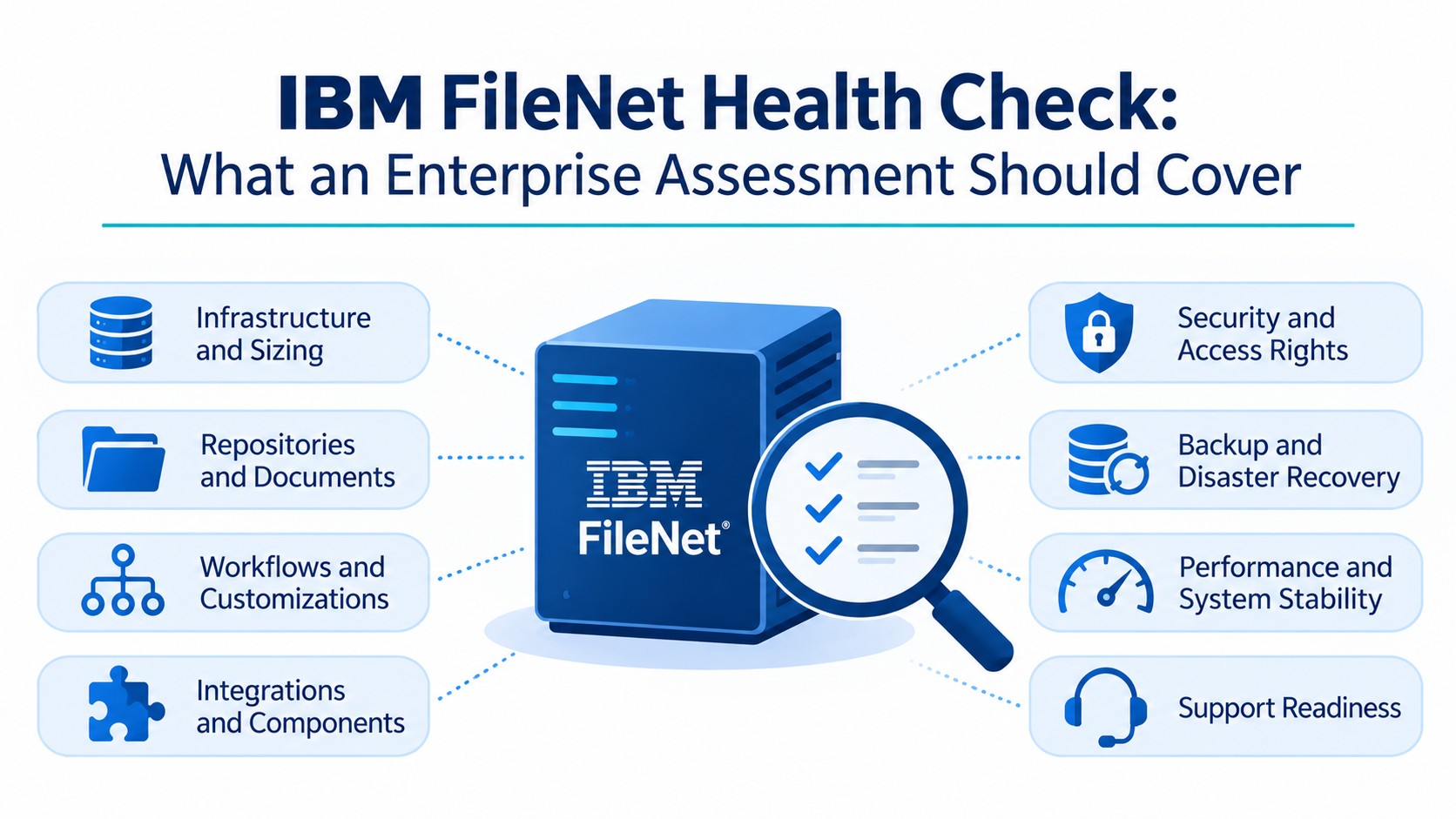
A meaningful FileNet assessment must consider the wider enterprise architecture rather than examining Content Platform Engine in isolation. The following areas help establish how the environment is configured, used, and maintained.
Infrastructure and Sizing
The infrastructure supporting FileNet influences availability, responsiveness, and capacity. The assessment reviews the underlying hardware, operating system, resource utilization, and repository growth indicators.
Key areas include:
- Server and infrastructure configuration.
- Operating-system and platform compatibility.
- CPU, memory, and storage utilization, where monitoring data is available.
- Database and storage capacity indicators.
- Document count, total repository size, and growth patterns.
- Infrastructure limitations that could affect future scalability.
Both document count and total content volume matter. A repository containing millions of small documents can create different capacity and processing demands from one containing fewer, larger files.
The objective is to determine whether the current infrastructure is appropriately sized for existing workloads and anticipated growth.
Document Management and Repositories
FileNet repositories contain the content structures and business information that enterprise applications depend on. Their configuration and usage can affect administration, performance, and long-term maintainability.
The assessment examines:
- Repository structure and usage.
- Document classes and custom objects.
- Repository organization and content volumes.
lps identify repository complexity and areas requiring closer technical attention, particularly when an organization is considering an upgrade, content restructuring, or modernization initiative.
BPM, Workflows, and Customizations
Enterprise FileNet implementations may include business processes and custom components developed around specific operational requirements. Incomplete documentation or the departure of original developers can make these components difficult to maintain.
The assessment examines workflow complexity, integration dependencies, custom logic, and the operational impact of applications built around FileNet.
Where applicable, it also considers the role of IBM Business Automation Workflow (BAW), Case Manager, and other process-related components.
The purpose is to identify which business processes depend on FileNet and whether customizations create maintenance, support, or operational risks.
Integrations and FileNet Components
FileNet rarely operates in isolation. Enterprise environments may connect it to business applications, identity services, document capture platforms, and external systems.
Depending on the implementation, relevant components may include:
- IBM Content Navigator and user-facing applications.
- Datacap and document capture processes.
- Custom applications and application interfaces.
- Enterprise systems connected to FileNet.
- Content Manager OnDemand (CMOD) or Image Services, where deployed.
The assessment considers the role of these components and their dependencies. An issue in an external application, authentication mechanism, or custom interface may affect a FileNet-dependent business process even when the core repository remains available.
User Experience and Support Readiness
FileNet rarely operates in isolation. Enterprise environments may connect it to business applications, identity services, document capture platforms, and external systems.
Depending on the implementation, relevant components may include:
- IBM Content Navigator and user-facing applications.
- Datacap and document capture processes.
- Custom applications and application interfaces.
- Enterprise systems connected to FileNet.
- Content Manager OnDemand (CMOD) or Image Services, where deployed.
The assessment considers the role of these components and their dependencies. An issue in an external application, authentication mechanism, or custom interface may affect a FileNet-dependent business process even when the core repository remains available.
Does a FileNet Health Check Include Security, OS Patching, and Vulnerability Checks?
Yes. An enterprise FileNet health check should examine security exposure across the platform and its supporting infrastructure. However, identifying a vulnerability and applying a patch are separate activities.
ECM Addons’ health check service identifies security-risk assessment areas that include infrastructure and operating-system security, FileNet version exposure, security best practices, integration risks, document access rights, and workflow access rights.
A detailed review can consider:
- FileNet version and relevant support or vulnerability exposure.
- Operating-system security posture and patch currency.
- Security configuration and access-control practices.
- Document-level permissions and access rights.
- Workflow access controls.
- Security implications of connected applications and integrations.
- Infrastructure and configuration risks identified during the assessment.
Operating-system patching requires compatibility checks across the environment. The appropriate updates depend on the operating system, application server, database, FileNet version, and their compatibility requirements. Applying updates without reviewing these dependencies can introduce avoidable operational problems.
The health check identifies patching gaps, version-related exposure, and areas requiring remediation. Actual patch installation, specialized vulnerability scanning, configuration changes, and penetration testing should be treated as separate activities unless explicitly included in the agreed scope.
How Are Backup, Restore, and Disaster Recovery Readiness Evaluated?
Having scheduled backups does not automatically mean an enterprise can recover its FileNet environment within its business recovery requirements.
A health check should examine whether backup policies cover the relevant FileNet databases, content storage, configuration, and supporting services.
The review can include:
- Backup coverage, policies, and schedules.
- Documented responsibilities for backup management.
- Availability and currency of restore procedures.
- Dependencies between FileNet and supporting services.
- Disaster recovery arrangements for required business services.
- Available restore tests and recovery evidence.
For example, restoring a FileNet service may involve more than recovering application files. The organization must understand the relationship between repository databases, content storage, configuration, and supporting infrastructure.
ECM Addons’ health check landing page identifies a Backup and Restore Policy Score as one of its assessment dimensions. The assessment helps identify gaps in documented procedures and available recovery evidence.
However, reviewing backup policies does not prove that a disaster recovery plan will meet its recovery objectives. That requires an appropriately planned restore or recovery exercise.
How Are FileNet Performance and System Stability Assessed?
Performance issues can originate from different components of the FileNet environment. Slow document retrieval, delayed business automation workflows, and inconsistent application responses may involve infrastructure, repository activity, integrations, or application-level dependencies.
A performance assessment should therefore consider available monitoring information, system logs, support history, and relevant infrastructure indicators.
The review can examine:
- System stability and the frequency or severity of support tickets.
- Available performance and resource-utilization information.
- Workflow and integration-related bottlenecks.
- Relevant FileNet errors and recurring operational issues.
- Infrastructure indicators that may contribute to performance problems.
IBM Content Platform Engine provides logging capabilities that can support monitoring, issue tracking, and problem diagnosis. These logs can help investigate errors and abnormal behavior. Detailed trace logging should be enabled selectively because certain trace levels can affect system performance.
The outcome should be a prioritized view of observed issues, potential contributing factors, and areas requiring deeper investigation-not an assumption that every bottleneck can be resolved through configuration changes alone.
How Does ECM Addons Score Your FileNet Environment?
ECM Addons uses assessment scores to organize findings across different areas of the FileNet environment. These dimensions provide a structured view of the platform’s condition and help identify areas that may need further attention.
The health check landing page identifies the following assessment dimensions:
Assessment area | What it evaluates |
Sizing Score | Document count, total content size, and system load |
Infrastructure Score | Supporting hardware and operating system |
Document Management Score | Object stores, document classes, and custom objects |
BPM Score | Workflow complexity, usage, and integration |
Integration Score | Integration components and their role in business use cases |
Customization Score | Custom applications, components, and workflows |
User Experience Score | User-facing components such as Workplace and Navigator |
FileNet Components Score | Additional components such as CMOD and Image Services |
Support Team Score | Support capability and operational readiness |
Aging Score | Environment age based on installation information |
System Stability Score | Frequency and severity of support tickets |
The security-risk assessment also includes dimensions such as Security Best Practices, Document Access Rights, Workflow Access Rights, Backup and Restore Policy, Availability, Scalability, and FileNet Version.
These scores help organize assessment findings. They should be interpreted alongside the underlying technical observations and recommendations, rather than treated as a substitute for technical evidence or formal security certification.
What Should an IBM FileNet Health Check Report Contain?
Assessment scores provide an overview, but enterprise decision-makers also need to understand what the findings mean and what actions should follow.
A useful health check report should translate technical observations into operational priorities. It should make clear which areas are performing as expected, where weaknesses exist, and what requires further investigation or remediation.
The report should ideally include:
- Environment overview: Relevant FileNet versions, deployed components, infrastructure, and configuration details.
- Assessment results: Findings across infrastructure, sizing, document management, workflows, integrations, customizations, and stability.
- Security observations: Version exposure, infrastructure security, access-control concerns, and backup or recovery gaps.
- Risk prioritization: Issues grouped according to their potential operational or business impact.
- Recommendations: Practical next steps, dependencies, and areas requiring specialist attention.
- Readiness considerations: Items to address before an upgrade, migration, infrastructure change, or broader modernization initiative.
This gives CIOs, IT directors, infrastructure teams, and FileNet administrators a shared basis for prioritizing improvements and allocating resources.
IBM FileNet Health Check: Enterprise Assessment Checklist
Before scheduling an assessment, organizations can use the following checklist to identify the information and areas that may need review.
- Identify deployed FileNet versions and supporting components.
- Review server, operating-system, database, and storage configurations.
- Examine CPU, memory, storage utilization, and repository growth indicators.
- Inventory object stores, document classes, and custom objects.
- Identify workflows, BAW, Case Manager, and custom application dependencies.
- Review IBM Content Navigator, Datacap, and relevant external integrations.
- Examine document permissions, workflow access, and security configurations.
- Review operating-system patch currency and FileNet version exposure.
- Check backup coverage, restore procedures, and available recovery evidence.
- Review recurring incidents, performance information, and support readiness.
- Document findings, priorities, and recommended next steps.
The checklist provides a starting point. The actual assessment scope should reflect the components deployed and the organization’s technical requirements.
Can an IBM FileNet Health Check Be Performed Remotely?
A FileNet health check can often be conducted remotely, depending on the environment, assessment scope, available documentation, and access arrangements.
The review may use configuration information, system reports, approved monitoring data, relevant logs, and discussions with the teams responsible for FileNet administration and infrastructure.
Remote assessments should be planned to avoid unnecessary production disruption. Any diagnostic activity requiring elevated access, additional logging, configuration changes, or resource-intensive checks should be agreed with the customer’s technical team before execution.
The assessment should define access boundaries and permitted activities. Production changes should not be made without authorization, and no assessment should assume that every diagnostic activity is impact-free.
When Should You Schedule a FileNet Health Check?
An IBM FileNet assessment is particularly useful when an organization is:
- Experiencing recurring performance issues or support incidents.
- Preparing for a FileNet upgrade or infrastructure change.
- Reviewing operating-system security, patching, or version exposure.
- Evaluating backup, restore, and disaster recovery readiness.
- Managing an environment that has not undergone a comprehensive technical review for several years.
- Facing a shortage of internal FileNet expertise or concentrated support knowledge.
- Planning a migration or broader content management modernization initiative.
Rather than waiting for a major incident, an assessment helps establish a baseline of the environment and identify which areas deserve attention first.
How ECM Addons Helps Assess Your IBM FileNet Environment
ECM Addons’ FileNet Health Check Services evaluate the technical and operational areas that influence the health of an enterprise FileNet environment.
The assessment covers infrastructure, sizing, document management, BPM, integrations, customizations, user experience, support readiness, and system stability. It also considers security-risk dimensions such as FileNet version exposure, infrastructure security, access rights, backup and restore policy, availability, and scalability.
The findings help organizations understand their current environment, identify areas requiring further investigation, and prioritize practical next steps.
Whether the objective is to address recurring issues, prepare for an upgrade, review security exposure, or evaluate long-term modernization options, the assessment provides a clearer basis for technical and operational decisions.
Get a Clearer Picture of Your IBM FileNet Environment
Your FileNet platform may still support critical business operations, but its current stability, security posture, and readiness for future demands should be based on evidence -not assumptions.
ECM Addons FileNet Health Check Services assess infrastructure, document management, workflows, integrations, customizations, user experience, support readiness, and system stability. The assessment also examines security-risk dimensions, including access rights, infrastructure security, backup and restore policy, availability, scalability, and version exposure.
Whether you are addressing recurring issues, planning an upgrade, or reviewing the long-term direction of your enterprise content management platform, a health check can help establish what needs attention first.
Request an IBM FileNet Health Check from ECM Addons to understand your environment’s current condition and identify practical next steps.
What components are checked during an IBM FileNet health assessment?
An IBM FileNet health assessment can cover infrastructure, operating systems, sizing, object stores, document classes, workflows, custom applications, integrations, user-facing components, security controls, support readiness, and system stability. The exact scope depends on the components deployed in the organization’s environment.
Does a FileNet health check include operating-system patching and vulnerability checks?
A health check can review operating-system security, patch currency, FileNet version exposure, and relevant vulnerability risks. Identifying gaps is different from applying patches. Patch installation, specialized vulnerability scanning, and penetration testing should be confirmed as separate or explicitly included activities.
How do you assess custom FileNet applications, workflows, and integrations?
The assessment reviews custom application dependencies, workflow components, integration connections, and recurring operational issues. Relevant architecture information, configuration details, logs, and input from application owners help identify dependencies and potential support or performance risks.
Does a FileNet health check assess backup, restore, and disaster recovery readiness?
Yes. The assessment can review backup policies, coverage, restore procedures, recovery dependencies, and available disaster recovery evidence. Reviewing documentation does not replace an actual restore test or disaster recovery exercise.
What does an IBM FileNet health check report contain?
A health check report should present the environment overview, assessment results, technical observations, security and operational risks, prioritized recommendations, and areas requiring further investigation. It provides a basis for planning improvements and allocating resources.
Can a FileNet health check be performed remotely without disrupting production?
Remote assessment is often possible using approved access, documentation, monitoring information, and relevant system logs. Activities that could affect production, such as configuration changes or resource-intensive diagnostics, should be agreed in advance. No assessment should assume that every diagnostic activity is impact-free.
For upgrades, IBM recommends backing up the FileNet environment, checking supporting software compatibility, and planning access restrictions during the upgrade. For migrations, organizations should validate the target environment and dependent business processes before transitioning users.