Migrating more than 300 million documents from IBM FileNet to SharePoint online requires more than a high-performance migration tool. At this scale, the challenge involves managing content volumes, preserving business-critical information, maintaining application dependencies, and ensuring that production operations continue throughout the transition.
For CIOs, CTOs, and enterprise architects, the priority is to modernize the content platform without compromising document accessibility, security, or business processes. A successful large-scale FileNet to SharePoint online migration requires a structured approach combining environment discovery, target architecture readiness, migration automation, performance optimization, continuous synchronization, and controlled cutover.
The objective is not simply to move hundreds of millions of documents. It is to ensure that the migrated content remains accurate, accessible, governed, and ready to support business operations.
How Do You Migrate 300 Million FileNet Documents to SharePoint Without Disrupting Operations?
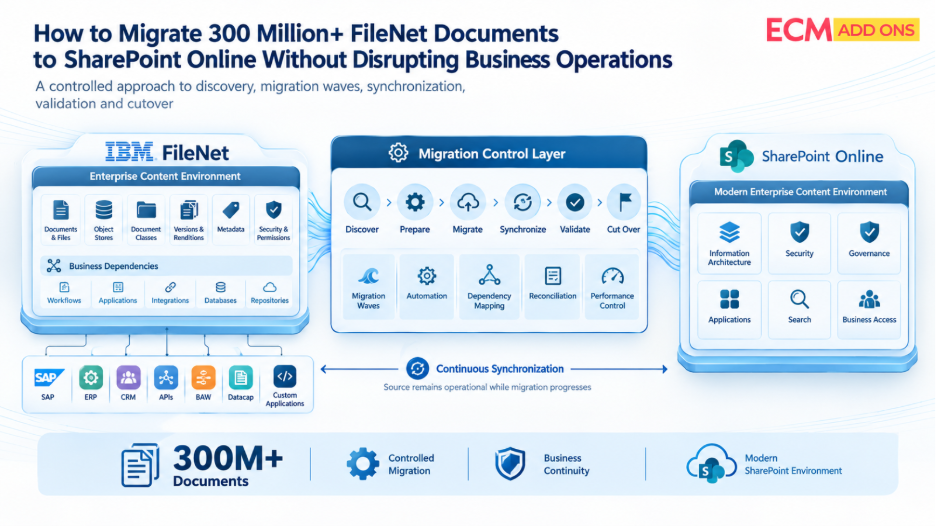
Migrating 300 million FileNet documents without disrupting business operations requires a phased migration strategy supported by automated discovery, dependency mapping, controlled transfer, and continuous synchronization. Start by assessing the source environment, including document volumes, business applications, versions, security configurations, workflows, and application integrations. Validate the SharePoint online architecture against representative workloads before migrating production content. Organize migration waves around business dependencies rather than document counts alone and use automated reconciliation to verify completeness and integrity. Keep FileNet operational for workloads that have not transitioned, synchronize ongoing changes, and move each business function to SharePoint online only after content, security, integrations, and recovery procedures meet agreed acceptance criteria.
1. Assess the FileNet Environment Before Migration
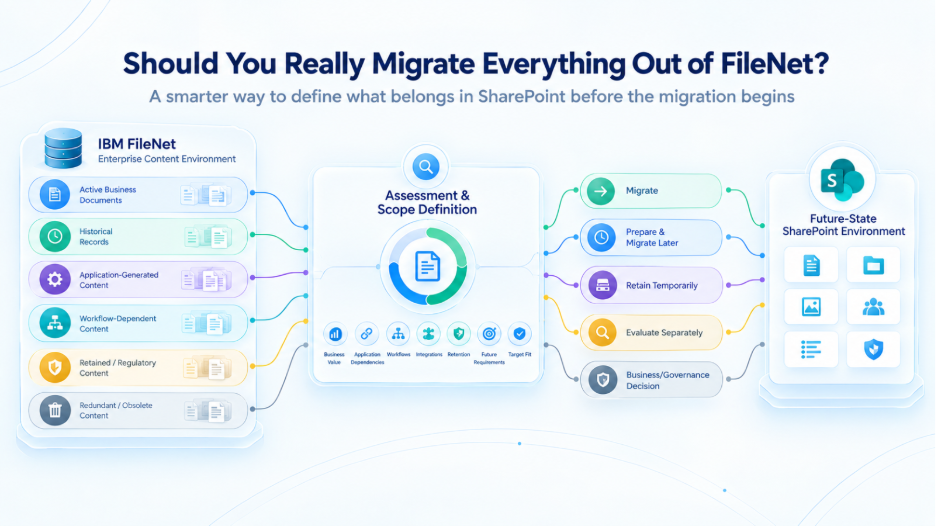
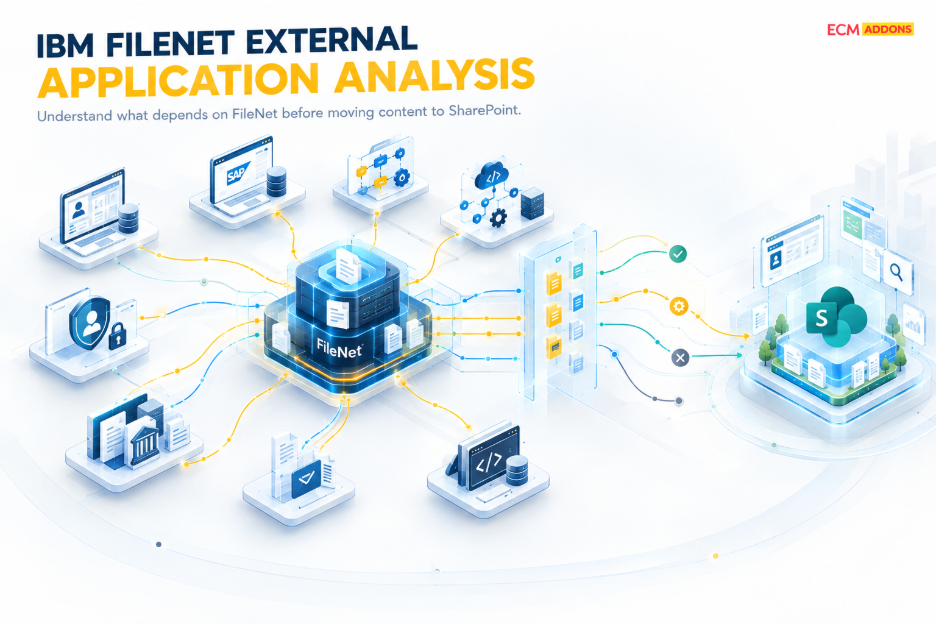
A FileNet repository rarely operates in isolation. It may contain multiple object stores, document classes, business application structures, version histories, security configurations, and retention policies. Business applications may also depend on IBM Content Navigator, Business Automation Workflow (BAW), Datacap, APIs, SAP, ERP platforms, and custom integrations.
Moving documents without identifying these dependencies can result in inaccessible records, broken application connections, and disrupted business processes.
A comprehensive discovery exercise should establish:
- Content inventory: Document volumes, file sizes, versions, renditions, metadata, and repository structures.
- Application dependencies: Workflows, APIs, integrations, scheduled jobs, and applications that retrieve or modify documents.
- Security and governance: Access permissions, retention requirements, records-management obligations, and audit needs.
- Migration complexity: Unsupported configurations, transformation requirements, exceptions, and content that requires further assessment.
Automated discovery helps create a reliable inventory and identify dependencies before migration begins. It also supports more accurate estimates of migration effort, infrastructure requirements, delivery timelines, and potential risks.
For enterprise leaders, this assessment establishes the baseline against which migration progress and readiness can be measured.
2. Prepare SharePoint online for Enterprise-Scale Content
A migration can transfer content successfully and still fail to meet business requirements if the destination architecture is not ready.
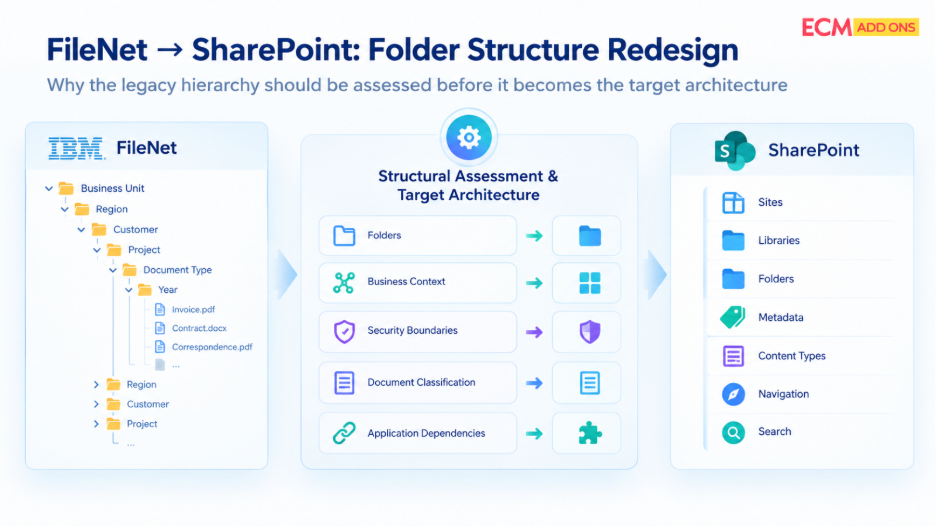
SharePoint online must be designed to accommodate the incoming information while supporting search, security, governance, application access, and future growth. This requires deliberate decisions about site collections, sites, libraries, content types, business applications, permissions, and information architecture.
FileNet structures should not be replicated automatically. Some document classes and business application properties can be mapped directly, while others may require transformation or a different implementation in SharePoint online. Workflows, custom applications, and repository-specific functionality must also be assessed individually because not every FileNet capability has a direct SharePoint online equivalent.
Performance and capacity planning are equally important. The migration team must account for source-system load, network throughput, destination service limits, API throttling, and the processing overhead associated with business applications, permissions, and document versions.
Before production migration, test representative content and application scenarios. Confirm that documents can be retrieved, permissions behave as expected, and critical integrations work against the proposed architecture.
SharePoint online architecture readiness should be demonstrated before each migration wave begins. This reduces the risk of transferring large volumes of content into a destination that requires substantial redesign.
3. Design Migration Waves Around Business Dependencies
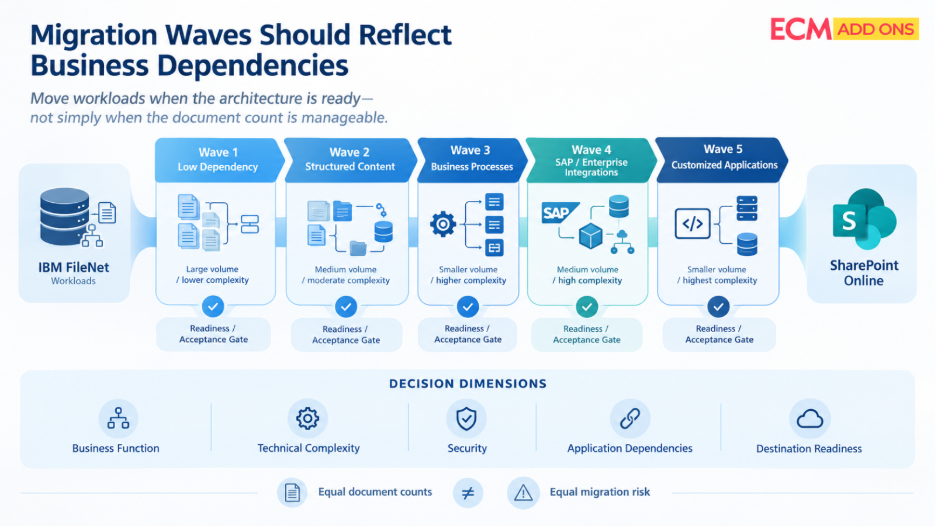
Dividing 300 million documents into equal-sized batches may simplify scheduling, but it does not necessarily reduce migration risk. A batch of straightforward documents may be easier to process than a smaller collection connected to critical workflows or business applications.
An effective enterprise FileNet migration groups content according to business function, technical complexity, security requirements, application dependencies, and destination readiness.
For example, lower-dependency content may be migrated first to validate the migration process. Subsequent waves can address more complex document structures, workflow integrations, SAP-related content, and customized applications. The sequence should reflect the organization’s actual architecture rather than a fixed migration template.
Each wave should have a defined scope, accountable owner, acceptance criteria, exception-handling process, and cutover plan. Its completion should depend on verified results, not simply the number of documents transferred.
This approach also gives leadership greater control over risk. If an application integration fails testing, the affected wave can be delayed while unrelated; validated workloads continue toward completion
4. Use FileNet Migration Automation to Manage Scale
Processing hundreds of millions of documents through repetitive, operator-driven activities increases the risk of inconsistent results and makes progress difficult to forecast.
FileNet migration automation helps standardize content extraction, transformation, transfer, synchronization, validation, and reporting. It can also support mapping between FileNet document classes and SharePoint online content structures, subject to the capabilities of the migration solution.
Automation should provide item-level tracking so that failed documents can be identified, investigated, and retried without unnecessarily repeating completed work. Transient errors, service throttling, permission conflicts, and unsupported content should be handled through appropriate retry mechanisms, exception queues, or escalation procedures.
A centralized dashboard should show more than overall completion percentages. It should identify documents processed, pending, failed, and validated, along with exception categories, processing rates, and progress by migration wave.
This visibility helps migration teams identify bottlenecks early and gives executive stakeholders a clearer understanding of delivery status, outstanding risks, and readiness for the next phase.
5. Optimize FileNet-to-SharePoint Migration Performance Without Overloading Production Systems
Migration throughput directly affects the time and resources required to move 300 million documents. However, increasing concurrency without understanding system constraints can overload the source environment, increase destination throttling, and affect business-critical workloads.
FileNet migration performance optimization should begin with representative pilot migrations. Measure extraction speed, transfer rates, metadata-processing overhead, validation time, and failure rates before establishing production throughput targets.
The migration team can then adjust concurrency, batch sizes, scheduling, and processing strategies according to the characteristics of the content. Large files, small documents, complex business applications, and version-heavy workloads may require different approaches.
Source database performance, storage latency, network utilization, and SharePoint online service responses should be monitored throughout execution. Migration activity can be scheduled around business demand, with appropriate controls to prevent excessive resource consumption during peak periods.
Estimate the migration timeline realistically
A preliminary estimate can be calculated using the total document count and the sustained migration rate.
For example, at a sustained rate of one million documents per day, transferring 300 million documents would theoretically take 300 days. At two million documents per day, the theoretical duration would be 150 days.
These calculations illustrate the relationship between throughput and duration; they are not delivery commitments. Actual timelines depend on document sizes, versions, business applications, security processing, validation, failures, synchronization, and destination constraints.
6. Implement FileNet Delta Synchronization
A long-running migration must account for changes occurring in FileNet after the initial content transfer. Employees continue creating documents, updating existing records, and using applications that depend on the source repository.
FileNet delta synchronization captures and transfers eligible changes made after the initial migration, helping keep the destination aligned with the source until cutover.
Depending on the source architecture and migration solution, synchronization may include new documents, content updates, business application changes, version updates, and relevant deletions or lifecycle changes.
The synchronization process needs reliable change tracking, checkpoints, retry handling, and clear rules for resolving conflicts. The organization must also establish which platform remains authoritative for each migration wave and whether users can modify content in SharePoint online before the transition is complete.
Before cutover, the migration team should process outstanding changes and verify that the source and destination are sufficiently aligned against agreed acceptance criteria.
FileNet should remain operational for business functions that have not transitioned. Its retirement should occur only after the relevant content, applications, and operational dependencies have been validated.
7. Validate FileNet Content, Applications, and Security Before Cutover to Avoid Business Disruption
Successful transfer does not automatically guarantee that migrated content is complete, accurate, secure, or usable. FileNet migration validation must therefore be part of the migration process rather than a final spot check.
Validation should compare the agreed source scope with the migrated SharePoint online content. Depending on the migration requirements, checks may include document counts, version coverage, metadata values, file sizes, and checksums or other file-integrity measures.
The team must also verify access permissions, document locations, required business relationships, and application integrations. A document may exist in SharePoint online but remains unusable if an application depends on a repository-specific identifier, URL, API, or workflow that has not been addressed.
Validation results should be recorded against predefined acceptance criteria. Failed items, approved exclusions, unresolved exceptions, and remediated discrepancies must be distinguishable in migration reports.
For regulated enterprises, the process should also provide appropriate evidence of reconciliation, security testing, and approval to support audit and records-management requirements.
8. Control FileNet to SharePoint online Migration Cutover
FileNet to SharePoint online migration cutover is the transition from the source environment to the new operating model. It requires coordination between IT, application owners, information security, and business stakeholders.
Before cutover, confirm that the agreed content scope has been migrated, outstanding changes have been synchronized, validation results meet acceptance criteria, and critical integrations have passed testing.
The cutover plan must define how updates are handled during the transition. Depending on the architecture, this may involve a controlled change freeze, temporary write restrictions, final delta synchronization, or another mechanism that prevents conflicting changes between platforms.
The team should then switch approved user and application access paths, verify critical business transactions, and monitor the environment for issues.
Recovery procedures should be agreed upon in advance. They must define the conditions that trigger a rollback, which system remains authoritative, and how changes made after cutover will be reconciled if the previous operating model needs to be restored.
A phased cutover limits the scope of each transition and helps isolate problems before additional business functions move to SharePoint.
9. Track Migration Success Through Enterprise KPIs
For a migration involving hundreds of millions of documents, a single completion percentage does not provide enough information for executive decision-making. Leadership needs visibility into content integrity, operational impact, synchronization status, and business readiness.
The following KPI framework can help CIOs and migration program leaders monitor progress.
KPI | What to Measure | Why It Matters |
Migration completion | Documents migrated against the approved scope | Shows progress against the migration plan |
Sustained throughput | Documents processed per hour or day | Supports realistic delivery forecasts |
Migration success rate | Successfully processed documents against attempted documents | Highlights processing reliability |
Validation pass rate | Documents meeting defined validation criteria | Indicates content integrity and acceptance readiness |
Exception backlog | Failed, unresolved, or pending items by category | Identifies remediation effort and delivery risks |
Delta synchronization backlog | Outstanding source changes awaiting processing and validation | Indicates how close the wave is to cutover readiness |
Source-system performance | Database, storage, and application resource utilization | Helps identify potential disruption to ongoing operations |
Application readiness | Critical integrations and business tests passed | Confirms that migrated content supports required business processes |
Security validation | Access-control tests passed and permission exceptions unresolved | Helps establish that content is accessible only as intended |
Cutover readiness | Required acceptance criteria completed and approvals obtained | Supports a controlled transition to SharePoint online |
KPIs should be reviewed at both migration-wave and program levels. Thresholds and targets must be established using pilot results, business requirements, and the organization’s risk tolerance rather than arbitrary benchmarks.
The executive dashboard should ultimately answer three questions: How much content has been migrated? How much has been verified? What remains before the affected business functions can safely transition?
FileNet Migration for Highly Regulated Industries
Organizations in financial services, insurance, healthcare, and life sciences may manage hundreds of millions of documents containing sensitive information, business records, and evidence required for audits. Migrating these repositories from IBM FileNet to SharePoint Online requires more than transferring content at scale; it also requires careful assessment of access permissions, business applications, retention obligations, and business application dependencies.
A regulated-industry migration should establish clear validation criteria, document exceptions, and verify that the controls required by the organization remain effective in the target environment. The migration approach must reflect the organization’s specific regulatory and records-management obligations rather than assume that the same controls apply to every industry.
Financial Services and Insurance
Banks and insurance companies may manage extensive collections of customer records, loan documents, policy documents, claims files, and transaction-related records. During FileNet-to-SharePoint migration, teams should assess access permissions, document relationships, retention schedules, and application dependencies to ensure that migrated content remains usable and appropriately governed.
Healthcare and Life Sciences
Healthcare and life sciences organizations may hold patient records, clinical documentation, research files, and other sensitive information across large content repositories. Migration planning should account for information access, metadata, retention requirements, and the applications that rely on these documents. Validation should confirm that the migrated content meets the organization’s defined requirements before the relevant workloads transition to SharePoint Online.
Compliance and Audit Readiness
For regulated organizations, successful migration involves more than confirming that documents have arrived in SharePoint Online. Content completeness, metadata accuracy, access permissions, retention requirements, and relevant audit information should be validated against agreed acceptance criteria. Documented reconciliation results and exception records help provide evidence for internal reviews and applicable audit requirements.
FileNet Migration for Government Organizations
Federal, state, and local government organizations may maintain millions of public records, case files, administrative documents, and long-term records in IBM FileNet. Migrating these repositories to SharePoint Online requires careful consideration of records retention, access restrictions, public-records obligations, and the business processes that depend on the content.
A controlled migration approach should identify record categories, applicable retention schedules, access requirements, and dependencies before content is transferred. Each migration wave should have defined validation criteria and documented approval requirements before the affected government functions transition to the target environment.
Federal, State and Local Agencies
Government agencies often manage large volumes of records across departments, programs, and operational systems. Before migrating FileNet content to SharePoint Online, teams should identify document ownership, access requirements, application dependencies, and differences in records-management needs across departments. Phased migration can help agencies validate individual workloads and manage exceptions before expanding to additional content collections.
Records Retention and Public Records
Government records may be subject to specific retention schedules, legal holds, archival requirements, and public-records obligations. Before migration, agencies should determine which records and associated metadata must be preserved, how retention requirements will be implemented in the target environment, and how migrated records will be validated. Source records should not be retired solely because the transfer is complete; retirement decisions should follow the agency’s applicable policies and approval process.
Secure, Compliant Cutover
Government cutover planning should confirm that the agreed content scope has been migrated, required permissions and integrations have been tested, and validation results meet the defined acceptance criteria. Outstanding changes, unresolved exceptions, user access, and recovery procedures should be addressed before the affected services transition to SharePoint Online. This provides a controlled basis for cutover while helping maintain access to records and continuity of government operations.
A Controlled Approach to Large-Scale FileNet to SharePoint Online Migration
Migrating 300 million or more FileNet documents requires coordination across discovery, architecture, automation, performance optimization, synchronization, validation, and cutover. Treating these as connected stages helps enterprises manage complexity without losing sight of business continuity.
The priority is to understand the source environment, prepare SharePoint online for the incoming workloads, and migrate in controlled waves supported by measurable acceptance criteria. Continuous synchronization and documented validation then help ensure that the transition reflects ongoing business activity rather than an outdated snapshot of the source repository.
For CIOs and enterprise technology leaders, success means more than completing a large-scale transfer. It means establishing a modern content environment that supports business applications, preserves essential information and governance requirements, and enables a controlled transition.
Planning a Large-Scale IBM FileNet to SharePoint Online Migration?
ECM Addons helps organizations assess and plan IBM FileNet modernization and migration initiatives, with a focus on enterprise content environments and complex application dependencies.
If your organization is evaluating a migration involving 100+ million documents, start by understanding the scope, dependencies, and readiness of your existing FileNet environment.